

Apex Trader Funding Payout Rules and Payout Methods (Plane, Conditions, Caps, Timing)
- Apex Trader Funding pays out only from a Performance Account (PA, a sim funded account) after you pass. On the new PA, once you meet the qualifying days, the 50% consistency rule and the minimum balance, you can request $500 or more up to the per-payout cap, with a 100% split (checked 2026-11-04).
- The official articles describe the qualifying days differently. The payout rules articles say 5 days, while the payout method article says 5 of 8 trading days with $50 or more (same check date, under review).
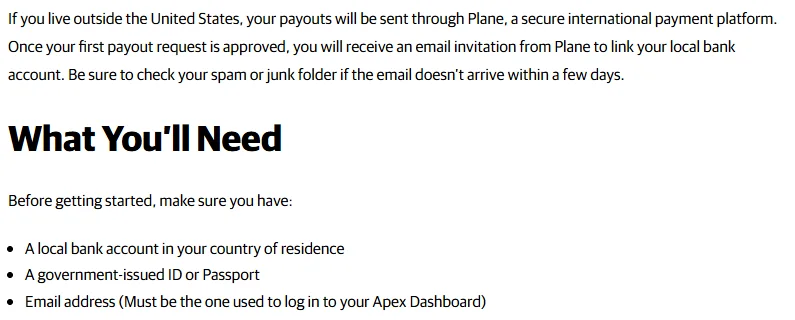
- Payouts outside the US go through Plane. An invitation email arrives after your first payout is approved, and you need a bank account in your own name in your country of residence. Plane receiving fees are not stated officially and are under review.
How do Apex Trader Funding payouts work? From the PA, with separate rules for new and Legacy accounts
Apex Trader Funding payouts come from the Performance Account (PA) you activate after passing the Evaluation. You cannot withdraw from an evaluation account. The PA is a sim (Sim Funded) account, and you request payouts from the dashboard once you meet the conditions.
Apex replaced its products on 2026-03-01. The main products on sale now are the new Intraday Trail and EOD Trail, and the earlier products remain as Legacy with their own rules. Legacy is being resold for a limited time, so payout conditions for an Apex PA depend entirely on which product you bought.
| Item | New PA (Intraday / EOD) | Legacy PA |
|---|---|---|
| Days required | 5 qualifying days, or 5 of 8 trading days with $50 or more (official articles differ, under review) | 8 or more trading days, 5 of them with $50 or more in profit |
| Consistency | 50% (at payout only) | 30% (until the 6th payout or a move to Live) |
| Profit split | 100% | 100% of the first $25,000, then 90% |
| Minimum payout | $500 | $500 |
| Number of payouts | PA closes after 6 payouts | No cap from the 6th payout on |
This page covers the new PA first: conditions, caps, how to request a payout, receiving payouts and reasons for denial. Legacy and Live are covered at the end.
Sources for this section (5)
Source: Official site: Payouts / Official site: Payouts 2 / Official site / Official site: Payouts 3 / Official site 2
What are the payout conditions for the new Apex Trader Funding PA?
To request a payout from a new Apex Trader Funding PA, you need to meet three conditions: qualifying days, the 50% consistency rule and the minimum balance for a request. The structure is the same for Intraday PA and EOD PA. Only the minimum daily profit differs.
Qualifying days and minimum daily profit by size
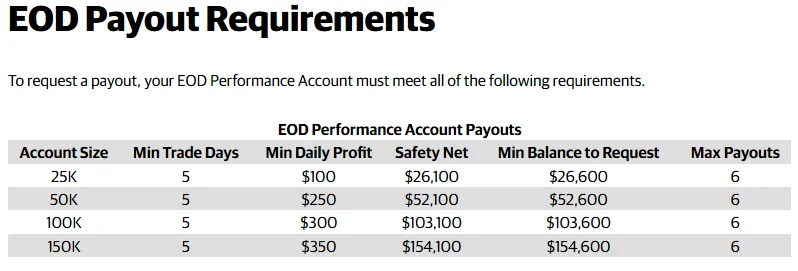
The payout rules articles say you need 5 qualifying days, and they do not have to be consecutive. A day counts only if its profit is at or above the amount below. This works out to at most one request per week.
| Item | 25K | 50K | 100K | 150K |
|---|---|---|---|---|
| Minimum daily profit for a qualifying day, Intraday PA | $100 | $200 | $250 | $300 |
| Minimum daily profit for a qualifying day, EOD PA | $100 | $250 | $300 | $350 |
| Safety Net (drawdown amount + $100) | $26,100 | $52,100 | $103,100 | $154,100 |
| Minimum balance to request | $26,600 | $52,600 | $103,600 | $154,600 |
| Maximum number of payouts | 6 | 6 | 6 | 6 |
Under review: official articles disagree on the qualifying days
The official information checked on 2026-11-04 describes the qualifying days in two ways. The Intraday and EOD payout rules articles say "5 days (non-consecutive allowed)." The payout method article (updated 2026-09-14) still says the next request needs "at least 8 trading days, 5 of them with $50 or more in profit."
The 5 of 8 trading days with $50 or more figure matches the Legacy PA payout conditions. We have not found an official Apex statement on which one applies to the new products, so this page lists both as under review. Before you request, compare your dashboard with the latest official help center text.
50% consistency rule (PA payouts only)
On the new PA, your best day must be under 50% of your net profit since the last approved payout (or since the PA started, for the first payout). Evaluations do not have this rule.
A rough guide to the net profit you need is "best day / 0.5." For example, if your best day is $800, you meet the rule only once net profit is above $1,600. Losing days reduce net profit, so a losing day has the same effect as raising the profit you need.
Until you meet the rule, the request button simply does not appear. Your account is not failed. Once a payout is approved, the calculation resets and a new cycle starts.
See the Apex Trader Funding 50% consistency rule and drawdown rules
Safety Net and minimum balance
The Safety Net is the maximum drawdown amount plus $100, and the official table says you keep it for the whole life of the PA. On the numbers, the minimum balance to request matches the Safety Net plus the $500 minimum payout. For 50K, you cannot request unless your balance is $52,600 or more.
Whether you can request an amount that takes you below the Safety Net is under review in the primary sources for this page. Use the requestable amount shown on the request screen.
Sources for this section (5)
Source: Official site: Payouts / Official site: Payouts 2 / Official site: Payouts 3 / Official site: Consistency / Official site: Payouts 4
What is the Apex Trader Funding payout cap, and how many payouts can you take?
The new Apex Trader Funding PA has a cap on each payout, and the cap rises as you take more payouts. You can take up to 6 payouts, and the PA closes after the 6th. Some payouts have different caps for Intraday and EOD, so the table shows both.
| Payout | Intraday 25K | Intraday 50K | Intraday 100K | Intraday 150K | EOD 25K | EOD 50K | EOD 100K | EOD 150K |
|---|---|---|---|---|---|---|---|---|
| 1st | $1,000 | $1,500 | $2,000 | $2,500 | $1,000 | $1,500 | $2,000 | $2,500 |
| 2nd | $1,000 | $2,000 | $2,500 | $3,000 | $1,000 | $1,500 | $2,500 | $3,000 |
| 3rd | $1,000 | $2,500 | $3,000 | $3,000 | $1,000 | $2,000 | $2,500 | $3,000 |
| 4th | $1,000 | $2,500 | $3,000 | $4,000 | $1,000 | $2,500 | $3,000 | $3,000 |
| 5th | $1,000 | $3,000 | $4,000 | $4,000 | $1,000 | $2,500 | $4,000 | $4,000 |
| 6th | $1,000 | $3,000 | $4,000 | $5,000 | $1,000 | $3,000 | $4,000 | $5,000 |
| Total of 6 | $6,000 | $14,500 | $18,500 | $21,500 | $6,000 | $13,000 | $18,000 | $20,500 |
The total of 6 is the maximum if you request the full cap every time. Because the PA closes after the 6th payout, the most you can receive from one PA is the sum of the 6 caps. What happens to any balance left at closing is under review in the primary sources for this page. For 25K, each cap is $1,000 and the total of 6 is $6,000.
The minimum payout is $500, and you can request any amount of $500 or more within the cap. The split is 100%, so there is no profit sharing with Apex at the sim funded stage.
Sources for this section (2)
How do you request an Apex Trader Funding payout, and how long does it take?
You request an Apex Trader Funding payout from the dashboard, for each PA that meets the conditions. From request to arrival there are three stages: Apex review, transfer and processing by your bank.
- Meet the qualifying days, 50% consistency and minimum balance on the PA (the request button appears when you do)
- Request an amount from the dashboard ($500 or more, within the cap for that payout)
- Wait for Apex review (within 2 business days)
- The transfer is sent after approval (3 to 4 business days)
- Your receiving bank processes it (3 to 7 business days)
| Stage | Official timing |
|---|---|
| Apex review | Within 2 business days |
| Transfer after approval | 3 to 4 business days |
| Bank processing | 3 to 7 business days |
| Typical total | About 5 to 11 business days |
These are business days, so weekends and US holidays push the calendar date out further. If you receive through Plane for the first time, you also need to respond to the invitation email after approval.
Trading after a request and automatic denial
You can keep trading the PA after you request. However, if your balance falls below the minimum balance for a request after you submit, the request is denied automatically. The account itself does not close.
On Tradovate accounts, Apex checks your real-time balance at the time of the request and that you have no open positions. Do not request while holding a position.
If you hear nothing after requesting
The Plane invitation email for payouts outside the US arrives after your first payout is approved, not right after you request. If you still have no update after the 2 business day review, contact the official help desk (ticket system).
 1
Sources for this section (4)
Source: Official site: Payouts / Official site: Payouts 2 / Official site: Payouts 3 / Official site
What are the Apex Trader Funding payout methods? (Plane and ACH)
Apex Trader Funding has two payout methods, depending on where you live. US residents receive ACH direct deposit, and residents outside the US receive through Plane.
| Item | Outside the US (Plane) | US residents (ACH) |
|---|---|---|
| Destination | A bank account in your own name in your country of residence | A US bank account |
| Information to register | Government ID number or passport number | SSN / TIN |
| How it starts | Invitation email from Plane after your first payout is approved | See the official article for US users |
| Receiving fee | Under review (not stated officially) | Under review (not stated officially) |
| Tax forms | Not issued to non-US persons | See the official article for US users |
Plane registration starts after the first approval
Outside the US, you start registration from the invitation email Plane sends after your first payout is approved. You need a bank account in your country of residence and a government ID number or passport number. Check your spam folder after the first approval so you do not miss the email.
Country-level details, such as which local currencies Plane pays out in, are under review in the primary sources for this page. We could not confirm from official text whether any international method other than Plane exists.
Receiving fees and what you actually get
Plane receiving fees are not stated officially and are under review. Because the split is 100%, what you receive is the requested amount minus the Plane fee (under review), your bank fees and any currency conversion spread. For example, if you request $1,500, Apex deducts nothing as a profit share.
Only accounts in your own name
Apex pays only to accounts in your own name. A user account registered as an individual cannot pay to a business account, and the reverse is also not allowed. Accounts in a family member name cannot be used either.
Tax forms
Apex does not issue tax forms to non-US persons. Whether you need to submit forms such as W-8BEN is under review in the primary sources for this page.
Sources for this section (4)
Source: Official site: Payouts / Official site: Payouts 2 / Official site: Prohibited conduct / Official site
Why are Apex Trader Funding payouts denied?
The Apex Trader Funding official home page shows "NO Payout Denials." At the same time, the prohibited activities article in the help center and the terms of use say violations can lead to account closure or forfeiture of balances. Both are official, so it helps to know both.
Requests that fail because conditions are not met
- Qualifying days, 50% consistency or the minimum balance is not met (the request button does not appear)
- Your balance fell below the minimum balance after the request (automatic denial; the account stays open)
- You still had an open position on Tradovate at the time of the request
- The receiving account is not in your name, or the individual and business names do not match
Trading treated as prohibited activity
- Trading without a stop
- Small take-profits combined with oversized stop-losses (the official example is a 5 tick target with a 150 tick stop)
- Using the drawdown threshold as a stop
- Hedging (same or correlated instruments, across accounts, or opposite positions with people in your household or related parties)
- Non-directional trading such as automated or algorithmic trading, HFT, or orders on both sides of news
- Account sharing, copy trading with others, or masking your location with a VPN or proxy
- Buying discounted evaluations in bulk and using them as throwaway accounts
If Apex finds a violation, the measures are Trader Probation, account closure, forfeiture of balances and a ban. If a household holds more than 20 PA accounts in total, all funds may be forfeited and all PAs closed.
See every Apex Trader Funding prohibited activity
Losing a PA without a violation
The new PA has an inactivity policy: if you do not have at least 2 trading days with $50 or more in net profit in the last 30 calendar days, the account closes on day 30. A closed account cannot be restored, and you lose eligibility for payouts. Notices are sent on day 15 and day 20.
Sources for this section (6)
Source: Apex Trader Funding official site / Official site: Prohibited conduct / Official terms of use / Official site: Hedging / Official site / Official site 2
What are the payout rules for an Apex Trader Funding Legacy PA?
An Apex Trader Funding Legacy PA is a PA from the products sold before 2026-03-01, or from the Legacy products now being resold for a limited time. Its payout conditions are separate from the new products.
| Size | Minimum balance to request | Cap for payouts 1 to 5 |
|---|---|---|
| 25K | $26,600 | $1,500 |
| 50K | $52,600 | $2,000 |
| 100K | $103,100 | $2,500 |
| 150K | $155,100 | $2,750 |
| 250K | $256,600 | $3,000 |
| 300K | $307,600 | $3,500 |
| 100K Static | $102,600 | $1,000 |
- 8 or more trading days, 5 of them with $50 or more in profit
- 30% consistency: a single day of profit cannot exceed 30% of the profit balance (until the 6th payout or a move to Live)
- Split is 100% of the first $25,000 per account, then 90%
- Safety Net (drawdown amount + $100) applies only to the first 3 payouts
- Minimum payout is $500
Legacy PA also keeps rules that the new products dropped, such as the 5:1 risk-reward ratio, the 30% open loss limit (MAE), and half of maximum contracts until the trailing drawdown stops.
See the differences between new and Legacy Apex Trader Funding products
Sources for this section (3)
Source: Official site: Payouts / Official site / Official site 2
How do payouts work in the Apex Trader Funding Live program?
The Apex Trader Funding Live (real capital) program is invitation only. Apex selects traders based on trading style, P&L, number of accounts, how fast sim profits build up, total sim payouts and similar factors. The official example is 3 consecutive payouts from one PA, but it is not a threshold that moves you up automatically.
| Item | Live conditions |
|---|---|
| Profit split | 90/10 (trader 90%) |
| Payout frequency | Daily. No trading day or daily profit requirements |
| Minimum and cap | $500 minimum, no cap |
| Processing | Sent to payment processing within 48 hours of the request |
| Safety Net | $3,100. You can withdraw profit above it (the Safety Net portion only after 90 days or more of trading; withdrawing it closes the account) |
| Bonus Vault | 20% of your Live payout amount (40% in the month of your first payout) paid as a bonus on the 15th of each month |
Once selected for Live, you cannot run Live and sim at the same time. Your evaluation accounts at that point are closed (only active evaluations are refunded), and your PAs are deactivated. The total positive sim balance of the deactivated PAs is recorded in the Bonus Vault. This is not real capital. It is paid out gradually as a bonus in line with your Live payouts.
The Live account itself has no fee, but professional data costs about $150 per month, and Apex covers one main data feed. The specific requalification conditions if you fail are under review.
Source: Official site
Apex Trader Funding payout rule change history
Apex Trader Funding help articles related to payouts kept being updated in fall 2026. The main changes and article update dates are below.
| Date | Change |
|---|---|
| 2026-03-01 | New products (Intraday / EOD) launched. PA has a 100% split, 50% consistency and ends after 6 payouts. Old products became Legacy |
| From 2026-03-01 | New inactivity policy for new PAs and resold Legacy (2 days with $50 or more in 30 days) |
| 2026-04-24 | 50% consistency article updated |
| 2026-09-03 | Payout method article for users outside the US (Plane) updated |
| 2026-09-14 | Payout method and timing article updated (the 8 trading day text remains) |
| 2026-10-02 | Payout request article updated |
| 2026-10-29 | Live program FAQ updated (Bonus Vault and more) |
The figures on this page were checked in the Apex official help center on 2026-11-04. Before you request, confirm the latest conditions in the official payout rules article and on your dashboard.
See how to start with Apex Trader Funding and activate a PA after passing
Sources for this section (7)
Source: Official site / Official site 2 / Official site: Consistency / Official site: Payouts / Official site: Payouts 2 / Official site: Payouts 3 / Official site 3
Apex Trader Funding FAQ
Does an Apex Trader Funding payout need 5 days or 8 days?
The official articles describe it differently, so it is under review. The Intraday and EOD payout rules articles say 5 qualifying days (non-consecutive allowed), and the payout method article (updated 2026-09-14) says 5 of 8 trading days with $50 or more (checked 2026-11-04). Check your dashboard and the latest official help center before requesting.
How do you receive Apex Trader Funding payouts outside the US?
The payout method outside the US is Plane. An invitation email arrives after your first payout is approved, and you register with a bank account in your own name in your country of residence and a government ID number or passport number. Plane receiving fees and country-level details are under review.
What is the Apex Trader Funding minimum payout and cap per payout?
How long do Apex Trader Funding payouts take?
Apex review takes up to 2 business days, the transfer after approval takes 3 to 4 business days, and bank processing takes 3 to 7 business days, for an official total of about 5 to 11 business days. Weekends and US holidays add time.
What is the Apex Trader Funding profit split?
Can Apex Trader Funding deny a payout?
The official home page says "NO Payout Denials," but requests that do not meet the conditions do not go through, and a request is denied automatically if your balance falls below the minimum after you submit. The official text also says prohibited activities such as trading without a stop or hedging can lead to account closure or forfeiture of balances.
Do you fail if you do not meet the Apex Trader Funding 50% consistency rule?
No. Until you meet it, the request button does not appear. Once net profit is above best day / 0.5 you can request, and the calculation resets after approval.