

Tradeify review: $145 one-time fee, no activation fee
- 50K price
- $145
- Profit target
- $3,000
- Profit split
- 90%
As of 2026-11-04, the Tradeify 50K Growth evaluation is a one-time $145. There is no monthly fee and no activation fee, and you keep 90% of profits after you pass. This page covers the 3 plans, the rules and payouts using official Tradeify sources.
- 50K price
- $145Growth, one-time fee
- Profit target
- $3,00050K Growth and Select
- Max drawdown
- $2,00050K account. Trails the end-of-day balance
- Profit split
- 90%Trader share in the Sim Funded account
- Activation fee
- $0None on any current plan
In 3 minutes
How Tradeify works: the Growth, Select and Lightning plans
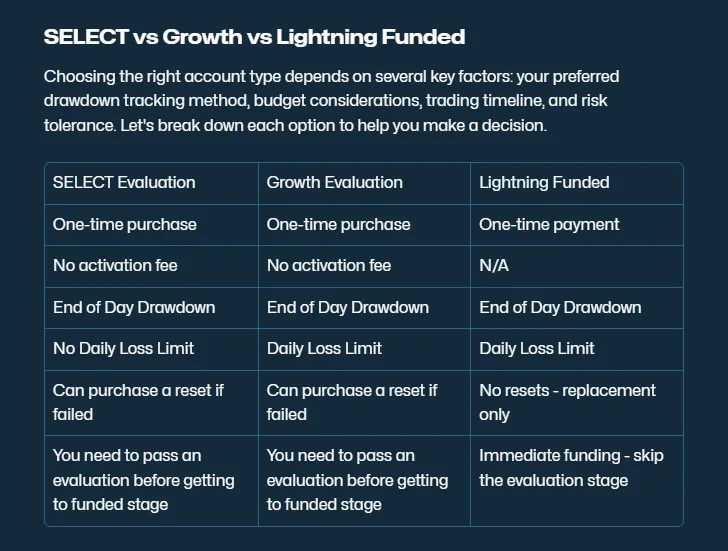
Tradeify is a futures prop firm run by Tradeify Holdings, Corp. in Boca Raton, Florida. It has 3 plans, and your choice decides whether there is an evaluation, at which stage the consistency rule applies, and how often you can request payouts.
- 1. Growth (evaluation, as little as 1 day)
This is the Tradeify evaluation plan. A 50K account is a one-time $145, and you pass when you reach the $3,000 profit target without touching the $2,000 maximum drawdown. There is no consistency rule during the evaluation, and the minimum is 1 trading day. There is a daily loss limit ($1,250 on 50K), but hitting it only stops trading for that day. In the Sim Funded account after you pass, 35% consistency and 5 profit days are payout requirements.
- 2. Select (evaluation, Flex or Daily when you pass)
There is no daily loss limit during the evaluation. Instead, 40% consistency applies, so the fastest pass is 3 days (2 days with the 50% add-on). A 50K account is $165. When you pass, you choose Select Flex, with a payout every 5 winning days, or Select Daily, with requests every day, and you cannot change it later on that account.
- 3. Lightning (no evaluation)
This plan skips the evaluation and starts you in a Sim Funded account from the moment you buy. A 50K account is $492, about 3 times the price of an evaluation. Resets are not available, so if you lose the account you buy a new one. You can request a payout once you reach the profit target for that payout and meet consistency of 20% for the 1st, 25% for the 2nd and 30% from the 3rd onward.
On every plan, passing the evaluation (or buying Lightning) moves you to a Sim Funded account. Trading there is simulated, but the profits lead to real payouts, and the trader share is 90%. You cannot withdraw from an evaluation account. As your payout record grows, you may be reviewed, and at Tradeify's discretion you may move to a live account (Elite Live, 80% profit split). A futures prop firm evaluates traders on futures listed on exchanges such as CME (ES, NQ, crude oil, gold and more), not on CFDs, and Tradeify is one of them.
What Tradeify costs
| Evaluation price (one-time) | Growth $99 to $369, Select $109 to $369. No monthly billing |
|---|---|
| Lightning price | $345 to $796. Starts in a Sim Funded account with no evaluation |
| Activation fee when you pass | None. $0 on every current plan |
| Reset | Growth 50K $95, Select 50K $109. Lightning cannot be reset |
| Market data | CME Level 1 is free (non-professional declaration required). Level 2 order book data is a paid add-on on Tradovate only |
| Payouts | 90% of profits in the Sim Funded account. Minimum payout is $250 to $1,500 depending on plan and size |
| Refunds | None. Purchases, resets and other fees are not refundable |
The 3 plans differ in price and in how resets work. Next, look at Tradeify pricing by account size.
Pricing
How much does Tradeify cost? One-time Growth and Select, and Lightning with no evaluation
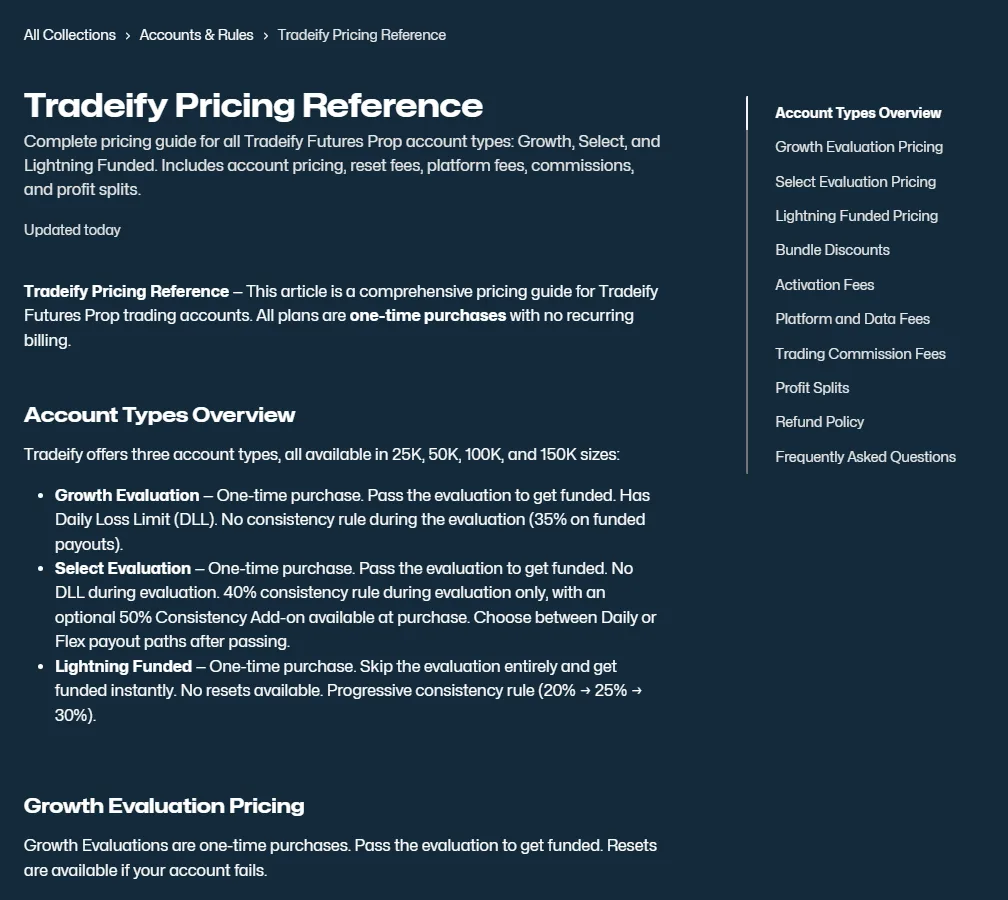
All Tradeify pricing is a one-time fee, with no monthly charge while you work toward a pass. The activation fee after you pass is also $0 on every current plan. In exchange, account purchases, resets and other fees are not refunded. At the same account size, Growth and Select are evaluation fees, while Lightning is the price of a Sim Funded account that skips the evaluation. At purchase you also choose the broker you will trade through (Tradovate, Rithmic or WealthCharts), and you cannot change it later, so decide on your platform first.
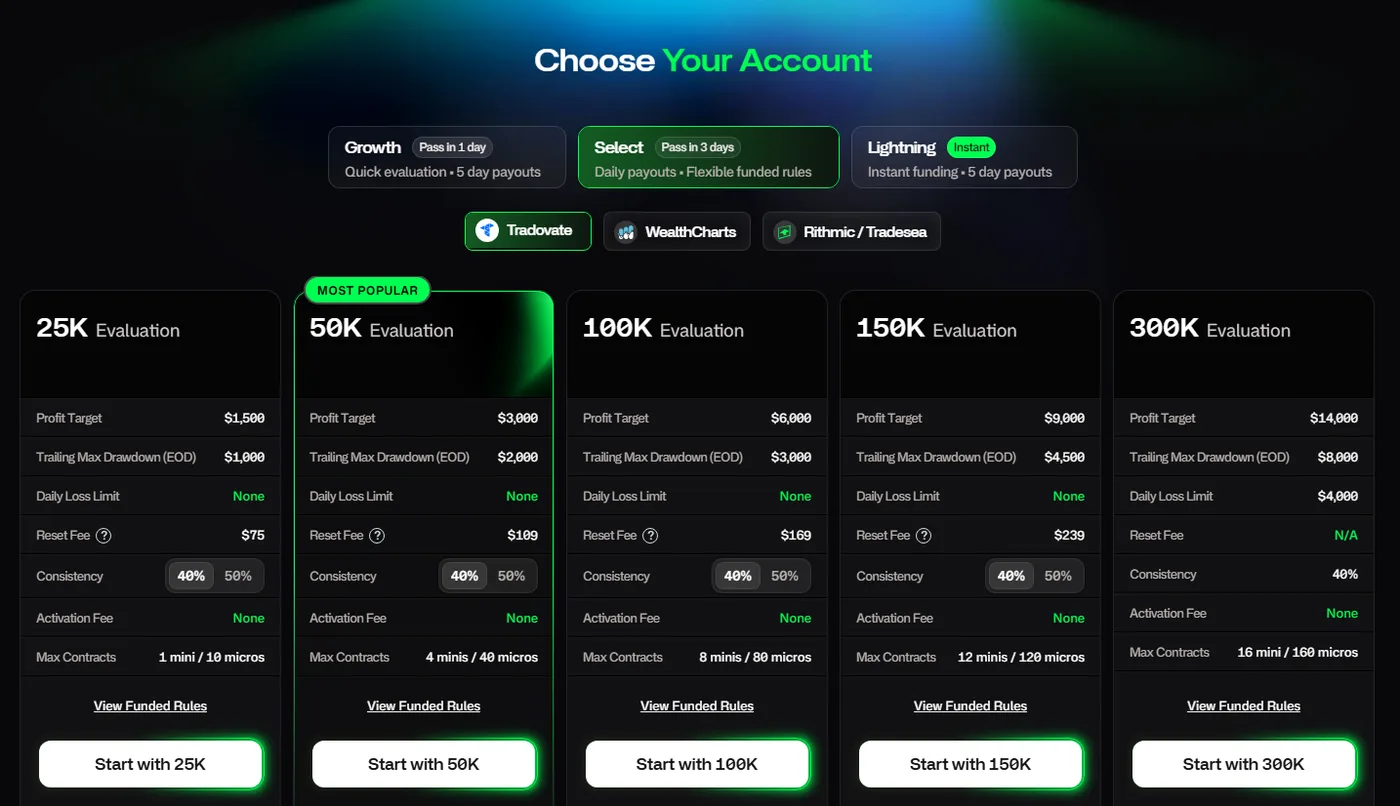
| Plan and size | Price (one-time) | One reset | Profit target | Max drawdown | Daily loss limit | |
|---|---|---|---|---|---|---|
| Growth 25K | $99 | $60 | $1,500 | $1,000 | $600 | See 25K |
| Growth 50K | $145 | $95 | $3,000 | $2,000 | $1,250 | See 50K |
| Growth 100K | $255 | $169 | $6,000 | $3,500 | $2,500 | See 100K |
| Growth 150K | $369 | $229 | $9,000 | $5,000 | $3,750 | See 150K |
| Select 25K | $109 | $75 | $1,500 | $1,000 | None during evaluation | See 25K |
| Select 50K | $165 | $109 | $3,000 | $2,000 | None during evaluation | See 50K |
| Select 100K | $265 | $169 | $6,000 | $3,000 | None during evaluation | See 100K |
| Select 150K | $369 | $239 | $9,000 | $4,500 | None during evaluation | See 150K |
| Select 300K | Differs between official articles (the permanent plan article says $570, the pricing reference says $349) | Not available | $14,000 | $8,000 | $4,000 | See 300K |
| Lightning 25K | $345 | Not available | No evaluation | $1,000 | None | See 25K |
| Lightning 50K | $492 | Not available | No evaluation | $2,000 | $1,250 | See 50K |
| Lightning 100K | $660 | Not available | No evaluation | $4,000 | $2,500 | See 100K |
| Lightning 150K | $796 | Not available | No evaluation | $5,250 | $3,000 | See 150K |
- There are no refunds. Account purchases, resets and all other fees are final.
- For Select 300K, the permanent plan article updated 2026-11-02 says $570 with up to 5 purchases per user per month. The pricing reference updated the same day says a limited release at $349 (V2; V1 was $449) with up to 3 purchases per lifetime. Which is correct is under review. Both articles agree that resets are not available and that identity verification is required before purchase.
Show 5 more notes
- The Select 50% add-on (sets evaluation consistency to 50% so you can pass in as little as 2 days) costs 25K $135, 50K $205, 100K $329 and 150K $459. The reset fee with the add-on is $90 on 25K. For 50K and up, the pricing reference body ($135, $209, $299) and its table ($145, $230, $319) disagree, so this is under review.
- Lightning cannot be reset. If you lose the Sim Funded account, you buy a new one at the same price. Growth Sim Funded accounts cannot be reset either.
- You can buy up to 15 Select evaluations in 30 days, and each evaluation can be reset up to 10 times in 30 days. Growth evaluations have no purchase limit.
- According to an official article updated 2026-11-02, Select Sim Funded accounts (Flex and Daily) at 50K, 100K and 150K can be restored with a paid Funded Reset. Conditions include requesting within 30 days of the breach, no payout history on that account, and up to 2 times per account per lifetime (the 2nd costs 10% more). The price depends on your payout count across all accounts (for the 1st reset with 0 to 1 payouts: 50K $450, 100K $570, 150K $815). It is not refundable.
- If you bought Select 50K before the move to the new dashboard, your profit target stays at $2,500 (also after a reset).
Total cost by number of resets: Tradeify Growth vs Select
This is the cost to pass the evaluation, calculated as price + reset fee x number of resets. With no monthly fee, the cost does not grow however many days you take. It grows only when you reset. On a 50K account, for example, Growth with 2 resets is $335, which is $61 more than Select with 1 reset ($274). Lightning cannot be reset, so if you lose a 50K account you pay $492 again for a new one.
| Plan and size | Pass first time | 1 reset | 2 resets |
|---|---|---|---|
| Growth 25K | $99 | $159 | $219 |
| Growth 50K | $145 | $240 | $335 |
| Growth 100K | $255 | $424 | $593 |
| Growth 150K | $369 | $598 | $827 |
| Select 25K | $109 | $184 | $259 |
| Select 50K | $165 | $274 | $383 |
| Select 100K | $265 | $434 | $603 |
| Select 150K | $369 | $608 | $847 |
- Estimates calculated from official list prices. Tax, commissions, data fees and the 50% add-on are not included.
Sources for this section (8)
Source: Official help: Article / Official help: Article 2 / Official help: Article 3 / Official help: Article 4 / Official help: Article 5 / Official help: Article 6 / Official help: Article 7 / Official help: Article 8
With pricing covered, next look at the Tradeify passing rules for each plan.
Tradeify Plans Compared (Growth, Select and Lightning Differences and Prices)Rules
Tradeify rules: $3,000 profit target and $2,000 max drawdown on 50K
The numbers you must respect in a Tradeify evaluation are set per plan and account size. On a 50K account, on both Growth and Select, you pass when you reach the $3,000 profit target without touching the $2,000 maximum drawdown. The difference is the rules during the evaluation. Growth has a daily loss limit and no consistency rule, so you can pass in as little as 1 day. Select has no daily loss limit, but 40% consistency applies, so the minimum is 3 days. Lightning has no evaluation. The only numeric rule that fails an account is touching the maximum drawdown (prohibited conduct such as hedging is separate). The daily loss limit and consistency only pause trading or push back your pass date.
| Rule (50K) | Growth | Select | Lightning |
|---|---|---|---|
| Evaluation | Yes | Yes | No (Sim Funded from purchase) |
| Profit target | $3,000 | $3,000 | Per payout: $3,000 for the 1st, $2,000 from the 2nd |
| Max drawdown (end of day) | $2,000 | $2,000 | $2,000 |
| Daily loss limit (stops the day only) | $1,250 | None during evaluation. Daily $1,000, Flex none | $1,250 |
| Consistency rule | None during evaluation. 35% in Sim Funded | 40% during evaluation (50% with add-on). None in Sim Funded | 20% for the 1st, 25% for the 2nd, 30% from the 3rd |
| Minimum trading days | 1 day | 3 days (2 with add-on) | None |
| Max position mini / micro | 4 / 40 | Evaluation 4 / 40. Sim Funded starts at 2 / 20 | 4 / 40 |
| Reset | $95 | $109 | Not available |
- Trading hours: the trading day opens at 6:00 PM ET, and all positions must be closed by 4:45 PM ET every day. Remaining positions are closed automatically, which is not itself a failure. Holding overnight or over the weekend is not allowed, including in live accounts.
- News: Tradeify has no restrictions on trading during economic releases on any account (at your own risk). In Sim Funded accounts, however, the 10-second rule described below is a payout requirement.
Show 6 more notes
- Consistency: your best day's profit divided by your total profit must be at or below the limit. Exactly at the limit (for example 40.00%) counts as meeting it. Going over does not fail the account: you can pass or request a payout once more trading days bring the ratio down. Commissions are not included in the profit calculation.
- The daily loss limit only stops trading for that day when you hit it (a soft breach). Once your profit reaches 6% of the starting balance, it widens from the next session to the same amount as the maximum drawdown ($2,000 on Growth 50K). Fast markets can push losses past the limit, so Tradeify warns not to use it as a stop loss.
- How contracts are counted: 10 micros equal 1 mini, and full-size and E-mini contracts count as 1 mini. You can hold minis and micros together as long as the total is within the limit.
- Growth and Select evaluation accounts also require at least 1 trade per week (Monday to Friday). Evaluations have no time limit.
- Tradable products: futures on CME, COMEX, NYMEX and CBOT (ES, NQ, YM, RTY, NKD, MES, MNQ, CL, NG, GC, SI, HG, 6E, 6J, ZC, ZS and more). EUREX is available on Tradovate accounts only and needs an extra subscription. Crypto futures and Micro Silver (SIL) cannot be traded.
- Growth and Lightning accounts bought before 2025-09-12 8:00 AM ET have contract limits of 5 / 50 on 50K, 10 / 100 on 100K and 15 / 150 on 150K.
Tradeify trading hours (Eastern Time)
| Event | US Eastern Time (ET) |
|---|---|
| Trading day opens (Sun to Thu) | 6:00 PM |
| All positions must be closed (daily) | 4:45 PM |
| Close-out on shortened holiday sessions | 12:59 PM |
| Trading closes and maintenance window | 5:00 to 6:00 PM |
| Daily loss limit resets | 6:00 PM (session open) |
| Payout reconciliation | 5:00 to 6:00 PM |
Sources for this section (3)
Source: Official help: Article / Official help: Daily loss limit / Official help: Payouts
 1
Sources for this section (9)
Source: Official help: Article / Official help: Article 2 / Official help: Article 3 / Official help: Article 4 / Official help: Consistency / Official help: Daily loss limit / Official help: Article 5 / Official help: News events / Official help: Article 6
The rule that needs the most care at Tradeify is how the maximum drawdown moves.
Tradeify Rules (Drawdown, Consistency Rule, 10-Second Rule and Hedging Ban)Drawdown
Tradeify drawdown: trails end-of-day balance, checked in real time
The Tradeify maximum drawdown is an end-of-day trailing drawdown (EOD Trailing) on every plan. The line moves up once a day, only when your end-of-day balance sets a new high, and it never moves down. The check, however, is in real time: if your account value, including open profit and loss, touches the line even for a moment, the account fails at that point. In evaluation accounts the line does not lock. Only Sim Funded accounts lock at a set level. Here is how it moves on a 50K Growth evaluation.
- Balance
- Loss floor (end of day)
- The floor does not lock at this stage
Tradeify max drawdown by account size
| Item | 25K | 50K | 100K | 150K |
|---|---|---|---|---|
| Growth max drawdown | $1,000 | $2,000 | $3,500 | $5,000 |
| Select (evaluation and Flex) max drawdown | $1,000 | $2,000 | $3,000 | $4,500 |
| Select Daily max drawdown | $1,000 | $2,000 | $2,500 | $3,500 |
| Lightning max drawdown | $1,000 | $2,000 | $4,000 | $5,250 |
| Level where it locks in Sim Funded | $25,100 | $50,100 | $100,100 | $150,100 |
| End-of-day balance that triggers the lock, Growth | $26,100 | $52,100 | $103,600 | $155,100 |
| End-of-day balance that triggers the lock, Lightning | $26,100 | $52,100 | $104,100 | $155,350 |
| End-of-day balance that triggers the lock, Select Flex | $26,100 | $52,100 | $103,100 | $154,600 |
| End-of-day balance that triggers the lock, Select Daily | $26,100 | $52,100 | $102,600 | $153,600 |
- A 50K account starts with a $50,000 balance, and the maximum drawdown line starts at $48,000. If your balance touches this line even once, the evaluation fails.
- If you finish day 1 with a balance of $50,500, the line rises by $500 to $48,500. Even if you were up to $51,000 during the day, the line is $48,500 when the close is $50,500.
Show 5 more notes
- The line does not drop on losing days. If day 2 ends at $49,800, the line stays at $48,500 and your remaining room shrinks to $1,300.
- In evaluation accounts the line never locks. Each new end-of-day high pushes the line up, so growing your profit does not widen your room beyond $2,000.
- The check is in real time. If an open loss touches the line, the account fails at that moment, and a later recovery does not undo it. Placing your stop loss inside the line protects against this.
- In Sim Funded accounts, the line locks at the starting balance + $100 ($50,100 on 50K) at whichever comes first: your end-of-day balance exceeding the maximum drawdown amount + $100 ($52,100 on 50K), or your first payout request. After that it does not move.
- The daily loss limit is a separate rule from the maximum drawdown. Hitting it only stops trading for that day, and the account stays open.
Source: Official help: Article
Next, see when and how much Tradeify pays out after you pass.
Payouts
Tradeify payout rules: keep 90% of profits, paid within 24 hours of approval
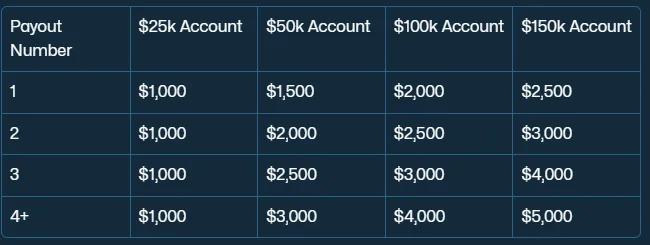
At Tradeify you request payouts from a Sim Funded account. The profit split is 90% to the trader on every plan, but how often you can request, the minimum payout and the cap per payout vary widely by plan. Growth pays every 5 profit days, Select Flex every 5 winning days, Select Daily every day, and Lightning when you reach the profit target for that payout. Payment goes to your Rise account within 24 hours of approval. Outside weekdays 8:00 to 17:00 ET and on US holidays, it can take up to 72 hours.
| Item (50K) | Growth | Select Flex | Select Daily | Lightning |
|---|---|---|---|---|
| When you can request | Every 5 profit days over $150 | Every 5 winning days ($150 threshold) | Every day | When you reach the profit target for that payout (no minimum days) |
| Profit target per payout | None | None | None | $3,000 for the 1st, $2,000 from the 2nd |
| Consistency rule | 35% | None | None | 20% for the 1st, 25% for the 2nd, 30% from the 3rd |
| Required balance | $53,000 | No requirement | $2,100 buffer (no payout that breaks it) | Profit target reached |
| Minimum payout | $500 | $250 | $250 | $1,000 |
| Cap per payout | $1,500 for the 1st, $2,000 for the 2nd, $2,500 for the 3rd, $3,000 from the 4th | Up to 50% of profit and $2,500 (bought on or after 2026-09-01). $3,000 if bought earlier | Up to 2 times profit since the last payout and $1,250 (bought on or after 2026-09-01). $1,000 if bought earlier | $2,000 for the 1st to 3rd, $2,500 from the 4th |
| Daily loss limit | $1,250 | None | $1,000 | $1,250 |
| Profit split | 90% | 90% | 90% | 90% |
Payout methods and fees
| Payout method | When you can use it | Time | Fee |
|---|---|---|---|
| Rise (main method) | By invitation from Tradeify Holdings, Corp. Requires identity verification, proof of address and a tax form (W-8BEN for non-US persons) | Paid within 24 hours of approval | Verifying |
| Where Rise can pay you | Bank transfer, crypto or local currency. The specific options for receiving to a bank in your country are under review | Bank transfer (ACH) takes 1 to 3 business days | Verifying |
| Plane (alternative method) | Only if Rise is unavailable in your country or you do not pass the Rise review. Bank-to-bank transfer | Up to 7 days (manual) | Verifying |
| Company name (LLC and similar) | Business verification (KYB) at payout. Requires photo ID for every shareholder with 25% or more, and other documents | Verifying | Verifying |
- The Select cap per payout depends on the purchase date. For accounts bought on or after 2026-09-01, Flex is 25K $1,250, 50K $2,500, 100K $3,500, 150K $4,500, and Daily is $600, $1,250, $1,750, $2,500. For accounts bought before 2026-09-01, Flex is $1,250, $3,000, $4,000, $5,000, and Daily is $600, $1,000, $1,500, $2,500. Flex with the 50% add-on is 50K $2,000, 100K $3,000, 150K $4,000.
- 10-second rule (Sim Funded accounts only, not evaluations): to request a payout, more than 50% of your trades must be held for more than 10 seconds, and more than 50% of your profit must come from trades held for more than 10 seconds. If you do not meet it, you cannot request a payout, but the account does not fail.
Show 8 more notes
- Once submitted, a request cannot be changed or cancelled, and each account can have only 1 open request at a time.
- You choose Select Flex or Select Daily when you pass the evaluation, and you cannot change it later on that account. From the 2nd Select payout onward, your net profit for that cycle must also be positive.
- Growth minimum payout and required balance: 25K is $250 and $26,500, 100K is $1,000 and $104,500, and 150K is $1,500 and $156,500. A profit day is a day over $100 on 25K, $200 on 100K and $250 on 150K.
- In Select Sim Funded accounts, the contract limit rises with your profit (on 50K: 2 / 20 at the start, 3 / 30 at $1,500 profit, 4 / 40 at $2,000). It updates the next day based on your end-of-day balance, and once raised it does not drop. Growth and Lightning can use the full contract limit from day 1.
- When you request a payout, the Sim Funded maximum drawdown locks at the starting balance + $100.
- Payout reconciliation runs every day from 5:00 to 6:00 PM ET.
- Whether Tradeify charges a fee on payouts is not stated in the official articles and is under review.
- You become eligible for review for a live account (Elite Live) after 3 payouts on 1 account or 10 payouts in total across all plans. The move is not automatic, and when it happens all Sim Funded and evaluation accounts close. Unpaid sim profits do not carry over, Elite Live starts at a $0 balance, and the profit split is 80%.
 1
Sources for this section (10)
Source: Official help: Payouts / Official help: Payouts 2 / Official help: Payouts 3 / Official help: Article / Official help: Payouts 4 / Official help: Payouts 5 / Official help: Article 2 / Official help: Article 3 / Official help: Article 4 / Official help: Article 5
If nothing here worries you, getting started with Tradeify takes 5 steps.
Tradeify Payout Rules (Caps, Timing and Rise by Plan)How to start
How to start with Tradeify: 5 steps from sign-up to your first payout request
Almost every Tradeify step happens on the official site and in your dashboard. Two points often cause confusion: the broker you choose at purchase cannot be changed later, and identity verification happens twice, once with Tradeify (Sumsub) and once with Rise, the payout provider.
1. Create an account on the official site
Sign up on the Tradeify website. Each person may have only 1 account, and you cannot hold separate personal and company (LLC) accounts. Paying in someone else's name or sharing an account is prohibited, even with a family member's consent.
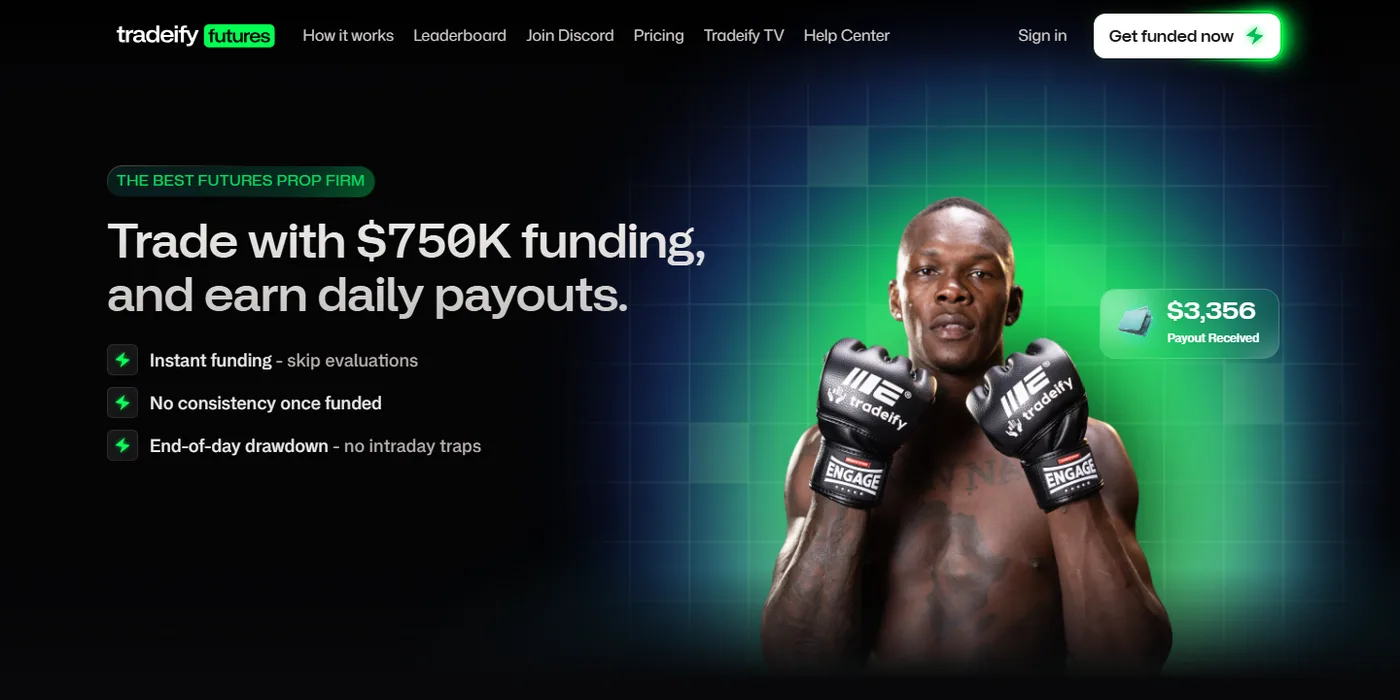
1Tradeify official siteTradeify official homepage (Source: Tradeify official site, English page, captured 2026-11-05) 2. Choose a plan, size and broker, then pay
Choose a plan (Growth, Select or Lightning) and a size from 25K to 150K. On the purchase screen you pick Tradovate, Rithmic or WealthCharts as your broker. The price is the same for all of them, but you cannot change it later. If you pay with crypto, identity verification is required at purchase. The full list of other payment methods is under review.
3. Log in to your platform and take the evaluation
You log in to the dashboard and to your broker's trading platform separately. Sign the CME Non-Professional Agreement the first time you log in. If you do not, you may be charged professional data fees of $300 a month. Lightning skips this step.
4. Activate your Sim Funded account after passing
Passing does not switch you over automatically: you activate the account yourself from the dashboard. There is no activation fee. Growth activations are limited to 5 accounts per day (a 24-hour UTC window), and you can hold a passed evaluation and activate it later. On Select you choose Flex or Daily at this point.
5. Complete identity verification and Rise setup, then request a payout
Depending on your country of residence, you complete Sumsub identity verification (a government-issued photo ID and a selfie) before your first payout or earlier. Rise, the payout provider, separately requires an ID, proof of address and a W-8BEN. You may also be asked to complete an AI interview (KYT) of under 10 minutes, and you can answer in any language.
Sources for this section (10)
Source: Official help: Article / Official help: Article 2 / Official help: Article 3 / Official help: Article 4 / Official help: Article 5 / Official help: Article 6 / Official help: Article 7 / Official help: Payouts / Official help: Payouts 2 / Official help: Article 8
Before you sign up, check which countries Tradeify accepts and the identity verification requirements.
How to Start with Tradeify (Eligible Countries, Broker Choice and Identity Verification)Countries and ID
Which countries can use Tradeify? The restricted countries list
Tradeify decides eligibility by your country of permanent residence. There are 65 countries and regions that cannot trade, based on the list as of 2026-11-04. The list can change, and not appearing on it does not guarantee that you can use Tradeify. How Rise pays out to banks in each country and which support languages are offered could not be confirmed in official articles and are under review. Check the official restricted countries page yourself before you sign up.
| Category | Details |
|---|---|
| Basis | Country of permanent residence, not citizenship |
| Countries and regions that cannot trade | 65. Residents cannot trade wherever they are staying |
| Your country | Check the official list (as of 2026-11-04) before you buy. Not being listed does not guarantee eligibility |
| When identity verification is required | Before the first payout, or earlier for residents of some countries. At purchase if you pay with crypto |
| Support languages | Under review. Only the KYT interview is stated to accept answers in any language |
- How eligibility is decided
- By country of permanent residence. Residents of an eligible country can trade while traveling in a restricted country. Residents of a restricted country cannot trade wherever they are staying.
- Countries and regions that cannot trade
- 65 countries and regions. In Asia, they include Indonesia, Malaysia, Vietnam, Cambodia, Laos, Myanmar, Pakistan, Sri Lanka, Macau, Mongolia and North Korea.
- Your country
- Tradeify publishes a restricted countries list (as of 2026-11-04). The list can change, so check that your country of residence is not on it on the official site before you sign up.
- When identity verification is required
- It depends on your country of residence. For residents of some countries, it is before the first payout. Residents of Brazil, China, South Korea, Taiwan, Thailand, the UK and some other countries must verify before receiving a Sim Funded account (the official article lists these countries inconsistently). If you pay with crypto, verification is required at purchase.
- What identity verification involves
- You submit a government-issued photo ID and a biometric selfie through Sumsub. Sanctions list and other checks (AML) are also run, and you are re-checked periodically.
- KYT interview
- An AI interview of under 10 minutes, and you can answer in any language. A person makes the final decision. Not completing it can lead to account limits, suspension, closure or payout holds.
- Receiving payouts outside the US
- The main payout provider is Rise, which is described as paying by bank transfer, crypto or local currency. The specific options and fees for receiving to a bank in your country are under review. Plane (up to 7 days) is available only if Rise cannot be used.
- Support languages
- Under review. No support channel in languages other than English is listed. You can contact Tradeify through the help center, Discord and dashboard chat.
- Taxes
- Under review. Tradeify's primary sources do not describe tax treatment. They only state that non-US persons submit a W-8BEN to Rise. Check how to report with a tax professional in your country.
Sources for this section (6)
Source: Official help: Article / Official help: Article 2 / Official help: Article 3 / Official help: Payouts / Official help: Payouts 2 / Official help: Article 4
Once you have checked eligibility, look at the Tradeify trading platforms too.
Platforms
Tradeify supported platforms: the broker you pick at purchase sets your platforms
Tradeify has no in-house trading platform. The broker you choose at purchase decides which platforms you can use: Tradovate gives you Tradovate, NinjaTrader and TradingView; Rithmic gives you Tradesea, Quantower, Sierra Chart and R|Trader; WealthCharts gives you WealthCharts only. The price is the same whichever you choose, but you cannot change it after purchase. If you need Level 2 order book data or want to trade EUREX futures, you must choose Tradovate.
| Broker and cost | Platforms | Cost | Notes |
|---|---|---|---|
| Tradovate | Tradovate, NinjaTrader, TradingView (via Tradovate) | Same account price | Level 2 and EUREX are paid add-ons on Tradovate only. NinjaTrader connection steps and licensing are under review |
| Rithmic | Tradesea, Quantower, Sierra Chart, R|Trader | Same account price | Sierra Chart needs a paid subscription. Level 2 not offered yet (in preparation) |
| WealthCharts | WealthCharts only | Same account price | Run by a third party with a separate login. Level 2 not offered yet (in preparation) |
| CME Level 1 data | All brokers | Free | Sign the non-professional declaration at first login. If unsigned, professional fees of $300 a month may apply |
| TradingView | Via Tradovate | Free plan available. Paid plans from $12.95 a month | The free plan has a delay of about 5 seconds. Paid plans are billed by TradingView directly |
| Commissions (round turn, 1 contract) | All brokers | ES, NQ, YM, RTY $5.76; MES, MNQ, MYM, M2K $1.82 | CL $5.98, GC $6.20, MGC and MCL $2.12, 6E and similar $6.20 |
| Tradovate API | Live Funded accounts only | Verifying | Not available in evaluation or Sim Funded accounts |
- Between accounts you own and manage yourself, you can send the same orders with Tradovate Group Trade or the WealthCharts Trade Copier. Copying to or from other people's accounts is prohibited, and all accounts must trade in the same direction. Setting them in opposite directions is a hedging violation.
- Automated trading bots are allowed only if you alone own the bot, do not share it with other people or firms, it is not HFT, and you can prove ownership. You may be asked to submit a live video of the code running on your computer, and you cannot use the same bot at other prop firms.
Show 2 more notes
- Select 300K supports Tradovate, Rithmic and WealthCharts.
- Commissions are round-turn amounts for 1 contract based on the free membership fee schedule.
Sources for this section (7)
Source: Official help: Article / Official help: Article 2 / Official help: Article 3 / Official help: Copy trading / Official help: Article 4 / Official help: Article 5 / Official help: Article 6
Finally, see whether Tradeify suits you compared with the other 5 firms.
Tradeify Supported Platforms (NinjaTrader, Tradovate, Rithmic and WealthCharts)Fit and compare
Who is Tradeify a good fit for, and who should look elsewhere?
A good fit if
- Traders who want a fixed evaluation cost with a one-time fee instead of a monthly one (every plan is one-time, no activation fee)
- Traders who want to pass the same day after one big winning day (Growth has no consistency rule and a 1-day minimum)
- Traders who want to trade during economic releases (no news restrictions on any account)
- Traders who want to skip the evaluation and start in a Sim Funded account (Lightning)
- Traders who want to choose their payout frequency (on Select you pick Flex, every 5 winning days, or Daily, when you pass)
- Traders who want a familiar platform such as NinjaTrader, Quantower or TradingView (set by the broker you choose at purchase)
Not a fit if
- Traders who want to hold positions overnight or over the weekend (not allowed, including live accounts; all positions closed by 4:45 PM ET)
- Traders whose style is mainly scalping with exits within seconds (payouts require more than 50% of trades and profit from holds over 10 seconds)
- Traders who want a refund if it does not work out (no refunds on purchases or resets)
- Traders who take breaks from trading (each account needs at least 1 trade per week)
- Traders who need to confirm bank payout options for their country first (Rise options and fees by country are under review)
- Traders who need support in a language other than English (no such channel is listed)
Where Tradeify stands out
Lowest 50K list price among the 3 one-time-fee firms with confirmed prices
Based on official information checked on 2026-11-04, Tradeify Growth 50K is a one-time $145 with no activation fee. The 50K list prices of the other 2 one-time-fee firms with confirmed prices are $153 and $249 (Lucid Trading list price under review). The 2 monthly firms charge $49 and $170, every month until you pass.
Sources for this section (5)
Source: Official help: Article / My Funded Futures official site / Apex Trader Funding official site / Take Profit Trader official site / Topstep official site
Choose evaluation or no evaluation, and your payout frequency, from 3 plans
Tradeify offers Growth, with a daily loss limit and a 1-day minimum; Select, with 40% consistency and a 3-day minimum; and Lightning, with no evaluation. On Select you choose Flex, every 5 winning days, or Daily, with requests every day, when you pass.
Sources for this section (5)
Source: Official help: Article / Official help: Article 2 / Official help: Article 3 / Official help: Article 4 / Official help: Payouts
Only the maximum drawdown fails an account among the numeric rules, and payment times are published
At Tradeify, going over the daily loss limit or consistency does not fail the account. The only numeric rule that does is reaching the maximum drawdown (prohibited conduct such as hedging is separate). In Sim Funded accounts the line locks at the starting balance + $100. Tradeify states that payouts are paid within 24 hours of approval (up to 72 hours outside business hours).
Sources for this section (5)
Source: Official help: Article / Official help: Article 2 / Official help: Consistency / Official help: Payouts / Official help: Payouts 2
What to know before choosing Tradeify
No refunds, and Lightning and Growth Sim Funded accounts cannot be reset
Tradeify does not refund purchases, resets or any other fees. If you lose a Lightning account, you pay again for a new one: $492 on 50K. Confirm the plan, size and broker before you buy.
Sources for this section (3)
Source: Official help: Article / Official help: Article 2 / Official help: Article 3
No holding past the session, and short holds affect payout eligibility
At Tradeify all positions must be closed by 4:45 PM ET every day. In Sim Funded accounts you cannot request a payout unless more than 50% of your trades and profit come from holds over 10 seconds. The definition of hedging is also broad: combinations such as buying ES while selling NQ, and opposite positions across accounts, are violations.
Sources for this section (3)
Source: Official help: Article / Official help: Article 2 / Official help: Hedging
Payout options by country and support languages are under review
Tradeify pays out mainly through Rise, and the specific options and fees for receiving to a bank in a given country could not be confirmed in official articles. No support channel in languages other than English is listed. Also note that unpaid sim profits do not carry over when you move to a live account.
Sources for this section (3)
Source: Official help: Payouts / Official help: Article / Official help: Article 2
Tradeify vs the other five (50K account)
| Firm | 50K price | Pricing model | Max drawdown (50K) | Profit split |
|---|---|---|---|---|
| Apex Trader Funding | $249 | One-time, plus $99 activation on passing | $2,000 | 100% sim funded, 90% live |
| Lucid Trading | Under review | One-time, no activation fee | $2,000 | 90% sim funded |
| My Funded Futures | $153 | One-time, no activation fee | $2,000 | 80% or 90% by plan |
| Take Profit Trader | $170/mo | Monthly, plus $130 activation on passing | $2,000 | PRO 80%, PRO+ 90% |
| Topstep | $49/mo | Monthly, plus $149 activation on passing (Standard) | $2,000 | 90% sim funded |
| Tradeify | $145 | One-time, no activation fee | $2,000 | 90% sim funded, 80% live |
- Same values as the firm list. Monthly and one-time prices are not directly comparable.
If it fits, you can start with a Tradeify 50K account for a one-time $145.
Common breaches
Why Tradeify accounts fail or payouts stop: 13 pitfalls from the official rules
The reasons you can lose a Tradeify account or have a payout stopped are written in the official rules. Below are the ones the rule text suggests are easy to run into, each split into the official rule and how to avoid it. Some cause a failure, while others only pause trading or hold a payout, so check the difference as well.
Touching the maximum drawdown with an open loss
Official rule:The Tradeify maximum drawdown line updates on end-of-day balances, but the check is in real time. If your account value, including open profit and loss, touches the line even for a moment, you fail immediately, and a recovery later in the day does not undo it.
How to avoid it:Before every trade, check how many dollars are left to the current line, and place your stop loss inside the line. In evaluations the line never locks, so remember your room is smallest on the day after a win. Sources for this section (2)
Holding a position past 4:45 PM ET
Official rule:All positions must be closed by 4:45 PM ET every day, and by 12:59 PM ET on shortened holiday sessions. Remaining positions are closed automatically. This is not a failure, but you may be closed out at a price you did not intend.
How to avoid it:Convert the deadline to your local time and set your own exit time ahead of it. Note that the local time shifts by 1 hour when US daylight saving time starts or ends.
Source: Official help: Article
Closing too many trades within 10 seconds, so you cannot request a payout
Official rule:In Sim Funded accounts you cannot request a payout unless more than 50% of your trades are held for more than 10 seconds and more than 50% of your profit comes from trades held for more than 10 seconds. The account does not fail, but you cannot withdraw until you meet it. Evaluation accounts are not covered.
How to avoid it:Once you are in a Sim Funded account, log the holding time of each trade and check your share of exits within 10 seconds before you request a payout. Sources for this section (2)
Taking opposite positions in correlated products (hedging)
Official rule:Opposite trades in the same product group, not just the same product, are prohibited as hedging (for example, buying ES and selling NQ, or buying MES and selling NQ). Buying an equity index while buying volatility (FVS) also counts as offsetting. A violation puts every related account in breach, and profits for that period are forfeited.
How to avoid it:Do not hold opposite directions in equity index futures at the same time. If you trade several products, keeping all of them in the same direction makes this easy to judge.
Source: Official help: Hedging
Sending opposite orders between your own accounts
Official rule:A violation is triggered automatically when opposite positions last more than 10 seconds and the hedged profit exceeds $150. Hedging across accounts or in correlated products is reviewed separately by the risk team. Setting a trade copier in opposite directions is also a hedging violation.
How to avoid it:When you set up a trade copier, confirm that every account trades in the same direction before you use it. Source: Official help: Hedging / Official help: Copy trading / Official help: ArticleSources for this section (3)
Not trading on an account for a week
Official rule:Both evaluation and Sim Funded accounts need at least 1 trade per week (Monday to Friday) per account. Without it the account may be closed, and you are contacted before that happens.
How to avoid it:If you hold several accounts, plan to trade on each one at least once every week. Source: Official help: Article / Official help: Article 2 / Official help: Article 3Sources for this section (3)
Choosing Select Flex or Select Daily without checking the difference
Official rule:You choose Flex or Daily when you pass the Select evaluation, and you cannot change it later on that account. Daily has a $1,000 daily loss limit (50K) and a $2,100 buffer, while Flex has no daily loss limit.
How to avoid it:Compare not only payout frequency but also the daily loss limit, maximum drawdown and cap per payout in the table before you choose. Source: Official help: Payouts / Official help: ArticleSources for this section (2)
Mistaking the consistency rule for a failure condition
Official rule:Tradeify consistency does not fail your account when you go over. It delays your pass or payout. The stage where it applies differs by plan: Growth has 35% in the Sim Funded account, Select has 40% during the evaluation, and Lightning has 20%, 25% and 30% per payout.
How to avoid it:Before you start, check whether consistency applies to the evaluation or the Sim Funded account on your plan. Keeping your best day within the limit avoids delays to your pass or payout. Sources for this section (2)
Using the daily loss limit as a stop loss
Official rule:The daily loss limit stops trading for the day when you hit it. In fast markets losses can go past the limit, and Tradeify warns not to use it in place of a stop loss.
How to avoid it:Place your own stop-loss orders and do not rely on the daily loss limit. The limit resets at 6:00 PM ET.
Source: Official help: Daily loss limit
Going over the contract limit with minis and micros combined
Official rule:10 micros equal 1 mini, and you can hold minis and micros together only if the total is within the limit. Select Sim Funded accounts start at 2 / 20 (50K), and the limit rises with your profit.
How to avoid it:Before you place an order, check the combined count of minis and micros. In a Select Sim Funded account, check that day's limit before you start. Source: Official help: Article / Official help: Article 2 / Official help: PayoutsSources for this section (3)
Paying in someone else's name or sharing an account
Official rule:Sharing an account, letting someone else trade, and paying in someone else's name are prohibited, even with a family member's consent. Multiple accounts and attempts to get around restrictions are also violations, and serious or repeated violations lead to permanent restrictions at the user level.
How to avoid it:Pay in your own name and do not share your login details. Keep to 1 account per person. Sources for this section (2)
Reversing a card payment (chargeback)
Official rule:A chargeback immediately freezes all your accounts and permanently bans future purchases and new accounts.
How to avoid it:If you question a charge, contact Tradeify support before you file a dispute with your card issuer.
Source: Official help: Article
Assuming sim profits remain when you move to a live account
Official rule:When you move to Elite Live, all Sim Funded and evaluation accounts close, and unpaid sim profits do not carry over. Elite Live starts at a $0 balance.
How to avoid it:Request any profits you can withdraw from Sim Funded accounts, following the payout rules, before the live account review.
Source: Official help: Article
Every reason above is written in the official Tradeify rules. Next, look at the facts about the company that you can verify on official sources.
Tradeify Rules (Drawdown, Consistency Rule, 10-Second Rule and Hedging Ban)The company
Is Tradeify legit? Company details and published figures
As material for judging whether Tradeify is trustworthy, this section lists only facts you can verify on the official site, terms of use and help center. Review scores and star ratings are not included. Keep in mind that evaluation and Sim Funded accounts are simulated, and only a live account, reached after a review, uses real capital.
| Operating company | Tradeify Holdings, Corp. Tradeify is a registered trademark of the company. Source: Tradeify official site |
|---|---|
| Address | 1700 S. Dixie Highway, Suite 305, Boca Raton, FL 33432 (Boca Raton, Florida, US) Source: Tradeify official site |
| Founder and CEO | Brett Simberkoff (listed as founder and CEO in the official help center) Source: Official help: Article |
| Year founded | Under review. We could not find it on official pages. Source: Tradeify official site |
| Affiliated broker | Tradeify Brokerage LLC (doing business as Slay Markets) is a CFTC-registered introducing broker and a member of the NFA (National Futures Association). Its NFA ID is 0575972. It is a separate company from the one that runs evaluations and Sim Funded accounts. Sources for this section (2)Source: Tradeify official site / Official terms of use |
| Payment processing | Novaflame LTD of Cyprus (registration number HE 480295) processes funds as payment agent for Tradeify Holdings, Corp. Source: Tradeify official site |
| Published figures | The official site states that from August 2025 to July 2026 (calculated as of 2026-08-09), 17.2% of evaluation accounts passed, 40.3% of evaluation participants reached a Sim Funded account on at least 1 account, 28.5% of those who reached it received a payout, and 3.0% of Sim Funded traders moved to a live account. All are Tradeify's own figures. Source: Tradeify official site |
| Terms of use | Published on the official site and governed by Florida law. They include a class action waiver. The Sim Funded account contract (Funded Trader Agreement) is also published. Sources for this section (2)Source: Official terms of use / Official site |
| Identity verification and review | Tradeify runs identity verification and sanctions list and other checks (AML) through Sumsub, and re-checks periodically. There is also an AI interview (KYT), and a person makes the final decision. Sources for this section (2) |
| Support channels | Help center, Discord and dashboard chat. The partnership and media contact is hey@tradeify.co. Support languages and support hours are under review. Payout processing business hours are stated as weekdays 8:00 to 17:00 ET. Sources for this section (3)Source: Tradeify official site / Official help: Article / Official help: Payouts |
| Enforcement | A hedging violation puts every related account in breach, profits for the violation period are forfeited, and severe or repeated cases lead to a permanent ban. Serious or repeated violations lead to permanent restrictions at the user level. A chargeback freezes all accounts and permanently bans future purchases. Sources for this section (3)Source: Official help: Hedging / Official help: Article / Official help: Article 2 |
The FAQ below answers the remaining detailed questions.
FAQ
Tradeify FAQ
What is Tradeify?
Tradeify is a futures prop firm run by Tradeify Holdings, Corp. in Boca Raton, Florida. Its founder and CEO is Brett Simberkoff. It offers 3 plans, the Growth and Select evaluations and Lightning with no evaluation, and pays 90% of profits based on trading results in a Sim Funded account. The year it was founded could not be confirmed on official pages and is under review.
Is Tradeify legit? What do Tradeify reviews say?
This page gives you facts you can verify on official sources rather than review scores or stars. On its official site, Tradeify publishes that from August 2025 to July 2026, 17.2% of evaluation accounts passed and 28.5% of those who reached a Sim Funded account received a payout (Tradeify's own figures). On the other hand, some points do not suit everyone: there are no refunds, you cannot hold past the session, and the 10-second rule affects payouts. The cautions are covered in the fit and pitfalls sections.
Which countries can use Tradeify?
Tradeify publishes a list of 65 countries and regions that cannot trade (as of 2026-11-04). Eligibility is decided by your country of permanent residence, and the list can change, so not being listed does not guarantee eligibility. Identity verification is required before the first payout, or earlier for residents of some countries. Check the official restricted countries page before you sign up.
How do I contact Tradeify support, and in which languages?
Support languages are under review. The official Tradeify help center does not list a channel in languages other than English. You can contact Tradeify through the help center, Discord and dashboard chat. Only the AI interview (KYT) is stated to accept answers in any language.
How much does Tradeify cost?
For a 50K account, Growth is a one-time $145, Select is $165, and Lightning, with no evaluation, is $492. Growth ranges from $99 for 25K to $369 for 150K, and Select from $109 to $369. The reset fee is $95 for Growth 50K and $109 for Select 50K, and Lightning cannot be reset.
Does Tradeify charge a monthly fee or an activation fee?
No. All Tradeify pricing is a one-time fee, and the activation fee after you pass is $0 on every current plan. However, the Sim Funded account does not start automatically after you pass: you activate it yourself from the dashboard. Platform and data fees (paid TradingView plans, Level 2 and so on) are separate.
What is the difference between Tradeify Growth, Select and Lightning?
Growth has a daily loss limit and no consistency rule during the evaluation, so you can pass in as little as 1 day. Select has no daily loss limit during the evaluation and 40% consistency, with a 3-day minimum. Lightning has no evaluation and starts in a Sim Funded account from purchase. Payout rules also differ: Growth every 5 profit days, Select either Flex (every 5 winning days) or Daily (every day), and Lightning by a profit target per payout.
Should I choose Tradeify Growth or Select?
Compare the rules that apply during the evaluation. If you want to pass the same day after one big winning day, Growth, with no consistency rule, fits. If you do not want a daily loss limit to stop your trading, Select, with no loss limit during the evaluation, fits. After you pass, Growth has 35% consistency and 5 profit days, while Select has no consistency and you choose Flex or Daily.
What is Tradeify Lightning?
It is a plan that skips the evaluation and starts you in a Sim Funded account from purchase. A 50K account is $492, with a $2,000 maximum drawdown and a $1,250 daily loss limit. You can request a payout when you reach $3,000 profit for the 1st and $2,000 from the 2nd, and meet consistency (20% for the 1st, 25% for the 2nd, 30% from the 3rd). It cannot be reset, so if you lose the account you buy a new one.
How much is Tradeify Select 300K?
Official Tradeify articles disagree. The permanent plan article updated 2026-11-02 says $570 with up to 5 purchases per month, while the pricing reference updated the same day says a limited release at $349 (V2) with up to 3 per lifetime. The Sim Funded account limit also differs: the permanent plan article says up to 3 accounts within the 5-account limit, while the pricing reference says up to 8 accounts on top of the 5-account limit. The evaluation has a $14,000 profit target, $8,000 maximum drawdown, $4,000 daily loss limit, 40% consistency and up to 16 / 160 contracts. It cannot be reset, and identity verification is required before purchase.
What are the Tradeify evaluation rules?
On a 50K account, you pass when you reach the $3,000 profit target without touching the $2,000 maximum drawdown. 100K has a $6,000 target and 150K a $9,000 target, with maximum drawdowns of $3,500 and $5,000 on Growth and $3,000 and $4,500 on Select. The maximum position on 50K is 4 minis or 40 micros, and all positions must be closed by 4:45 PM ET every day.
How fast can I pass a Tradeify evaluation?
Growth can be passed in as little as 1 day. Select has the 40% consistency rule, so the minimum is 3 days, or 2 days with the 50% add-on. Lightning has no evaluation. No evaluation has a time limit, but you must trade at least once a week.
What is the Tradeify consistency rule?
It caps the share of your total profit that can come from your best day. The stage where it applies differs by plan: Growth 35% in the Sim Funded account, Select 40% during the evaluation (50% with the add-on), and Lightning 20% for the 1st, 25% for the 2nd and 30% from the 3rd payout. Exactly at the limit counts as meeting it, and going over does not fail the account: you can move on once more trading days bring the ratio down.
Is the Tradeify drawdown trailing?
Yes. Every plan uses an end-of-day trailing drawdown (EOD Trailing). The line rises once a day, only when your end-of-day balance sets a new high, and never drops. The check is in real time, so touching it even for a moment, including open losses, fails the account. In Sim Funded accounts the line locks at the starting balance + $100 once your end-of-day balance exceeds the maximum drawdown amount + $100 or you request a payout. It does not lock in evaluation accounts.
Do I fail if I hit the Tradeify daily loss limit?
No. The Tradeify daily loss limit only stops trading for that day, and you can resume at the next session at 6:00 PM ET. It applies to Growth, Lightning and Select Daily, not to the Select evaluation or Select Flex. Once your profit reaches 6%, the limit widens to the same amount as the maximum drawdown.
What is the Tradeify 10-second rule?
It is a requirement for requesting a payout from a Sim Funded account: more than 50% of your trades must be held for more than 10 seconds, and more than 50% of your profit must come from trades held for more than 10 seconds. If you do not meet it, you cannot request a payout, but the account does not fail. It does not apply to evaluation accounts.
Can I hold positions overnight or over the weekend at Tradeify?
No. On every account, including live accounts, all positions must be closed by 4:45 PM ET every day, and by 12:59 PM ET on shortened holiday sessions. You can hold within a single session (from 6:00 PM ET to 4:45 PM ET the next day).
Can I trade news events at Tradeify?
Yes. Tradeify has no restrictions on trading during economic releases on any account (at your own risk). In Sim Funded accounts, however, many exits within 10 seconds can keep you from meeting the payout requirements.
When can I request a Tradeify payout, and what are the requirements?
On a 50K account, Growth lets you request once you have 5 profit days over $150, consistency of 35% or less and a balance of $53,000 or more. Select Flex allows a request every 5 winning days ($150 threshold), and Select Daily every day. Lightning allows the 1st request once you reach $3,000 profit with consistency of 20% or less, with no minimum trading days. The minimum payout is $500 on Growth, $250 on Select and $1,000 on Lightning.
What is the Tradeify payout cap per request?
On a 50K account, Growth starts at $1,500 for the 1st payout and rises to $3,000 from the 4th, and Lightning is $2,000 for the 1st to 3rd and $2,500 from the 4th. Select depends on the purchase date: for accounts bought on or after 2026-09-01, Flex is up to 50% of profit and $2,500, and Daily is $1,250. For accounts bought before 2026-09-01, Flex is $3,000 and Daily is $1,000.
Should I choose Tradeify Select Flex or Select Daily?
Compare payout frequency and risk rules. Flex lets you request every 5 winning days, has no daily loss limit, and the 50K maximum drawdown is $2,000. Daily lets you request every day, has a $1,000 daily loss limit and a $2,100 buffer on 50K, and the cap per payout is up to 2 times profit since the last payout and $1,250 (bought on or after 2026-09-01). You choose when you pass and cannot change it later.
How long do Tradeify payouts take?
Payment goes to your Rise account within 24 hours of approval (if your Rise account is set up). Outside weekdays 8:00 to 17:00 ET and on US holidays, it can take up to 72 hours. After you submit a request you cannot change or cancel it, and each account can have 1 open request at a time.
How do I receive Tradeify payouts outside the US?
The main payout provider is Rise, which you join by invitation from Tradeify. Rise requires an ID, proof of address and a W-8BEN, and is described as paying by bank transfer, crypto or local currency. The specific options and fees for receiving to a bank in your country, and any Tradeify payout fee, are under review. Plane (up to 7 days) is available only if Rise cannot be used, for example because of country restrictions.
What is the Tradeify profit split?
In Sim Funded accounts (Growth, Select, Lightning) the split is 90% to the trader and 10% to Tradeify. In the Elite Live account it is 80%. Legacy Live, for accounts bought before 2025-12-03, keeps its previous terms.
How do I move to a Tradeify live account (Elite Live)?
You become eligible for review after 3 payouts on 1 account or 10 payouts in total across all plans, but the move is not automatic. When you move, all Sim Funded and evaluation accounts close, and only accounts with a payout record become Elite Live accounts (up to 5). Unpaid sim profits do not carry over, and you start at a $0 balance. The Elite Live profit split is 80%, and you can request payouts every day.
What is the Tradeify pass rate?
On its official site, Tradeify publishes that from August 2025 to July 2026 (calculated as of 2026-08-09), 17.2% of evaluation accounts passed. It also states that 40.3% of evaluation participants reached a Sim Funded account on at least 1 account, 28.5% of those who reached it received a payout, and 3.0% of Sim Funded traders moved to a live account. All are Tradeify's own figures.
What reviews does Tradeify carry out?
Tradeify has 3 kinds of review. The first is identity verification: an ID and selfie check through Sumsub, and an AI interview (KYT) of under 10 minutes. The second is the check when you request a payout, which looks at whether you meet requirements such as the 10-second rule and consistency. The third is the review for moving to a live account, an overall assessment of traders who have met the payout count.
When does Tradeify require identity verification (KYC), and what do I need?
It is required before the first payout, or earlier for residents of some countries. If you pay with crypto or buy Select 300K, it is required before purchase. You submit a government-issued photo ID and a biometric selfie through Sumsub. Rise, the payout provider, separately checks your ID, proof of address and tax form (W-8BEN).
Which platforms does Tradeify support? Can I use NinjaTrader?
It depends on the broker you choose at purchase. Tradovate gives you Tradovate, NinjaTrader and TradingView; Rithmic gives you Tradesea, Quantower, Sierra Chart and R|Trader; WealthCharts gives you WealthCharts only. You can use NinjaTrader if you choose Tradovate. The connection steps and licensing are under review. You cannot change the broker after purchase.
What are the Tradeify commissions?
Per round turn for 1 contract, ES, NQ, YM and RTY are $5.76; MES, MNQ, MYM and M2K are $1.82; CL is $5.98; GC is $6.20; and MGC and MCL are $2.12. CME Level 1 data is free, but you must sign the non-professional declaration at first login.
Can I use automated trading or copy trading at Tradeify?
Yes, with conditions. Bots are allowed if you alone own them, do not share them with other people or firms, and they are not HFT, and you may be asked for a live video to confirm ownership. Copy trading is allowed only between your own accounts, all in the same direction. The Tradovate API is available only in live accounts.
Can I trade forex or crypto at Tradeify?
At Tradeify futures, you can trade only the futures on the official supported products list. Crypto futures (including Bitcoin futures) are stated as not tradable, and spot forex is not on the list. CME currency futures (6E, 6J, 6B, 6A and more) can be traded. The official site also links to separate services such as Forex and Perps, but this page covers Tradeify futures only.
Can I get a refund or cancel at Tradeify?
There are no refunds. Account purchases, resets and other fees are all final. Because it is a one-time fee, there is no subscription to cancel as there would be with a monthly fee. A chargeback with your card issuer leads to all accounts being frozen and a permanent ban on future purchases.
How many accounts can I hold at Tradeify?
Up to 5 Sim Funded accounts per person and 5 per household, and you can mix Growth, Select and Lightning. For evaluations, Select is limited to 15 accounts in 30 days, and Growth has no limit. You can hold a passed evaluation and activate it later. How Select 300K Sim Funded accounts are counted differs between official articles and is under review.
What are the downsides of Tradeify?
The official rules show 4 main cautions. Purchases and resets are not refunded. You cannot hold past the session, and the daily close-out deadline may fall at an inconvenient hour in your time zone. In Sim Funded accounts the 10-second rule affects payouts, and the definition of hedging is broad. Bank payout options by country and support languages are under review.
How are Tradeify profits taxed?
This is under review. Tradeify's primary sources do not describe tax treatment. What Tradeify requires is that non-US persons submit a W-8BEN to Rise, the payout provider. Check how to report with a tax professional in your country.
Which countries can use Tradeify?
India, United States, United Kingdom, Canada, Australia, Philippines, Nigeria: none of these is on Tradeify's official restricted list (checked 2026-11-04). Based on permanent residence. 65 countries and regions cannot trade. Not being listed is not a guarantee of eligibility, so check the official list before you buy.
Guides
More on Tradeify
Being verified
What we are still verifying about Tradeify
Values that conflict between official sources or are not stated officially are listed here instead of guessed (checked 2026-11-04).
- VerifyingSelect 50% add-on reset fees differ between text ($135 / $209 / $299) and table ($145 / $230 / $319).
- VerifyingSelect 300K price is $570 in the permanent plan article and $349 (V2) in the pricing reference.
- VerifyingSelect 300K purchase limits (5 a month or 3 lifetime) and funded account limits also differ.
- VerifyingThe founding year is not confirmed on official pages.
- VerifyingWhether Tradeify charges a fee on payouts (not stated in official articles)
- VerifyingSpecific options and fees for receiving Rise payouts to a bank in each country
- VerifyingSupport languages and support hours
- VerifyingFull list of payment methods at purchase (only identity verification for crypto payments is confirmed)
- VerifyingNinjaTrader connection steps and licensing
- VerifyingThe list of countries that must verify identity early differs between the KYC article body and its FAQ section (treatment of India and the UK)
Sources and date checked
Numbers on this page come from the official pages cited in each section (checked 2026-11-04). Values that conflict between official sources are marked as being verified. We do not rank or score firms.
Show all 44 sources
- Official help: Article help.tradeify.co
- Official help: Article help.tradeify.co
- Official help: Article help.tradeify.co
- Official help: Article help.tradeify.co
- Official help: Article help.tradeify.co
- Official help: Article help.tradeify.co
- Official help: Article help.tradeify.co
- Official help: Article help.tradeify.co
- Official help: Article help.tradeify.co
- Official help: Consistency help.tradeify.co
- Official help: Daily loss limit help.tradeify.co
- Official help: Article help.tradeify.co
- Official help: News events help.tradeify.co
- Official help: Article help.tradeify.co
- Official help: Payouts help.tradeify.co
- Official help: Payouts help.tradeify.co
- Official help: Payouts help.tradeify.co
- Official help: Payouts help.tradeify.co
- Official help: Payouts help.tradeify.co
- Official help: Article help.tradeify.co
- Official help: Article help.tradeify.co
- Official help: Article help.tradeify.co
- Official help: Article help.tradeify.co
- Official help: Article help.tradeify.co
- Official help: Article help.tradeify.co
- Official help: Article help.tradeify.co
- Official help: Article help.tradeify.co
- Official help: Article help.tradeify.co
- Official help: Article help.tradeify.co
- Official help: Copy trading help.tradeify.co
- Official help: Article help.tradeify.co
- Official help: Article help.tradeify.co
- Tradeify official site tradeify.co
- Official terms of use tradeify.co
- Official site tradeify.co
- Official help: Article help.tradeify.co
- Official help: Article help.tradeify.co
- Official help: Article help.tradeify.co
- Official help: Hedging help.tradeify.co
- Official help: Article help.tradeify.co
- My Funded Futures official site myfundedfutures.com
- Apex Trader Funding official site apextraderfunding.com
- Take Profit Trader official site takeprofittrader.com
- Topstep official site www.topstep.com
Tradeify: a futures prop firm with a one-time $145 50K account and no activation fee
The Tradeify 50K Growth account is a one-time $145, with a $3,000 profit target, a $2,000 maximum drawdown and a 90% profit split after you pass. Once you understand the differences between Growth, Select and Lightning, choose the plan, size and broker that fit you on the official site.
- 50K price
- $145
- Profit target
- $3,000
- Max drawdown
- $2,000
- Profit split
- 90%