

My Funded Futures (MFFU) review: $153 one-time, no activation fee
- 50K price
- $153
- Profit target
- $3,000
- Profit split
- 80 to 90%
As of 2026-11-04, the My Funded Futures (MFFU) Builder 50K costs a one-time $153, and there is no activation fee after you pass. This page covers the plans, rules and payouts using official My Funded Futures sources.
 1
- 50K price
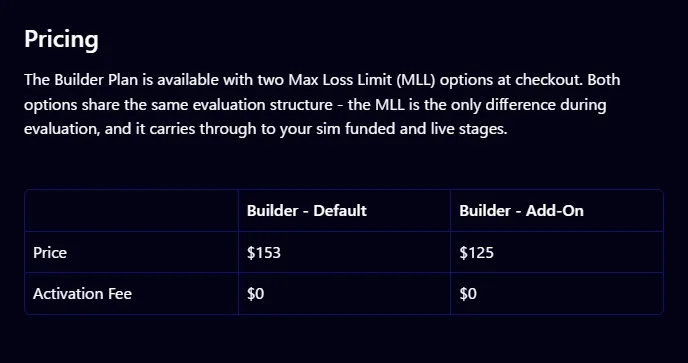
- $153Builder, one-time payment
- Profit target
- $3,00050K account. Same on every plan
- Maximum Loss Limit (MLL)
- $2,00050K account. Trails the end-of-day balance
- Profit split
- 80 to 90%80% on Builder and Pro, 90% on Rapid and Rapid EOD
- Activation fee
- $0None on any plan or size
In 3 minutes
How My Funded Futures works: evaluation, Sim Funded, Live
My Funded Futures is a futures prop firm run by MyFunded Futures, LLC, often shortened to MFFU. Its terms are governed by Texas law in the US. When you pass the evaluation, you move to a simulated funded account (Sim Funded), request payouts from the profits you make there, and move to a real-capital account (Live) once you meet the conditions.
- 1. Evaluation (simulated)
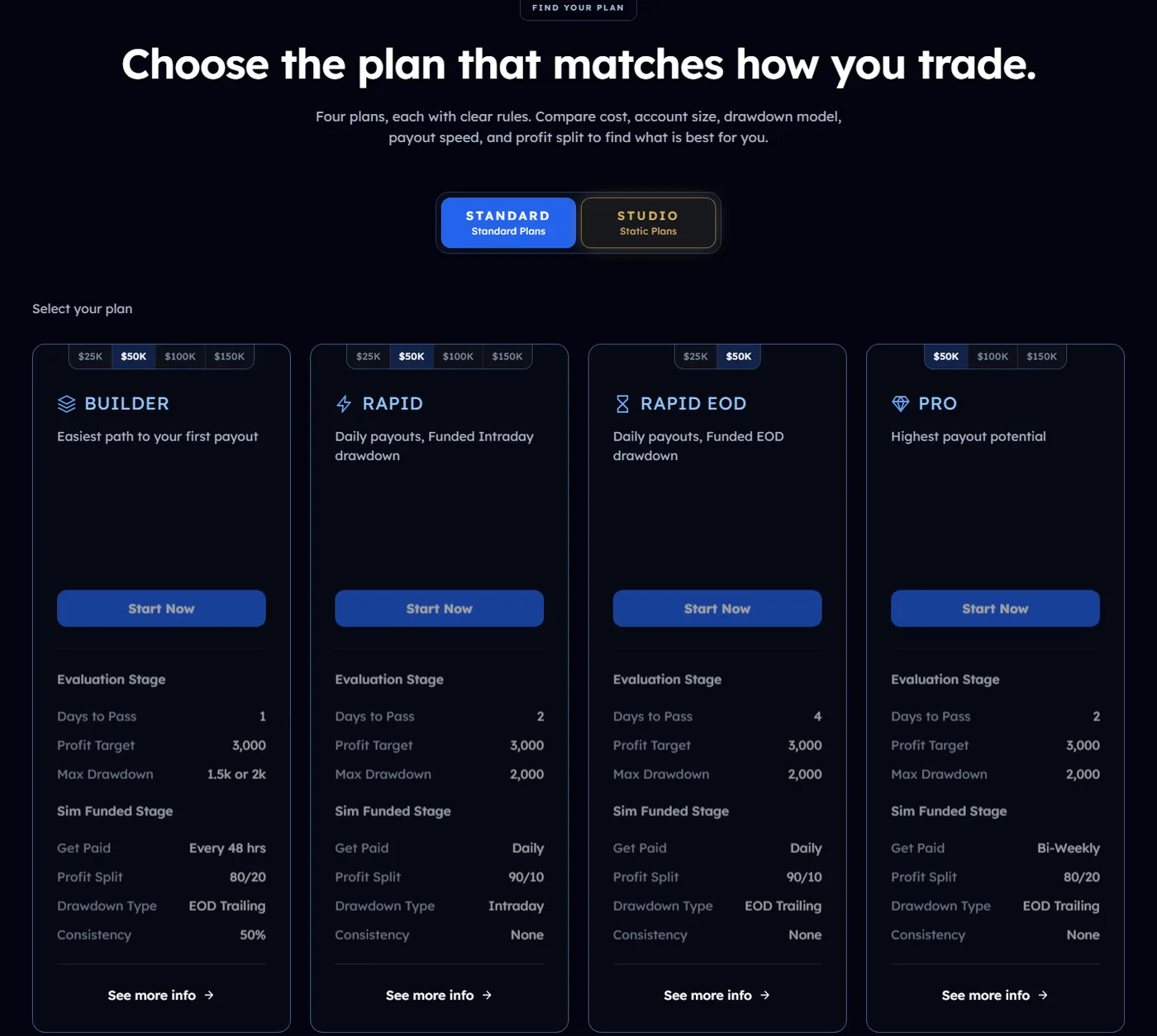
You pass the My Funded Futures evaluation by reaching the profit target set for your plan and size without touching the Maximum Loss Limit (MLL). On a 50K account the target is $3,000 and the MLL is $2,000. Builder has no evaluation consistency rule and takes at least 1 day. Rapid and Pro have a 50% consistency rule and take at least 2 days. Rapid EOD has a 30% consistency rule and takes at least 4 days. You cannot request payouts from an evaluation account.
- 2. Sim Funded (simulated funded account)
After passing, you can upgrade to Sim Funded right away from your dashboard and trade the same day. A review of up to 24 hours may apply. Trading is still simulated, but profits made here are eligible for payouts. Your share is 80% on Builder and Pro and 90% on Rapid and Rapid EOD.
- 3. Live (real-capital account)
Once you meet the payout or profit conditions, you move to Live and trade a real brokerage account. The conditions vary by plan: on Builder it comes after your fifth payout is approved, and on the Rapid plans it happens when you make $10,000 in net profit in one trading day, among other routes. You cannot decline the move to Live.
New purchases from 2026-08-25 onward are one-time payments with no renewal charges. Monthly subscriptions bought before then continue under their old terms (official sources disagree on the cutoff: a help article says 2026-08-25, while the terms define purchases before 2026-08-20 as legacy). You pay only the evaluation price; the activation fee after passing is $0 on every plan and size. Resets are available regardless of purchase date, but the reset price could not be confirmed on official pages and is Under review. One-time accounts also carry a new rule: an account may be closed after 7 calendar days in a row without trading. A futures prop firm evaluates traders on exchange-listed futures such as ES, NQ, crude oil and gold on exchanges like CME, not on CFDs. My Funded Futures is one of these firms.
What My Funded Futures costs
| Evaluation price (one-time) | Builder 50K $153, Rapid 50K $209, Rapid EOD 25K $145, Pro 50K $265. Other sizes: Under review |
|---|---|
| Studio price | 5K $75, 10K $140, 20K $280. An experimental plan for Hyperprop only |
| Activation fee on passing | None. $0 on every plan and size |
| Reset | Available regardless of purchase date. Price: Under review |
| Monthly billing | None for purchases from 2026-08-25 onward (one-time payment) |
| Payouts | You keep 80% (Builder, Pro) or 90% (Rapid, Rapid EOD). Minimum payout $500 on 50K ($1,000 on Pro) |
| Refunds | Within 14 days of purchase with no trading. The refund amount differs between official sources and is Under review |
Price and passing rules differ by plan. Here is My Funded Futures pricing by account size.
Pricing
How much does My Funded Futures cost? Five one-time plans by account size
Every My Funded Futures purchase from 2026-08-25 onward is a one-time payment. There is no monthly fee while you work toward passing, and the activation fee after you pass is $0. On the public plan pages, we could confirm prices for the Builder, Rapid and Pro 50K, the Rapid EOD 25K and the three Studio sizes. Prices for other sizes could not be confirmed on public pages and are marked Under review.
| Plan and size | Price (one-time) | Profit target | Maximum Loss Limit (MLL) | Evaluation consistency | Minimum trading days | |
|---|---|---|---|---|---|---|
| Builder 25K | Verifying | $1,500 | $1,000 | None | 1 day | See the 25K plan |
| Builder 50K | $153 | $3,000 | $2,000 | None | 1 day | See the 50K plan |
| Builder 50K ($1,500 MLL version) | $125 | $3,000 | $1,500 | None | 1 day | See the 50K plan |
| Builder 100K | Verifying | $6,000 | $3,000 | None | 1 day | See the 100K plan |
| Builder 150K | Verifying | $9,000 | $4,500 | None | 1 day | See the 150K plan |
| Rapid 25K | Verifying | $1,500 | $1,000 | 50% | 2 days | See the 25K plan |
| Rapid 50K | $209 | $3,000 | $2,000 | 50% | 2 days | See the 50K plan |
| Rapid 100K | Verifying | $6,000 | $3,000 | 50% | 2 days | See the 100K plan |
| Rapid 150K | Verifying | $9,000 | $4,500 | 50% | 2 days | See the 150K plan |
| Rapid EOD 25K | $145 | $1,500 | $1,000 | 30% | 4 days | See the 25K plan |
| Rapid EOD 50K | Verifying | $3,000 | $2,000 | 30% | 4 days | See the 50K plan |
| Pro 50K | $265 | $3,000 | $2,000 | 50% | 2 days | See the 50K plan |
| Pro 50K One Day | Free add-on to Pro 50K (listed as limited time) | $4,000 | $2,000 | None | 1 day | See One Day |
| Pro 100K | Verifying | $6,000 | $3,000 | 50% | 2 days | See the 100K plan |
| Pro 150K | Verifying | $9,000 | $4,500 | 50% | 2 days | See the 150K plan |
| Studio #003 (5K) | $75 | $500 | $250 (static) | None | None | See the 5K plan |
| Studio #001 (10K) | $140 | $1,000 | $500 (static) | None | None | See the 10K plan |
| Studio #002 (20K) | $280 | $2,000 | $1,000 (static) | None | None | See the 20K plan |
- Prices are regular prices checked on the official plan pages and help articles on 2026-11-04. For sizes other than the Builder, Rapid and Pro 50K, the Rapid EOD 25K and Studio, prices could not be confirmed on public pages and are Under review.
- The Builder 50K has a version with a $1,500 Maximum Loss Limit at a regular price of $125. Its payout buffer also drops to $1,600.
Show 5 more notes
- The official help center states that the activation fee is $0 on every plan and size.
- Resets remain available after the switch to one-time payments, regardless of purchase date. The reset price is Under review, as we could not find it in the help center or on the plan pages.
- Official sources disagree on the cutoff for the old monthly plans (Legacy Subscription). The terms define purchases before 2026-08-20 as Legacy Subscriptions, while a help article treats new purchases from 2026-08-25 onward as one-time payments.
- Studio is for Hyperprop only, and you can hold just one account, either an evaluation or a Sim Funded account. Daily sales are capped, and sold-out plans are restocked after 00:00 ET.
- Accepted payment methods are Visa, Mastercard, Google Pay and Apple Pay (some US states only), and crypto (ETH, LTC, USDT, USDC, SOL, POL, TRON). Only cards in your own name are accepted, and the billing address must match your registered address. Prepaid cards are not accepted.
Cost to pass: My Funded Futures 50K plans compared
Because the price is a one-time payment, the cost does not grow however many days you take to pass. It grows only if you reset, and the My Funded Futures reset price is Under review. This table shows the cost of passing on the first attempt and the cost after passing. With no activation fee, the Builder 50K takes you to Sim Funded for $153.
| Plan and size | Pass on first attempt | Activation fee on passing | One reset |
|---|---|---|---|
| Builder 50K | $153 | $0 | Under review |
| Builder 50K ($1,500 MLL version) | $125 | $0 | Under review |
| Rapid 50K | $209 | $0 | Under review |
| Rapid EOD 25K | $145 | $0 | Under review |
| Pro 50K | $265 | $0 | Under review |
| Studio #001 (10K) | $140 | $0 | Under review |
- Estimates based on official regular prices. Tax, trading commissions and data fees are not included.
Sources for this section (13)
Source: Official site / Official site: API / Official site: API 2 / Official site 2 / Official help: Article / Official help: Article 2 / Official help: Article 3 / Official help: Article 4 / Official help: Article 5 / Official help: Article 6 / Official terms of use / Official help: Article 7 / Official help: Article 8
With pricing covered, here are the My Funded Futures passing rules for each plan.
My Funded Futures (MFFU) Plans ComparedRules
My Funded Futures rules: $3,000 target and $2,000 Maximum Loss Limit on 50K
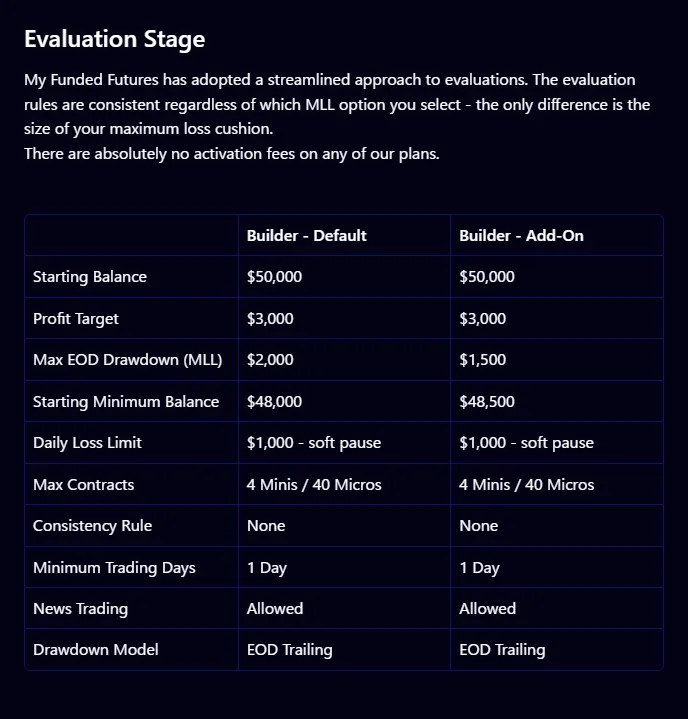
The numbers you must respect in a My Funded Futures evaluation are set by plan and account size. On a 50K account, every plan passes when you reach the $3,000 profit target without touching the $2,000 Maximum Loss Limit (MLL). What differs is the rules during the evaluation. Builder has no consistency rule and takes at least 1 day. Rapid and Pro have a 50% consistency rule and take at least 2 days. Rapid EOD has a 30% consistency rule and takes at least 4 days. The official help center explains that reaching the MLL is the only numeric rule that closes an account, and that the Builder daily loss limit only stops trading for that day (prohibited trading violations are separate).
| Rule (50K account) | Builder | Rapid | Rapid EOD | Pro |
|---|---|---|---|---|
| Profit target | $3,000 | $3,000 | $3,000 | $3,000 ($4,000 on One Day) |
| Evaluation Maximum Loss Limit (end of day) | $2,000 ($1,500 version available) | $2,000 | $2,000 | $2,000 |
| Daily loss limit | $1,000 (stops trading for the day only) | None | None | None |
| Evaluation consistency | None | 50% | 30% | 50% (none on One Day) |
| Minimum trading days | 1 day | 2 days | 4 days | 2 days (1 day on One Day) |
| Maximum position mini / micro (evaluation) | 4 / 40 | 5 / 50 | 3 / 30 | 3 / 30 |
| Sim Funded drawdown | End of day, same as the evaluation | $2,000 intraday trailing | End of day | Locks at starting balance + $100 after the first payout |
| Sim Funded T1 news | Allowed | Not allowed 2 minutes before and after | Not allowed during T1 | Not allowed 2 minutes before and after |
- Trading hours: the official hours run from 6:00 PM EST to 4:10 PM EST, and positions are flattened automatically at 4:10 PM EST. Whether these EST times shift during US daylight saving time is Under review. Overnight holding is not allowed. On holiday early-close days there is no automatic flattening, and you fail if you do not close positions yourself.
- Consistency: each plan has a set percentage, and the calculation is explained in the official consistency rule article. My Funded Futures says exceeding it does not fail you; you can continue toward passing by adding trading days. Builder has no evaluation consistency rule, but a 50% rule applies to payouts in Sim Funded.
Show 6 more notes
- Economic news (Tier 1): FOMC, FOMC minutes, the jobs report (NFP) and CPI, plus EIA reports for energy and crop reports for agriculture. All evaluations and Builder allow trading through T1 events. In Sim Funded on Rapid, Pro and Rapid EOD, you cannot hold positions or orders from 2 minutes before to 2 minutes after a release.
- 2% price limit rule: in Sim Funded and Live, trading within 2% of the CME price limit is prohibited. Equity index futures (ES, MES, NQ, MNQ, RTY, M2K, YM, MYM) halt overnight on a 5% move.
- How contracts are counted: an order that exceeds your limit by combining different products (for example, 2 minis plus 20 micros that together exceed the limit) is a violation even if it fills.
- 7 calendar days of inactivity: accounts bought as one-time payments from 2026-08-25 onward, including Sim Funded, may be closed after 7 calendar days in a row without trading. Contact support in advance if you plan a break.
- Tradable products: CME equity index, currency and agricultural futures, COMEX metals and more (ES, NQ, RTY, MES, MNQ, M2K, 6E, 6J, NKD, HE, LE and others). Micro Bitcoin (MBT) futures count as minis. SI, HG, PL, NG and QG are temporarily restricted, and metal micros have a contract limit.
- Number of accounts: up to 10 evaluations at once. In Sim Funded, up to 5 accounts in total if you hold only 25K and 50K accounts (up to 3 each for Rapid EOD 25K and 50K, 2 for Builder 25K, 1 for Builder 50K). If you hold even one 100K or 150K, the limit is 3 accounts in total across all sizes.
My Funded Futures trading hours
| Event | Official time | During US daylight saving time |
|---|---|---|
| Trading day opens (Globex open) | 6:00 PM EST | Under review |
| Automatic flattening (regular days) | 4:10 PM EST | Under review |
| Early close on holidays | No automatic flattening | You must close positions yourself |
| T1 news restriction (example: 8:30 release) | 8:28:00 to 8:32:00 | Under review |
| Studio restock (when sold out) | After 00:00 ET | Follows ET |
Sources for this section (3)
Source: Official help: Article / Official help: News events / Official help: Article 2
Sources for this section (14)
Source: Official help: Article / Official help: API / Official help: API 2 / Official help: Article 2 / Official help: Article 3 / Official help: Consistency / Official help: Article 4 / Official help: News events / Official help: Article 5 / Official help: Article 6 / Official help: Article 7 / Official help: Article 8 / Official help: Article 9 / Official help: Article 10
The thing to watch most closely at My Funded Futures is how the drawdown behaves, which changes by plan and stage.
My Funded Futures (MFFU) RulesDrawdown
Is the My Funded Futures drawdown EOD or intraday? Three types
My Funded Futures uses three drawdown types within one firm. Most evaluations, plus Sim Funded on Builder, Rapid EOD and Pro, use end-of-day trailing (EOD Trailing). Only Rapid Sim Funded uses intraday trailing, and Studio uses a static Maximum Loss Limit that does not move. Note that the same Rapid plan switches type between the evaluation and Sim Funded. Here is how it works on a 50K evaluation.
- Balance
- Loss floor (end of day)
- Locks at $50,100
My Funded Futures max drawdown by account size
| Item | 25K | 50K | 100K | 150K |
|---|---|---|---|---|
| Builder Maximum Loss Limit (evaluation and Sim, end of day) | $1,000 | $2,000 | $3,000 | $4,500 |
| Rapid evaluation (end of day) | $1,000 | $2,000 | $3,000 | $4,500 |
| Rapid Sim Funded (intraday) | $1,000 | $2,000 | $3,000 | $4,500 |
| Rapid EOD (evaluation and Sim, end of day) | $1,000 | $2,000 | Not offered | Not offered |
| Pro evaluation (end of day) | Not offered | $2,000 | $3,000 | $4,500 |
| Sim Funded buffer (MLL + $100) | $1,100 | $2,100 | $3,100 | $4,600 |
| Where the Sim Funded line locks | Starting balance + $100 | Starting balance + $100 | Starting balance + $100 | Starting balance + $100 |
- A 50K account starts at $50,000 with a $2,000 Maximum Loss Limit, so the line starts at $48,000. At My Funded Futures, touching this line is the numeric condition that costs you the account.
- With end-of-day trailing, the line rises when your end-of-day balance sets a new high. Open profits during the day alone do not move the line.
Show 6 more notes
- The line also locks at a set level during the evaluation. In the official example, the Rapid 25K line locks once the balance reaches $25,100, and falling below that level after that fails the account.
- In Sim Funded, once your profit reaches the drawdown amount + $100, the line locks at starting balance + $100 and stops moving. On 50K the buffer is $2,100.
- Rapid Sim Funded uses intraday trailing: the line follows the high of your account value including open profits. If you run up during the day and then give it back, your room shrinks by that amount. Trailing stops once you pass the buffer.
- In Pro Sim Funded, the line locks at starting balance + $100 (for example, $50,100) after your first payout.
- The Studio Maximum Loss Limit is static and does not move (5K $250, 10K $500, 20K $1,000).
- The Builder daily loss limit is separate from the Maximum Loss Limit. Hitting it only stops trading for that day.
Source: Official help: Article
Next, here is when and how much you can receive from My Funded Futures after passing.
Payouts
My Funded Futures payout rules: keep 80 to 90% of profits via Riseworks
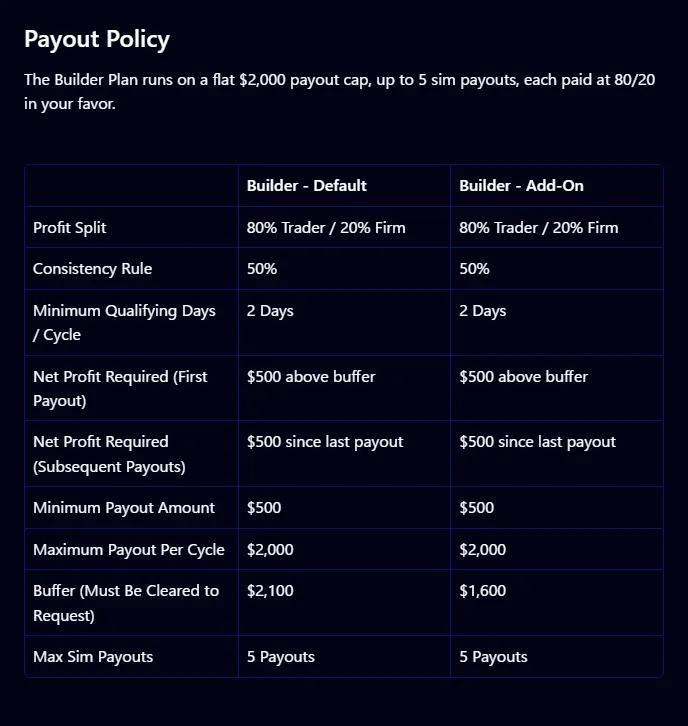
At My Funded Futures you can request payouts from Sim Funded. The trader profit split is 80% on Builder and Pro and 90% on Rapid and Rapid EOD. How often you can request also depends on the plan: daily on Rapid and Rapid EOD, every 14 calendar days from your first trade on Pro, and on Builder once you meet 2 qualifying days in each cycle. Most requests are approved instantly, and manual reviews take 6 to 12 business hours on weekdays. Payouts go through Riseworks (Rise), where you can choose bank transfer or crypto.
| Item (50K account) | Builder | Rapid | Rapid EOD | Pro |
|---|---|---|---|---|
| When you can request | 48 hours after your first trade. 2 qualifying days per cycle | Daily (first request from 24 hours after your first trade) | Daily | Every 14 calendar days from your first trade |
| Buffer (MLL + $100) | $2,100 ($1,600 on the $1,500 MLL version) | $2,100 (realized profit) | $2,100 for the first payout | $2,100 |
| Profit needed for the first payout | $500 above the buffer | Amount above the buffer | First: above the buffer. After that: $500 net profit since the last payout | Listed as up to 60% of profit even below the buffer |
| Consistency at payout | 50% | None | Verifying | None |
| Minimum payout | $500 | $500 | $500 | $1,000 |
| Maximum per payout | $2,000 per cycle | Verifying | No cap | Sim-stage total up to $100,000 per user |
| Move to Live | After your fifth payout is approved | Automatic at $10,000 net profit in one trading day, or by review | Automatic at $10,000 net profit in one trading day, or by review | Reviewed after 3 consecutive payouts, reaching $100,000, an invitation or similar |
| Profit split | 80% | 90% | 90% | 80% |
Payout methods and fees
| Payout method | When it applies | Time | Fee |
|---|---|---|---|
| Riseworks (Rise) | Before your first payout you must complete KYC and create a Riseworks account. You sign an agreement in Riseworks with your first payout | Most approved instantly. Manual review takes 6 to 12 business hours on weekdays | Verifying |
| Withdrawing from Rise | Bank transfer or crypto. Specific options for receiving funds in your country: Under review | Verifying | Verifying |
| Plaid / ACH | US residents only | Verifying | Verifying |
- Builder minimum payouts and per-cycle caps are $250 and $1,000 on 25K, $500 and $2,000 on 50K, and $1,000 and $3,000 on 100K. On 150K the minimum is $1,500; the per-cycle cap is $4,500 in the help article (150K guide) but $3,500 on the Builder plan page, so which is correct is Under review.
- Builder Sim Funded starts at a $0 balance, and the balance can go negative until the line rises to $0. You can take up to 5 payouts in Sim, and you move to Live once the fifth is approved.
Show 7 more notes
- The Rapid per-payout cap is Under review, as we could not find it in the official articles. Rapid EOD payouts can be requested daily with no cap.
- After your first Pro payout, the Maximum Loss Limit line locks at starting balance + $100.
- When a Rapid plan moves to Live automatically, any profit above $10,000 that day is forfeited. At the move, up to $5,000 of Sim profit is held as a Reserve, and it is paid as a performance bonus once you reach 20 profitable days and $10,000 in total payouts in Live.
- Pro Live reviews are triggered by 3 consecutive payouts on the same account, reaching the $100,000 cap (any excess is forfeited), an invitation from the risk team, or reaching $20,000 in profit (review only).
- When you move to Live, multiple Sim accounts are combined into one Live account. You cannot decline the move, and if you lose a Live account you cannot trade Sim, buy a new evaluation or reset for 21 days.
- In a Live account, the CME professional data subscription, round-trip commissions and platform licenses are paid by the trader and deducted from the Live balance.
- The 1099 (a US tax form) is for US persons. For payouts through Rise it comes from Rise, and for Plaid / ACH it comes from My Funded Futures. Payout fees are Under review, as we could not find them in the official articles.
Sources for this section (14)
Source: Official help: Payouts / Official help: Payouts 2 / Official help: Article / Official help: Article 2 / Official help: Article 3 / Official help: Article 4 / Official site / Official help: API / Official help: API 2 / Official help: Article 5 / Official help: API 3 / Official help: API 4 / Official help: Live funded / Official help: Article 6
If nothing here worries you, getting started with My Funded Futures takes 5 steps.
My Funded Futures (MFFU) Payout RulesHow to start
How to start with My Funded Futures: 5 steps from sign-up to payout
Almost everything at My Funded Futures happens on the official site and in your dashboard. Two points trip people up. Your card must be in your own name, with a billing address that matches your registered address. And identity verification (KYC) is required before you trade Sim Funded, with a Riseworks account also needed for payouts.
1. Create an account on the official site
Sign up on the My Funded Futures website. Each person may have only one profile. Letting anyone else trade your account, even family or friends, and sharing a computer or phone are prohibited.
Official homepage (promo bar and Trustpilot rating hidden) (Source: My Funded Futures official site, English page, captured 2026-11-05) 2. Choose a plan and size, then pay
Choose a plan and size from Builder, Rapid, Rapid EOD, Pro and Studio. You can pay by Visa, Mastercard, crypto and other methods, and only cards in your own name are accepted. Prepaid cards are not accepted, and crypto payments are not refundable.
3. Connect a platform and take the evaluation
Trade on a supported platform such as NinjaTrader, Tradovate or TradingView. On Tradovate, you sign the market data agreement at your first login to activate it. Positions are flattened automatically every day at 4:10 PM EST, so decide in advance when you will close out.
4. Upgrade to Sim Funded after passing
Once you pass, you can upgrade to Sim Funded right away from your dashboard and trade the same day. A review of up to 24 hours may apply. There is no activation fee.
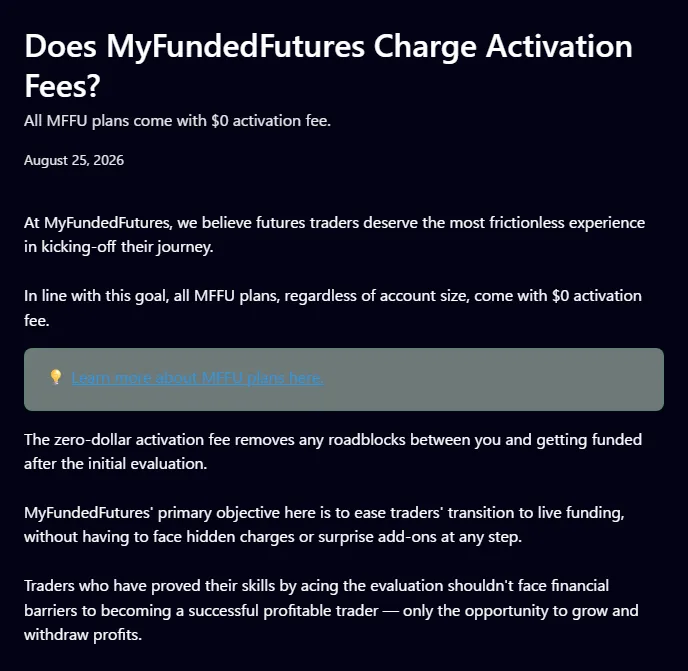
1Activation fee is $0 on all plans (official)$0 activation fee on all plans (Source: Official help: Article, English page, captured 2026-11-05) 5. Complete KYC and Riseworks, then request a payout
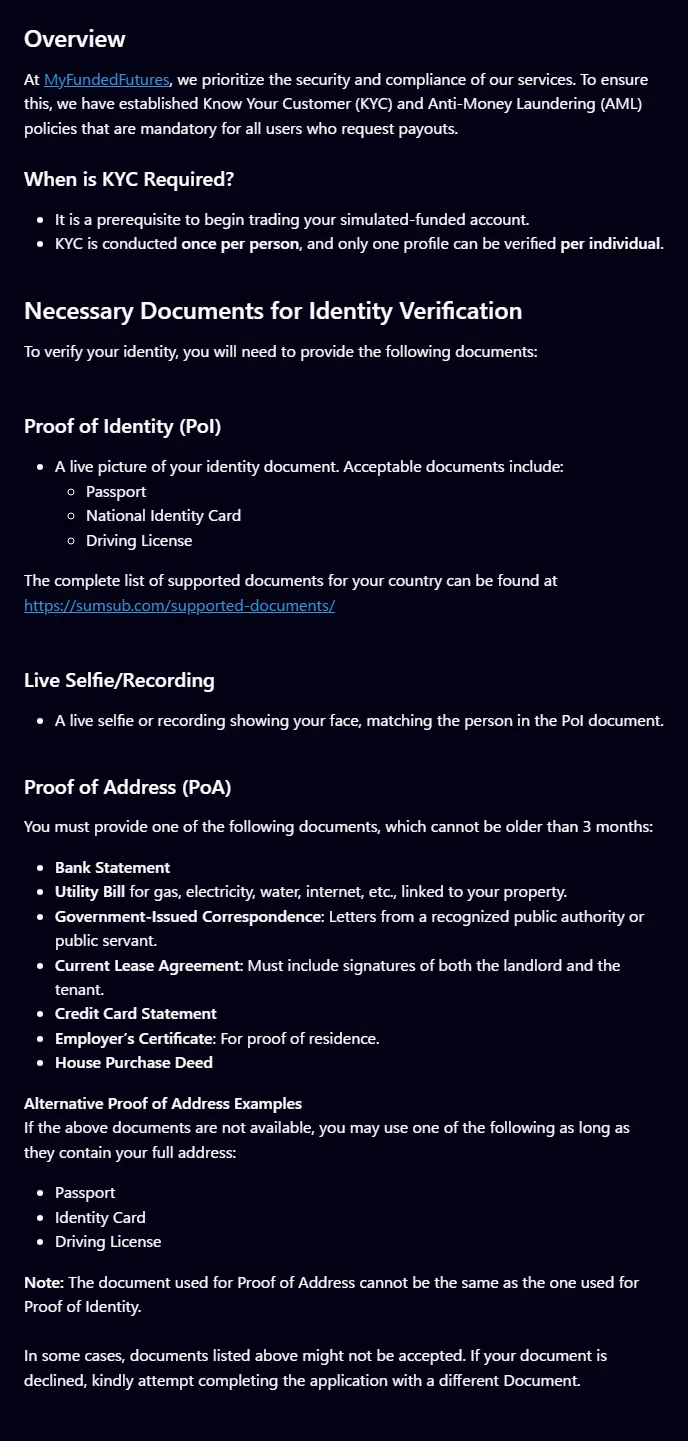
Before trading Sim Funded, you verify your identity through Sumsub. You need a photo of an original photo ID (passport, driver license and similar), a live selfie, and proof of address dated within 3 months. Before your first payout you create a Riseworks account, and you sign an agreement with your first payout.
1Documents required for identity verification (official)When KYC is required and the documents needed (Source: Official help: Article, English page, captured 2026-11-05)

Sources for this section (13)
Source: Official help: Article / Official help: Article 2 / Official help: Article 3 / Official help: Article 4 / Official help: Refunds / Official help: Article 5 / Official help: Article 6 / Official help: Article 7 / Official help: Article 8 / Official help: Article 9 / Official help: Article 10 / Official help: Article 11 / Official help: Payouts
Before you buy, also check which countries can use My Funded Futures and the verification requirements.
How to Start with My Funded FuturesCountries and ID
Which countries can use My Funded Futures? The restricted countries list
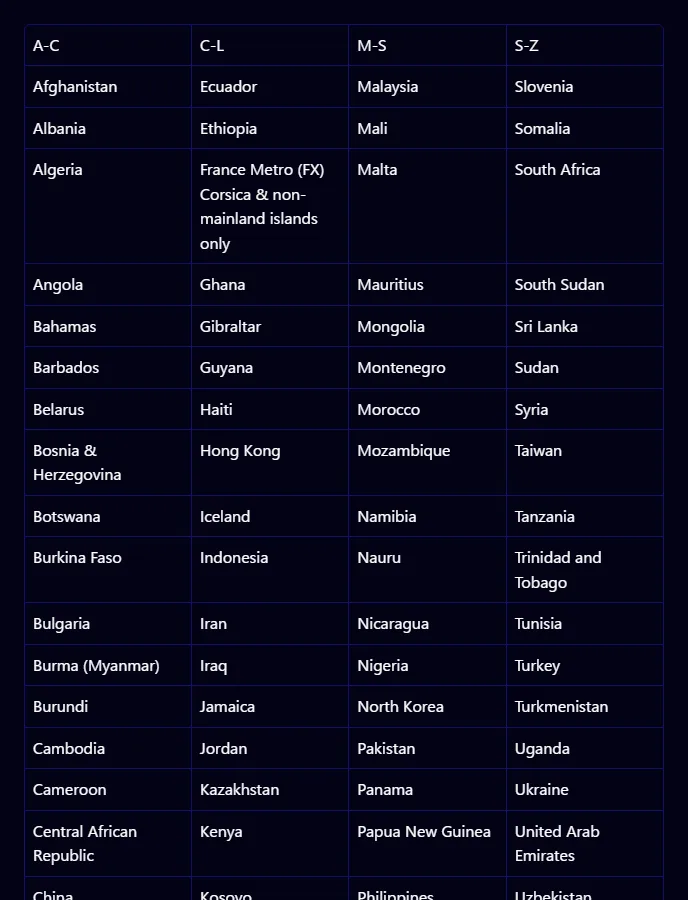
My Funded Futures decides eligibility by citizenship or residence. As of 2026-11-04, 90 countries and regions are restricted. The list can change, and a country not appearing on it is not a guarantee that you can use the service. How to receive payouts in your country and which support languages are available could not be confirmed in official articles and are Under review. Check the official restricted countries page for your country before you buy.
| Category | Details |
|---|---|
| Basis | Citizenship or residence |
| Restricted countries and regions | 90. OFAC-sanctioned countries, countries restricted by partners, and countries with high card fraud and similar risks |
| Countries not on the list | As of 2026-11-04, not being listed is not a guarantee of eligibility |
| Traveling in a restricted country | You can trade (advance notice recommended). New purchases and resets are not available during the stay |
| When KYC is required | Before you start trading Sim Funded (everyone who requests payouts) |
| Support languages | Under review |
- How eligibility is decided
- By citizenship or residence. If either falls in a restricted country, you are restricted. The list includes citizens and residents of OFAC-sanctioned countries, countries restricted by partners, and countries with a high risk of card fraud and similar issues.
- Restricted countries and regions
- 90 countries and regions. In Asia they include China, Hong Kong, Taiwan, Indonesia, Malaysia, the Philippines, Vietnam, Cambodia, Laos, Myanmar, Pakistan, Sri Lanka, Mongolia, North Korea and Kazakhstan, among others.
- Countries not on the list
- The list was checked on 2026-11-04. It can change, so confirm on the official page before you buy.
- While traveling
- You can keep trading while staying in a restricted country for travel (contacting support in advance is recommended). New purchases and resets are not available during the stay.
- When KYC is required and what it involves
- It is required before you start trading Sim Funded. Through Sumsub you submit a photo of an original photo ID, a live selfie or video, and proof of address dated within 3 months (a bank statement, utility bill, government document or similar; the same document as your ID is not accepted). Decisions cannot be changed.
- Ongoing checks
- Sanctions lists, PEP (politically exposed person) status and adverse media are checked automatically, and document expiry dates are checked daily. You must also be of legal age.
- Payment
- Cards are Visa and Mastercard. Google Pay and Apple Pay are available in some US states only. Crypto is not available in some countries. Official articles do not list available payment methods by country.
- Receiving payouts outside the US
- Payouts are received from Riseworks (Rise) by bank transfer or crypto. Specific options and fees for receiving funds in your country are Under review. Plaid / ACH is for US residents only.
- Support languages
- Under review. Support is through live chat on the site, Discord, the help center and email, and the official help center does not list support in other languages.
- Tax forms
- The only tax document in My Funded Futures primary sources is the US 1099. How payouts are taxed where you live: Under review. Ask a tax professional in your country.
Sources for this section (7)
Source: Official help: Article / Official help: Article 2 / Official help: Article 3 / Official help: Article 4 / Official help: Payouts / Official help: Article 5 / Official help: Article 6
Once you have checked eligibility, check the My Funded Futures trading platforms.
Platforms
My Funded Futures platforms: NinjaTrader, Tradovate, TradingView and 5 more
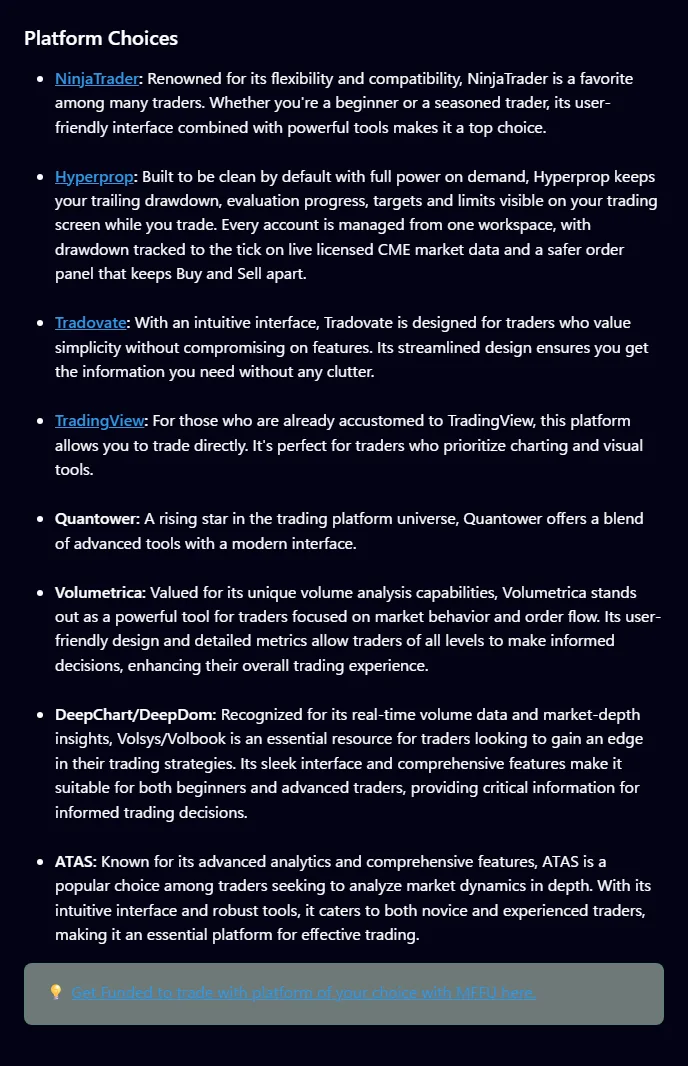
The official My Funded Futures platform list includes 8 platforms: NinjaTrader, Hyperprop, Tradovate, TradingView, Quantower, Volumetrica, DeepChart / DeepDom and ATAS. Studio works with Hyperprop only. Rithmic is not on the official list and is Under review. If you use Tradovate, you sign the market data agreement at your first login.
| Platform or cost | Official listing | Cost | Details |
|---|---|---|---|
| NinjaTrader | On the supported list | Verifying | Connection steps and license handling: Under review |
| Tradovate | On the supported list | Verifying | Sign the market data agreement at first login to activate |
| TradingView | On the supported list | Verifying | Whether a paid plan is required: Under review |
| Quantower, Volumetrica, DeepChart / DeepDom, ATAS | On the supported list | Verifying | Connection steps are in the official help article on connecting platforms |
| Hyperprop | On the supported list. The only option for Studio | Verifying | Other platforms cannot be used with Studio |
| Rithmic | Not on the official supported list | Verifying | Under review |
| Commissions (per contract, round trip) | All plans | ES, NQ, RTY $4.68; MES, MNQ, M2K $1.90 | MBT $3.50, MET $1.16, 6E and similar $5.12, 6A $5.04, NKD $6.22 |
| Live account costs | Paid by the trader | CME professional data, round-trip commissions, platform licenses | Deducted from the Live balance |
- Copy trading is allowed on all account types. The firm recommends Tradesyncer, and Tradovate group copying and other tools can also be used. You are responsible for the setup. Copying between you and other traders is prohibited.
- Automated trading is allowed if it follows your own setup. Strategies that exploit favorable simulated fills are prohibited, as is HFT. In Live you must follow CME guidelines.
Show 2 more notes
- Sharing a computer or phone with other traders is prohibited, and violations can lead to a permanent ban.
- Market data fees during the Sim stage are Under review, as they could not be confirmed in official articles.
Sources for this section (8)
Source: Official help: Article / Official help: Article 2 / Official help: Article 3 / Official help: Article 4 / Official help: Live funded / Official help: Copy trading / Official help: Prohibited conduct / Official help: Article 5
Finally, see whether My Funded Futures fits you compared with the other 5 firms.
My Funded Futures (MFFU) Supported PlatformsFit and compare
Who My Funded Futures suits, and who it does not
A good fit if
- Traders who want a fixed, one-time evaluation cost instead of a monthly fee (purchases from 2026-08-25 onward are one-time, with no activation fee)
- Traders who want to pass the same day after one big winning day (Builder has no evaluation consistency rule and a 1-day minimum)
- Traders who want to request payouts every day after passing (daily on Rapid and Rapid EOD, with no cap on Rapid EOD)
- Traders who want to trade through economic news releases (all evaluations and Builder allow trading during T1 events)
- Traders who want to pick a plan that matches their style (5 plans with different consistency rules, drawdown types and payout frequency)
- Traders who want to use a familiar platform such as NinjaTrader, Tradovate, TradingView or ATAS
Not a fit if
- Traders who want to hold positions overnight (not allowed; positions are flattened at 4:10 PM EST)
- Traders who take breaks from trading (one-time accounts may be closed after 7 calendar days without trading)
- Traders considering Rapid whose trades swing widely in open profit during the day (Rapid Sim Funded uses intraday trailing)
- Traders who want clear refund terms up front (official sources disagree on the refund amount)
- Traders who want to confirm how they will receive payouts in their country before buying (options and fees for receiving funds from Riseworks are Under review)
- Traders who need support in a language other than English (no other language desks are listed)
Where My Funded Futures stands out
One-time payment with no activation fee, and a $153 list price for 50K
According to official information checked on 2026-11-04, the My Funded Futures Builder 50K is a one-time $153 with no activation fee. Among the three one-time-payment firms whose list prices we could confirm, it is the second lowest after Tradeify at $145 (the Lucid Trading list price is Under review).
Sources for this section (6)
Source: Official site / Official help: Article / Tradeify official site / Apex Trader Funding official site / Take Profit Trader official site / Topstep official site
Five plans with different evaluation rules and payout frequency
My Funded Futures offers Builder, with no consistency rule and a 1-day minimum; Rapid, with a 50% consistency rule and daily payouts; Rapid EOD, with a 30% consistency rule and end-of-day drawdown in Sim too; Pro, with no daily loss limit or consistency rule in Sim; and Studio, for Hyperprop only with a static Maximum Loss Limit.
Sources for this section (6)
Source: Official site / Official site: API / Official site: API 2 / Official site 2 / Official help: Article / Official help: Consistency
The Maximum Loss Limit is the only numeric rule that closes an account, and approval times are published
The official help center explains that reaching the Maximum Loss Limit (MLL) is the only numeric rule that closes an account, and that the Builder daily loss limit only stops trading for the day. Exceeding the consistency rule does not fail you. Most payouts are approved instantly, and manual reviews are stated to take 6 to 12 business hours on weekdays.
Sources for this section (4)
Source: Official help: Article / Official help: Consistency / Official help: Payouts / Official help: Payouts 2
What to know before choosing My Funded Futures
Official sources disagree on the refund amount, and crypto payments are not refunded
Refunds require no trading and a request within 14 days of purchase, but the terms page says $75 is deducted from the amount paid, while a help article says refunds are in full. Which is correct is Under review. Crypto payments are not refundable, and cancelling removes your dashboard access immediately.
Sources for this section (2)
Source: Official site / Official help: Refunds
No overnight holding, and weeks without trading can cost you the account
My Funded Futures flattens positions automatically at 4:10 PM EST, and overnight holding is not allowed. On holiday early-close days there is no automatic flattening, and you fail if you do not close positions yourself. One-time accounts may be closed after 7 calendar days in a row without trading.
Sources for this section (2)
Drawdown and news rules change by plan and stage
Rapid uses end-of-day drawdown in the evaluation but switches to intraday trailing in Sim Funded. In Rapid and Pro Sim Funded you cannot hold positions or orders from 2 minutes before to 2 minutes after T1 news. You cannot decline the move to Live, and if you lose a Live account you cannot buy a new evaluation for 21 days.
Sources for this section (4)
Source: Official site: API / Official help: News events / Official help: Live funded / Official help: API
My Funded Futures vs the other five (50K account)
| Firm | 50K price | Pricing model | Max drawdown (50K) | Profit split |
|---|---|---|---|---|
| Apex Trader Funding | $249 | One-time, plus $99 activation on passing | $2,000 | 100% sim funded, 90% live |
| Lucid Trading | Under review | One-time, no activation fee | $2,000 | 90% sim funded |
| My Funded Futures | $153 | One-time, no activation fee | $2,000 | 80% or 90% by plan |
| Take Profit Trader | $170/mo | Monthly, plus $130 activation on passing | $2,000 | PRO 80%, PRO+ 90% |
| Topstep | $49/mo | Monthly, plus $149 activation on passing (Standard) | $2,000 | 90% sim funded |
| Tradeify | $145 | One-time, no activation fee | $2,000 | 90% sim funded, 80% live |
- Same values as the firm list. Monthly and one-time prices are not directly comparable.
If it fits, you can start My Funded Futures with the Builder 50K for a one-time $153.
Common breaches
Why do traders fail or lose payouts at My Funded Futures? 13 pitfalls from the official rules
The reasons you can lose a My Funded Futures account or have a payout held are written in the official rules. Below are the ones the rule text suggests are easy to run into, split into the official rule and how to avoid it. Some cause a fail, while others only stop trading or hold a payout, so check which is which.
Touching the Maximum Loss Limit in Rapid Sim Funded when open profits pull back
Official rule:Rapid Sim Funded uses intraday trailing drawdown: the line follows the high of your account value including open profits. It behaves differently from the end-of-day drawdown in the evaluation.
How to avoid it:When open profits grow during the day, calculate your room assuming the line has risen too. Trailing stops once you pass the buffer ($2,100 on 50K), so focus first on reaching the buffer. Source: Official site: API / Official help: APISources for this section (2)
Leaving positions open on a holiday early-close day
Official rule:On regular days positions are flattened automatically at 4:10 PM EST, but on holiday early-close days there is no automatic flattening. If you do not close positions yourself, you fail.
How to avoid it:Check US holiday trading hours the week before, and close out early on early-close days.
Source: Official help: Article
Leaving orders working right up to T1 news in Rapid or Pro Sim Funded
Official rule:In Sim Funded on Rapid, Pro and Rapid EOD, you cannot hold positions or orders from 2 minutes before to 2 minutes after T1 news (FOMC, NFP, CPI and others). For an 8:30 release, you must be flat by 8:28:00 and can resume after 8:32:00.
How to avoid it:For a release at 8:30, cancel every order, including limit and stop orders, at least 2 minutes before. Whether the EST-based times shift during US daylight saving time is Under review, so check the official schedule. Source: Official help: News events / Official help: API / Official help: API 2Sources for this section (3)
Not trading a one-time account for 7 calendar days
Official rule:Accounts bought as one-time payments from 2026-08-25 onward, including Sim Funded, may be closed after 7 calendar days in a row without trading.
How to avoid it:If you plan a break, contact support in advance. If you hold several accounts, plan to trade each of them.
Source: Official help: Article
Taking opposite positions in the same underlying (hedging)
Official rule:Holding a short and a long in the same underlying at once (for example, NQ and MNQ) is fully prohibited. Combinations of unrelated assets are allowed, but trading that relies on them is described as a negative factor in reviews.
How to avoid it:Do not hold opposite directions in the large and small contracts of the same index, such as NQ and MNQ or ES and MES. Source: Official help: Hedging / Official help: Prohibited conductSources for this section (2)
Exceeding the contract limit by combining different products
Official rule:An order that exceeds your limit by combining different products is a violation even if it fills, and can cost you the account.
How to avoid it:Before ordering, check that your minis, micros and other products together stay within your account limit.
Source: Official help: Article
Trading near the price limit (2% rule)
Official rule:In Sim Funded and Live, trading within 2% of the CME price limit is prohibited. Equity index futures halt overnight on a 5% move.
How to avoid it:On days with large moves, check the distance to the price limit before you place an order.
Source: Official help: Article
Using methods that exploit simulated fills
Official rule:HFT, placing multiple limit orders at the same price at once, exploiting unrealistic fills in illiquid contract months or hours, and tight bracket orders that rely on zero slippage are prohibited. Violations end the agreement, forfeit profits and can put passed evaluations under review.
How to avoid it:Review your methods and order entry against whether you would get the same fills in the real market.
Letting someone else trade, or sharing a device
Official rule:Trading by another person, sharing a computer or phone, copy trading with other traders, and coordinating with others to run the same or opposite strategies in unrelated accounts are prohibited. Family and friends are no exception.
How to avoid it:Use your trading device only yourself and never share your login. Copy only between your own accounts. Source: Official help: Article / Official help: Prohibited conduct / Official help: Copy tradingSources for this section (3)
Paying with someone else's card
Official rule:Cards in another person's name cannot be used, even a family member's or friend's. The billing address must match your registered address, and prepaid cards are not accepted.
How to avoid it:Use a card in your own name with the same billing address as your registered address. Sources for this section (2)
Missing the 50% consistency rule at payout on Builder
Official rule:Builder has no consistency rule in the evaluation, but a 50% rule applies to payouts in Sim Funded. You also need 2 qualifying days in each cycle.
How to avoid it:After passing, record your daily profits and check the calculation in the official consistency rule article before requesting a payout. Sources for this section (2)
Reversing a card payment (chargeback)
Official rule:A chargeback freezes all related accounts without notice. A chargeback on services already provided is treated as fraud and results in a permanent ban.
How to avoid it:If you question a charge, contact support@myfundedfutures.com before filing a dispute with your card issuer. Source: Official help: Article / Official siteSources for this section (2)
Assuming you can decline the move to Live later
Official rule:You cannot decline the move to Live. On the Rapid plans you move automatically when you make $10,000 in net profit in one trading day, and profit above $10,000 that day is forfeited. If you lose a Live account, you cannot trade Sim, buy a new evaluation or reset for 21 days.
How to avoid it:On the Rapid plans, decide in advance what you will do as a day's profit approaches $10,000. Check the Live conditions in each plan's official article. Source: Official help: Live funded / Official help: API / Official help: ArticleSources for this section (3)
Every reason above is written in the official My Funded Futures rules. Next, here are the facts about the company that can be confirmed in official sources.
My Funded Futures (MFFU) RulesThe company
Is My Funded Futures legit? Company facts and published figures
To help you judge whether My Funded Futures is trustworthy, this section lists only facts that can be confirmed on the official site, in the terms and in the help center. Review scores and star ratings are not included. Keep in mind that the evaluation and Sim Funded are simulated (orders are not actually filled in the market), and only Live trades in the real market.
| Operating company | MyFunded Futures, LLC, as stated in the terms, the cancellation page and the disclaimer page. Sources for this section (3)Source: Official terms of use / Official site / Official site 2 |
|---|---|
| Governing law and jurisdiction | Governed by Texas law in the US. Lawsuits go to the state courts of Collin County, Texas, or the US District Court for the Eastern District of Texas, Sherman Division, with the arbitration clause taking priority. Source: Official terms of use |
| Dispute resolution | Unresolved disputes go to binding arbitration under American Arbitration Association (AAA) rules. The policy states that by registering you waive chargebacks and lawsuits. Source: Official help: Refunds |
| Address and founding year | Under review. We could not find an address on the terms page. The site shows a "2023-2026" copyright notice, which is not a stated founding year. Leadership information could not be confirmed either. Sources for this section (2)Source: Official terms of use / Official site |
| How the accounts work | The evaluation and Sim Funded are fully simulated. Builder Live is described as a real account with Blue Row Capital. Sources for this section (3)Source: Official site / Official site 2 / Official help: Article |
| Published figures | The disclaimer page says 19.97% of evaluation participants reached the target and passed, about 19.95% reached Sim Funded, 39.2% of those who reached Sim Funded received at least 1 payout, and 4.2% of Sim Funded traders moved to Live. No measurement period is stated, and all are My Funded Futures' own figures. Source: Official site |
| Stated scale | The official help center mentions "more than 100,000 traders," and the official site shows more than 72K Discord members. Both are My Funded Futures' own claims. Sources for this section (2)Source: Official help: Article / Official site |
| Identity verification and screening | Identity verification through Sumsub, with automatic checks against sanctions lists, PEP status and adverse media; document expiry dates are checked daily. One person, one profile. Sources for this section (2) |
| Enforcement | Prohibited trading violations can lead to immediate termination, forfeited profits, review of passed evaluations and no refund. The terms allow suspension or termination for any reason when the terms are violated. Chargebacks result in all accounts being frozen and a permanent ban. Sources for this section (3)Source: Official help: Prohibited conduct / Official terms of use / Official help: Article |
| Support channels | Live chat on the site (account matters), Discord (general questions), the help center, and email at support@myfundedfutures.com (the contact for refunds, cancellations and before any chargeback). Support languages and hours are Under review. Sources for this section (2)Source: Official help: Article / Official site |
The FAQ below answers the remaining detailed questions.
FAQ
My Funded Futures FAQ
What is My Funded Futures (MFFU)?
My Funded Futures is a futures prop firm run by MyFunded Futures, LLC, often called MFFU. Its terms are governed by Texas law in the US. After passing the evaluation you move to Sim Funded (a simulated funded account) and keep 80% or 90% of the profits made there. The company address and founding year could not be confirmed on official pages and are Under review.
What are My Funded Futures reviews like?
Instead of review scores or star ratings, this page gives you facts you can confirm in official sources. On its disclaimer page, My Funded Futures says 19.97% of evaluation participants passed and 39.2% of those who reached Sim Funded received at least 1 payout (no measurement period stated; the firm's own figures). On the other hand, official sources disagree on the refund amount, and an account may close after 7 calendar days of inactivity, which will not suit everyone.
Is My Funded Futures a scam?
Here are facts you can confirm in official sources. The firm is run by MyFunded Futures, LLC, its terms are governed by Texas law, and disputes go to arbitration under American Arbitration Association rules. The evaluation and Sim Funded are simulated, and only Live trades in the real market. The address and founding year are Under review.
Is My Funded Futures available in my country?
As of 2026-11-04, My Funded Futures restricts 90 countries and regions. Eligibility is based on citizenship or residence, and the list can change, so a country not appearing on it is not a guarantee of eligibility. Identity verification is required before you start trading Sim Funded. Check the official restricted countries page before you buy.
What support does My Funded Futures offer?
Support languages are Under review; the official help center does not list support in other languages. Use live chat on the site for account matters, Discord for general questions, and email at support@myfundedfutures.com for refunds and cancellations.
How much does My Funded Futures cost?
Regular prices checked on 2026-11-04 are a one-time $153 for Builder 50K, $209 for Rapid 50K, $145 for Rapid EOD 25K and $265 for Pro 50K. Studio is $75 for 5K, $140 for 10K and $280 for 20K. Prices for other sizes could not be confirmed on public pages and are Under review.
Is My Funded Futures a monthly subscription or a one-time payment?
New purchases from 2026-08-25 onward are one-time payments with no renewal charges. Monthly subscriptions bought before then continue under their old terms. Official sources disagree on the cutoff date: a help article says 2026-08-25, while the terms define purchases before 2026-08-20 as Legacy Subscriptions. One-time accounts may be closed after 7 calendar days in a row without trading.
Does My Funded Futures charge an activation fee?
No. The official help center states that the My Funded Futures activation fee is $0 on every plan and size. Once you pass, you can upgrade to Sim Funded right away from your dashboard.
Can I reset a My Funded Futures account, and how much does it cost?
Resets remain available after the switch to one-time payments, regardless of purchase date. The reset price is Under review, as we could not find it in the official help center or on the plan pages. You cannot reset while staying in a restricted country or for 21 days after losing a Live account.
How do the My Funded Futures plans differ?
Builder has no evaluation consistency rule and a 1-day minimum; you can take up to 5 payouts in Sim before moving to Live. Rapid has a 50% evaluation consistency rule and a 2-day minimum, with intraday trailing drawdown and daily payouts in Sim. Rapid EOD has a 30% consistency rule and a 4-day minimum, with end-of-day drawdown in Sim too and daily payouts with no cap. Pro has a 50% consistency rule, no daily loss limit or consistency rule in Sim, and payouts every 14 calendar days. Studio is an experimental plan for Hyperprop only with a Maximum Loss Limit that does not move.
Should I choose My Funded Futures Rapid or Pro?
Compare payout frequency and the Sim drawdown. Rapid has a 90% Sim profit split and daily payouts, but its Sim drawdown is intraday trailing. Pro has an 80% profit split and payouts every 14 calendar days, but no daily loss limit or consistency rule in Sim, and the line locks at starting balance + $100 after your first payout. Both have a 50% evaluation consistency rule.
What is the My Funded Futures Builder plan?
A plan with no evaluation consistency rule that you can pass in as little as 1 day. The 50K is $153, with a $3,000 profit target, a $2,000 Maximum Loss Limit and a $1,000 daily loss limit (stops trading for the day only). Sim Funded starts at a $0 balance, and a 50% consistency rule applies at payout. The profit split is 80%, and you move to Live once your fifth Sim payout is approved.
What is My Funded Futures Studio?
An experimental plan for Hyperprop only, with a static Maximum Loss Limit that does not move. It comes in 5K, 10K and 20K at $75, $140 and $280. There is no daily loss limit, consistency rule or minimum day count, and in Sim you can withdraw all or part of your profit at any time. You can hold just one account; the Sim profit split is 80% and Live is 90%.
Are My Funded Futures Flex and the old Pro plan still available?
The official My Funded Futures help center treats Flex as a Legacy (old) plan. The Pro plan redesigned in October 2026 is current, and holders of the old Pro keep the old rules. New purchases are limited to Builder, Rapid, Rapid EOD, Pro and Studio. Detailed terms of the old plans are Under review.
What are the My Funded Futures evaluation rules?
On a 50K account you pass by reaching the $3,000 profit target without touching the $2,000 Maximum Loss Limit (MLL). 100K has a $6,000 target and $3,000 MLL, and 150K has $9,000 and $4,500. Evaluation consistency is none on Builder, 50% on Rapid and Pro, and 30% on Rapid EOD. Positions are flattened automatically every day at 4:10 PM EST.
How many days does it take to pass a My Funded Futures evaluation?
At least 1 day on Builder and Pro 50K One Day, 2 days on Rapid and Pro, and 4 days on Rapid EOD. Studio has no minimum. Pro 50K One Day is described as a free, limited-time add-on, with a $4,000 target.
What is the My Funded Futures consistency rule?
A rule with a set percentage for each plan; the calculation is explained in the official consistency rule article. In the evaluation it is 30% on Rapid EOD, 50% on Rapid and Pro, and none on Builder and Pro One Day. Builder applies a 50% rule at payout in Sim Funded. Exceeding it does not fail you; you can move on by adding trading days.
Is the My Funded Futures drawdown EOD or intraday?
It depends on the plan and stage. Most evaluations, plus Sim Funded on Builder, Rapid EOD and Pro, use end-of-day trailing. Only Rapid Sim Funded uses intraday trailing, which follows the high including open profits. Studio uses a static Maximum Loss Limit that does not move. In Sim Funded, once profit reaches the drawdown amount + $100, the line locks at starting balance + $100.
Does My Funded Futures have a daily loss limit?
Only Builder does, at $1,000 on 50K. Hitting it only stops trading for that day; the account stays open. Rapid, Rapid EOD and Pro have no daily loss limit. Official sources disagree on the Builder Live daily loss limit: the Builder plan page lists 25K $600, 50K $1,000, 100K $1,750 and 150K $2,500, while the 25K, 100K and 150K guides say "none" (the 50K guide also says $1,000).
Can I hold positions overnight at My Funded Futures?
No. My Funded Futures trading hours run from 6:00 PM EST to 4:10 PM EST, and positions are flattened automatically at 4:10 PM EST. On holiday early-close days there is no automatic flattening, so you fail if you do not close positions yourself.
Can I trade news releases at My Funded Futures?
All evaluations and Builder allow trading through T1 news (FOMC, FOMC minutes, NFP, CPI and others). In Sim Funded on Rapid, Pro and Rapid EOD, you cannot hold positions or orders from 2 minutes before to 2 minutes after a release. Strategies such as straddles aimed at the moment of release are prohibited.
What happens if I stop trading at My Funded Futures for a while?
Accounts bought as one-time payments from 2026-08-25 onward, including Sim Funded, may be closed after 7 calendar days in a row without trading. Contact support in advance if you plan a break. The official Builder article says Live accounts have no inactivity rule.
When can I request a My Funded Futures payout, and what are the conditions?
On a 50K account, Builder lets you request a payout starting 48 hours after your first trade, once you are $500 above the $2,100 buffer and meet 2 qualifying days per cycle and the 50% consistency rule. Rapid allows daily requests starting 24 hours after your first trade, and Rapid EOD also allows daily requests. Pro allows a request every 14 calendar days from your first trade. The minimum payout is $500 on Builder 50K, Rapid and Rapid EOD, and $1,000 on Pro.
What is the My Funded Futures payout cap?
Builder has a per-cycle cap: $1,000 on 25K, $2,000 on 50K and $3,000 on 100K. For 150K the help article says $4,500 and the plan page says $3,500, so it is Under review. Rapid EOD has no cap, and the Rapid cap is Under review because we could not find it. Pro allows up to $100,000 per user during the Sim stage.
How long do My Funded Futures payouts take?
The official help center says most requests are approved instantly, and manual reviews take 6 to 12 business hours on weekdays. How many days it takes for funds to reach your bank from Riseworks is Under review.
How do I receive My Funded Futures payouts outside the US?
Complete identity verification and create a Riseworks account before your first payout. You sign an agreement in Riseworks with your first payout, then withdraw from Rise by bank transfer or crypto. Plaid / ACH is for US residents only. Specific options for receiving funds in your country and payout fees are Under review.
What is the My Funded Futures profit split?
In Sim Funded, the trader keeps 80% on Builder and Pro and 90% on Rapid and Rapid EOD (90% on Rapid since 2026-01-12). Studio is 80% in Sim and 90% in Live.
How do I move to My Funded Futures Live?
It depends on the plan. Builder moves after your fifth Sim payout is approved. Rapid and Rapid EOD move automatically when you make $10,000 in net profit in one trading day, or when the risk team approves you on review. Pro is reviewed after 3 consecutive payouts, reaching the $100,000 cap, an invitation, or reaching $20,000 in profit. Studio moves after 5 payouts or $5,000 in total requests. You cannot decline the move.
What is the My Funded Futures Reserve Program?
When a Rapid plan moves to Live, up to $5,000 of your Sim profit is held back. It is paid as a performance bonus once you reach 20 profitable days and $10,000 in total payouts in Live. If you lose the Live account, the Reserve covers the deficit and the rest returns to a payout-only Sim account. Pro also has a Reserve, with bonus conditions of $10,000, $20,000 or $30,000 in total payouts depending on size.
What is the My Funded Futures pass rate?
On its disclaimer page, My Funded Futures says 19.97% of evaluation participants reached the target and passed, and about 19.95% reached Sim Funded. It also says 39.2% of those who reached Sim Funded received at least 1 payout, and 4.2% of Sim Funded traders moved to Live. No measurement period is stated, and all are the firm's own figures.
When is My Funded Futures KYC required, and what do I need?
It is required before you start trading Sim Funded, for everyone who requests payouts. Through Sumsub you submit a photo of an original photo ID (passport, national ID card or driver license), a live selfie or video, and proof of address dated within 3 months. The same document as your ID cannot be used for proof of address, and decisions cannot be changed.
What payment methods does My Funded Futures accept?
Visa, Mastercard, Google Pay and Apple Pay (some US states only), and crypto (ETH, LTC, USDT, USDC, SOL, POL, TRON). Only cards in your own name are accepted, and the billing address must match your registered address. Prepaid cards are not accepted, and crypto is not available in some countries.
Can I get a refund or cancel at My Funded Futures?
You can request a refund within 14 days of purchase if you have not traded (including holding positions or accessing market data). However, the terms page says $75 is deducted from the amount paid, while a help article says refunds are in full, so the amount is Under review. Crypto payments and lost accounts are not eligible. You cancel by email, and your dashboard access ends immediately.
How many My Funded Futures accounts can I hold?
Up to 10 evaluations at once. In Sim Funded, up to 5 accounts in total if you hold only 25K and 50K accounts (up to 3 each for Rapid EOD 25K and 50K, 2 for Builder 25K, 1 for Builder 50K). If you hold even one 100K or 150K, the limit is 3 accounts in total across all sizes. Studio is limited to one account.
Which platforms does My Funded Futures support? Can I use Rithmic?
The official supported list includes 8 platforms: NinjaTrader, Hyperprop, Tradovate, TradingView, Quantower, Volumetrica, DeepChart / DeepDom and ATAS. Studio works with Hyperprop only. Rithmic is not on the supported list and is Under review.
What are the My Funded Futures commissions?
Per contract, round trip: $4.68 for ES, NQ and RTY; $1.90 for MES, MNQ and M2K; $3.50 for MBT; $5.12 for 6E and similar; and $6.22 for NKD. In a Live account, CME professional data, commissions and platform licenses are deducted from the Live balance.
Can I use automated trading or copy trading at My Funded Futures?
Yes, with conditions. Automated trading is allowed if it follows your own setup; strategies that exploit favorable simulated fills and HFT are prohibited. Copy trading is allowed on all account types, and the firm recommends Tradesyncer. Copying between you and other traders, and sharing devices, are prohibited.
What are the downsides of My Funded Futures?
The official rules point to 4 main cautions. Official sources disagree on the refund amount, and crypto payments are not refunded. Overnight holding is not allowed, and positions are flattened automatically every trading day. One-time accounts may be closed after 7 calendar days without trading. Rapid Sim Funded uses intraday trailing drawdown and restricts trading 2 minutes before and after T1 news.
Are My Funded Futures profits taxable?
Under review. The only tax document in My Funded Futures primary sources is the US 1099 (sent by Rise for payouts through Rise, and by My Funded Futures for Plaid / ACH). Nothing covers tax treatment outside the US. Ask a tax professional in your country how to report payouts.
Which countries can use My Funded Futures?
Of these, Philippines, Nigeria is on My Funded Futures's official restricted list (checked 2026-11-04). Based on citizenship or residence. 90 countries and regions are restricted. Not being listed is not a guarantee of eligibility, so check the official list before you buy.
Guides
More on My Funded Futures
Being verified
What we are still verifying about My Funded Futures
Values that conflict between official sources or are not stated officially are listed here instead of guessed (checked 2026-11-04).
- VerifyingRefund amount: the terms deduct $75, while the help center says full refund.
- VerifyingBuilder 150K cap per cycle: $4,500 in the help center, $3,500 on the plan page.
- VerifyingBuilder Live daily loss limit: help articles and the plan page differ for 25K, 100K and 150K.
- VerifyingPricing: sizes other than 50K (25K for Rapid EOD) could not be confirmed on public pages.
- VerifyingTrading hours: the firm writes EST. Whether this follows daylight saving time (ET) is not stated.
- VerifyingWhether the trading hours shift during US daylight saving time (the official pages say EST and do not mention daylight saving time)
- VerifyingThe reset price (not found in the official help center or on the plan pages)
- VerifyingWhether My Funded Futures or Rise charges payout fees
- VerifyingSpecific ways to receive funds from Riseworks to a bank outside the US, and how long transfers take
- VerifyingSupport languages and support hours
- VerifyingThe Rapid (intraday) per-payout cap and the Rapid EOD consistency rule at payout
- VerifyingThe Pro Sim Funded maximum position (the official text says "3 mini / 3 micro," and its meaning is unclear)
- VerifyingThe Builder 25K and 50K Live maximum position
- VerifyingRithmic support, NinjaTrader connection steps and license handling, and Sim-stage market data fees
- VerifyingCompany address, founding year and leadership
Sources and date checked
Numbers on this page come from the official pages cited in each section (checked 2026-11-04). Values that conflict between official sources are marked as being verified. We do not rank or score firms.
Show all 54 sources
- Official site myfundedfutures.com
- Official site: API myfundedfutures.com
- Official site: API myfundedfutures.com
- Official site myfundedfutures.com
- Official help: Article help.myfundedfutures.com
- Official help: Article help.myfundedfutures.com
- Official help: Article help.myfundedfutures.com
- Official help: Article help.myfundedfutures.com
- Official help: Article help.myfundedfutures.com
- Official help: Article help.myfundedfutures.com
- Official terms of use myfundedfutures.com
- Official help: Article help.myfundedfutures.com
- Official help: Article help.myfundedfutures.com
- Official help: API help.myfundedfutures.com
- Official help: API help.myfundedfutures.com
- Official help: Article help.myfundedfutures.com
- Official help: Consistency help.myfundedfutures.com
- Official help: Article help.myfundedfutures.com
- Official help: News events help.myfundedfutures.com
- Official help: Article help.myfundedfutures.com
- Official help: Article help.myfundedfutures.com
- Official help: Article help.myfundedfutures.com
- Official help: Article help.myfundedfutures.com
- Official help: Article help.myfundedfutures.com
- Official help: Payouts help.myfundedfutures.com
- Official help: Payouts help.myfundedfutures.com
- Official help: Article help.myfundedfutures.com
- Official help: Article help.myfundedfutures.com
- Official help: API help.myfundedfutures.com
- Official help: API help.myfundedfutures.com
- Official help: Live funded help.myfundedfutures.com
- Official help: Article help.myfundedfutures.com
- Official help: Article help.myfundedfutures.com
- Official help: Article help.myfundedfutures.com
- Official help: Refunds help.myfundedfutures.com
- Official help: Article help.myfundedfutures.com
- Official help: Article help.myfundedfutures.com
- Official help: Article help.myfundedfutures.com
- Official help: Article help.myfundedfutures.com
- Official help: Article help.myfundedfutures.com
- Official help: Article help.myfundedfutures.com
- Official help: Article help.myfundedfutures.com
- Official help: Copy trading help.myfundedfutures.com
- Official help: Prohibited conduct help.myfundedfutures.com
- Official site myfundedfutures.com
- Official site myfundedfutures.com
- Official site myfundedfutures.com
- Official help: Article help.myfundedfutures.com
- Official help: API help.myfundedfutures.com
- Official help: Hedging help.myfundedfutures.com
- Tradeify official site tradeify.co
- Apex Trader Funding official site apextraderfunding.com
- Take Profit Trader official site takeprofittrader.com
- Topstep official site www.topstep.com
My Funded Futures: a futures prop firm with a $153 one-time 50K plan and no activation fee
The My Funded Futures Builder 50K is a one-time $153, with a $3,000 profit target, a $2,000 Maximum Loss Limit and an 80% profit split after you pass. Once you have compared Builder, Rapid, Rapid EOD, Pro and Studio, choose the plan and size that fit you on the official site.
- 50K price
- $153
- Profit target
- $3,000
- Maximum Loss Limit (MLL)
- $2,000
- Profit split
- 80 to 90%