

How to Start with Topstep: Eligible Countries, Sign-Up Steps, ID Verification and Your First Plan
- As of 2026-11-04, starting with Topstep takes 5 steps: create a profile, buy a monthly Trading Combine, pay, complete the CME non-professional declaration and log in to TopstepX. You must be 18 or older, and eligibility is judged on both citizenship and permanent residency.
- The first purchase is the monthly Trading Combine. The path you choose at purchase (Standard or No Activation Fee) and the Daily Loss Limit (DLL) cannot be changed later.
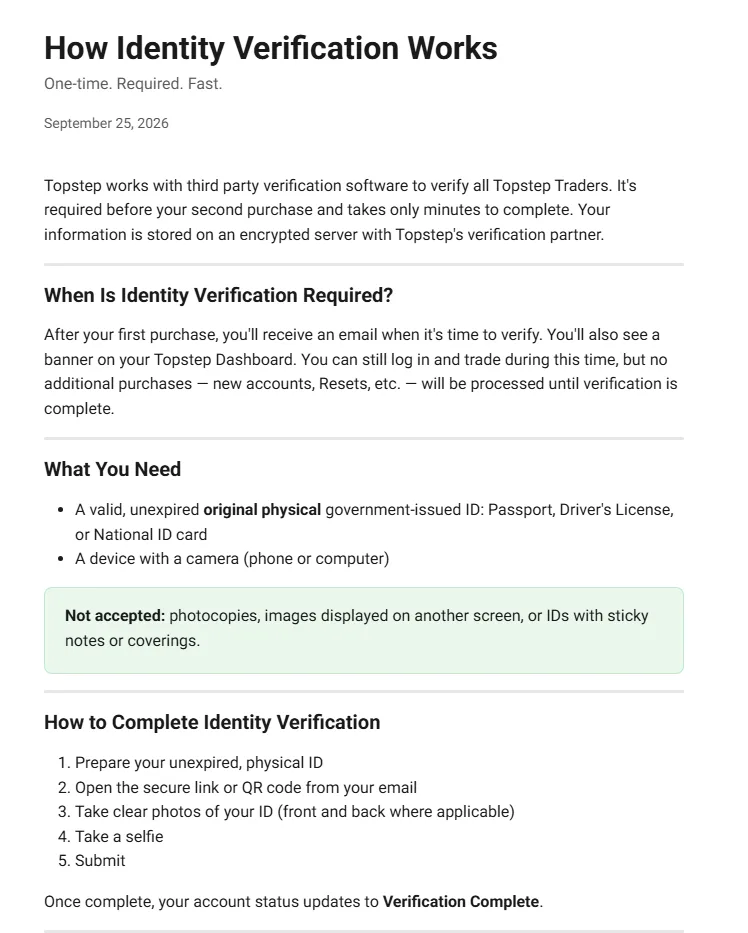
- Identity verification (IDV) is required before your second purchase. It uses a photo of an original government-issued ID and a selfie; copies and IDs shown on a screen are not accepted.
Which countries can trade with Topstep?
Whether you can sign up with Topstep is judged on both your citizenship and your permanent residency, not just the country you live in. US citizenship is not required, and you must be 18 or older. OFAC sanctions and partner restrictions are also used in the decision.
The official help center has a list of countries where neither trading nor payouts are allowed (34 entries) and a list of countries where you can use the XFA but cannot move to the Live Funded Account (25 countries and regions), as of 2026-11-04. The lists are said to change at any time, so check whether your country is on either list on the official page right before you apply.
| What to check | Official condition | What it means for you |
|---|---|---|
| Basis for eligibility | Both citizenship and permanent residency | Check both your citizenship and your country of residence against the 2 lists (as of 2026-11-04) |
| Age | 18 or older | You cannot sign up if you are under 18 |
| Number of profiles | 1 per person | Creating a second one, for example with another email address, violates the terms |
| Citizen of an ineligible country with permanent residency elsewhere | Reviewed with a government-issued photo ID showing permanent residency and a bank statement from your country of residence | More documents than standard identity verification |
| Citizen of an eligible country living in an ineligible country | Cannot trade | Trading during short stays is also subject to review |
| How you connect | VPN, proxy and TOR are prohibited | Connect directly, for example from your home internet connection |
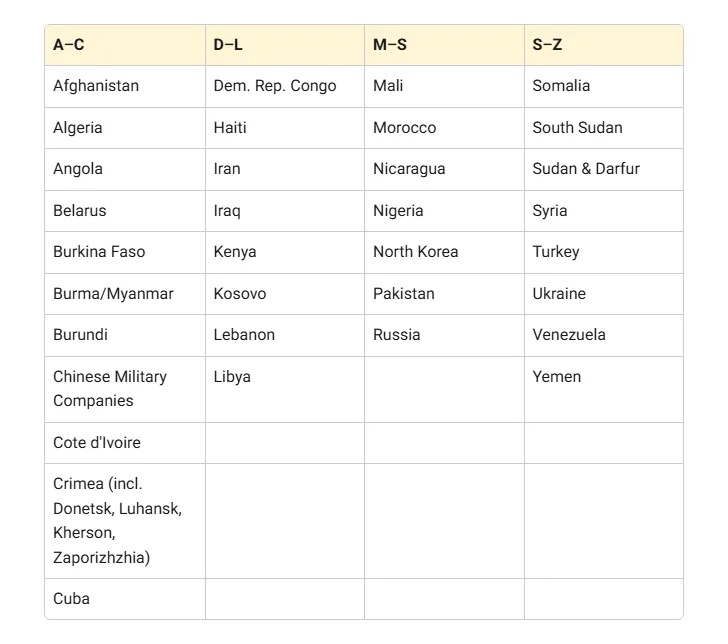
If you live in a country other than your country of citizenship, first check whether your citizenship appears on either list. Even with a listed citizenship, you may be reviewed using documents that show permanent residency in your country of residence.
If you meet the conditions, the next step is creating an account and buying a Trading Combine.
Sources for this section (3)
Source: Official help: Eligible countries / Official help: Combine rules / Official help: Prohibited conduct
How do you sign up for Topstep? Steps from registration to your first trade
Opening a Topstep account follows this order: create an account, buy the Trading Combine evaluation account and log in to the TopstepX trading platform. The full flow is below.
- Create a Topstep account (profile)
- Choose the Trading Combine size and path, decide whether to add a DLL, and buy it
- Pay with a card or other method in your own name
- Complete the CME non-professional declaration to enable market data
- Log in to TopstepX and start trading
Creating an account
Each person may have only 1 Topstep profile. Creating multiple profiles violates the terms and can lead to account closure. The fields and screen order on the sign-up page are not in the official help center we checked, so they are Under review.
Buying a Trading Combine
The Trading Combine comes in 3 sizes, 50K, 100K and 150K, as a monthly subscription that renews automatically every 30 days. There is no deadline to pass, and it keeps renewing until you pass or cancel. At purchase, you choose 1 of 2 paths: Standard or No Activation Fee. The path cannot be changed after purchase.
At purchase, you also decide whether to add a Daily Loss Limit (DLL). A DLL added at purchase cannot be changed later and carries over to the XFA after you pass. Hitting the DLL is not a rule violation; trading simply stops for the day. How to decide is covered under choosing your first plan below.
Payment methods
Topstep accepts Visa, Mastercard, American Express, Discover, Google Wallet and Apple Pay. PayPal is not accepted. Cards must be in your own name, and prepaid or gift cards may not work. Listed prices are before tax, and local taxes may be added at purchase.
CME non-professional declaration and data
To use market data in a simulated account, the CME non-professional declaration is required. Level 1 data (4 exchanges) is free. Level 2 (DOM) order book data costs $38 per month, billed on the 28th of each month, with no proration or refunds. You can start with Level 1 only and add Level 2 when you need it.
Logging in to TopstepX and first setup
You trade on Topstep's own TopstepX. It runs in the browser and includes TradingView charts. There is no mobile app, but it works in a mobile browser. Under exchange rules, you can have only 1 logged-in session across all devices, so you cannot have it open on a computer and a phone at the same time.
TopstepX round-turn commissions are $1.00 for minis and $0.50 for micros, plus NFA and exchange fees. For example, ES is $3.78 and MES is $1.22. The TopstepX login page URL and the layout of the dashboard you use after passing are Under review within what we checked. Quantower can also be used through TopstepX, but only for the Trading Combine and XFA.
See how TopstepX works and the supported tools
Sources for this section (8)
Source: Official help: Combine rules / Official help: Subscriptions / Official help: Pricing / Official help: XFA / Official help: Market data / Official help: TopstepX / Official help: Commissions / Official help: Quantower
Which Topstep account should you choose first? Size and path
For your first Topstep account, you decide 2 things: account size and path. Larger sizes have a larger profit target and Maximum Loss Limit (MLL), and a higher monthly price.
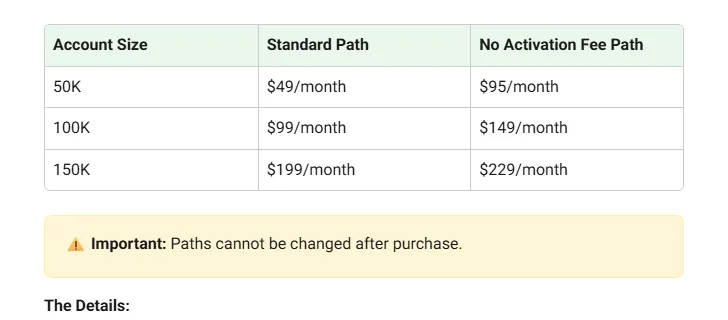
| Item | 50K | 100K | 150K |
|---|---|---|---|
| Monthly Standard | $49 | $99 | $199 |
| Monthly No Activation Fee | $95 | $149 | $229 |
| Activation fee after passing, Standard | $149 | $149 | $149 |
| Activation fee after passing, No Activation Fee | Free | Free | Free |
| Profit target | $3,000 | $6,000 | $9,000 |
| Maximum Loss Limit (MLL) | $2,000 | $3,000 | $4,500 |
| Maximum position mini / micro | 5 / 50 | 10 / 100 | 15 / 150 |
| DLL amount if added | $1,000 | $2,000 | $3,000 |
 1
Standard vs No Activation Fee
Standard has a lower monthly price but charges a $149 activation fee each time you pass. No Activation Fee costs more per month but has no fee when you pass. If you pass 50K in 1 month, Standard costs $49 plus the $149 activation fee for a total of $198, while No Activation Fee costs $95. The more months it takes to pass, the more the monthly difference adds up.
The month in which the totals flip depends on how many months and resets it takes to pass. Our pricing article compares the totals month by month.
Compare Topstep pricing and plan totals
Should you add a DLL?
Adding a DLL at purchase lowers the No Activation Fee monthly price by $10 on 50K, $20 on 100K and $30 on 150K, every month. In addition, since 2026-06-02, for a limited time with no announced end date, accounts that added a DLL at purchase get double the XFA per-payout cap. Adding it later at XFA activation does not qualify.
On the other hand, with a DLL, trading stops once the day's loss reaches the limit, and you cannot resume until the next session at 5:00 PM CT. You can only decide at purchase, so weigh it against your usual daily loss.
Sources for this section (7)
Source: Official help: Pricing / Official help: Subscriptions / Official help: Combine rules / Official help: Max drawdown / Official help: Consistency / Official help: XFA / Official help: Payouts
How does Topstep identity verification (IDV) work?
Topstep identity verification is required before your second purchase. You can buy your first Trading Combine before verifying, but you must complete it before moving on to a second purchase. Verification uses third-party software.
| Item | Official condition |
|---|---|
| When it is required | Before your second purchase |
| Accepted ID | An original, valid government-issued ID (passport, driver's license, national ID card) |
| What you capture | A photo of the ID and a selfie |
| Not accepted | Copies of an ID, or an ID shown on a screen |
| Re-verification | May be requested at any time |
| Citizen of an ineligible country with permanent residency elsewhere | Reviewed with a government-issued photo ID showing permanent residency and a bank statement from your country of residence |
 1
The help center does not say which local documents count as a national ID card, so this is Under review. Having an original passport or driver's license ready avoids any doubt about the document type.
Identity verification is not necessarily a one-time step. Topstep states that it can request re-verification at any time. Disguising your connection with a VPN or proxy is prohibited conduct.
Once verified, you can move on to your second and later purchases.
Sources for this section (3)
Source: Official help: ID verification / Official help: Prohibited conduct / Official help: Eligible countries
How do you use the Topstep practice account?
While you hold an active Trading Combine, Topstep gives you a free 150K practice account (up to 15 lots). Practice account resets are also free. It is separate from the evaluation account, so you can use it to try TopstepX and practice order entry.
Even if you hit the MLL and lose Combine eligibility, the subscription continues and you can keep practice trading in that account. At renewal you receive 1 Reset Credit. Reset Credits issued on or after 2025-12-11 expire 1 year after issue.
When practicing, trading the same hours as the real evaluation helps you get a feel for it. The Topstep trading day starts at 5:00 PM CT, and on weekdays all positions must be closed by 3:10 PM CT. Holding overnight or over the weekend is not allowed.
See Topstep trading hours and rules in detail
Sources for this section (3)
Source: Official help: Article / Official help: Resets / Official help: Hours and products
What do you do after passing the Topstep Combine?
You can pass the Topstep Trading Combine in as little as 2 days; passing in 1 day is not possible. When you pass, the subscription for that Combine is canceled automatically, with no refund or proration for the current month. Profit from the Combine does not carry over to the XFA.
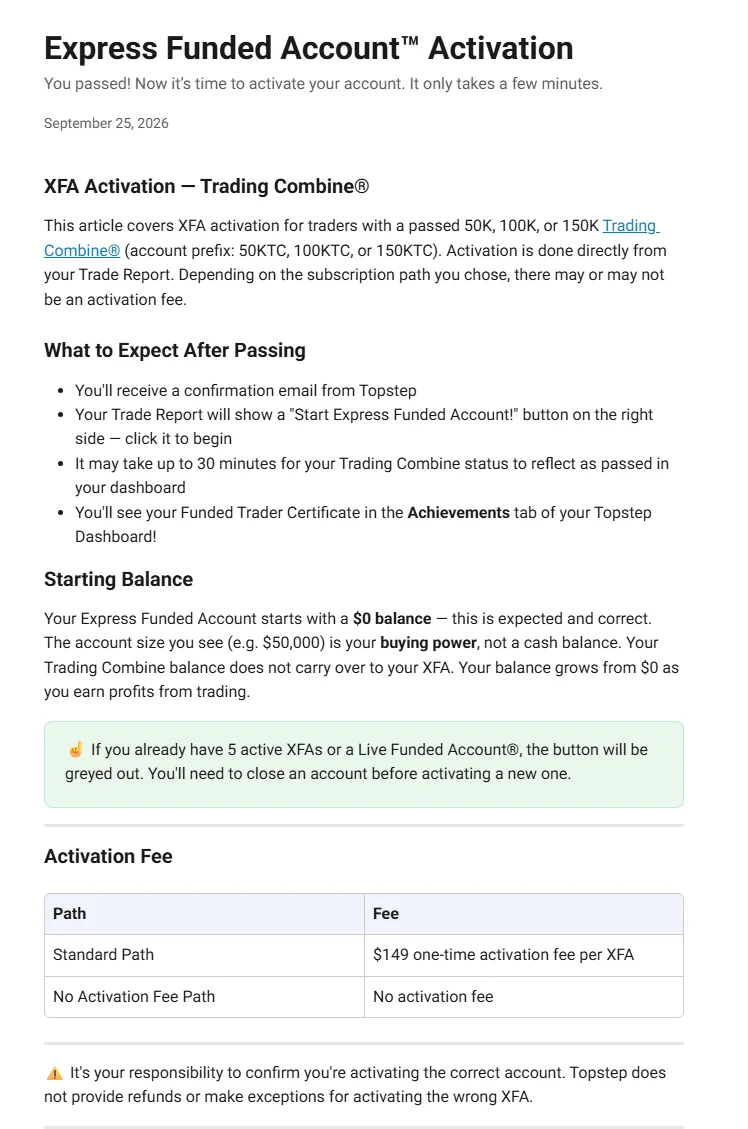
- Activate the XFA (Express Funded Account) from the dashboard
- On the Standard path, pay the $149 activation fee. The No Activation Fee path is free
- The XFA is ready within minutes. If you pass on a Friday, it is available from Sunday 5:00 PM CT
- Trade the XFA and request a payout from the dashboard once you meet the conditions
 1
You can hold up to 5 XFAs at once. If you already hold 5, or hold a Live Funded Account, you cannot activate a new XFA. An XFA with no trading for more than 30 days may be closed, and it cannot be put on hold.
You choose between 2 payout conditions, and timing and fees vary by payout method. International Wire/SWIFT costs $30 and takes 5 to 10 business days. The payout steps are covered in detail in a separate article.
See the Topstep payout rules and methods
Sources for this section (5)
Source: Official help: Combine rules / Official help: Subscriptions / Official help: XFA activation / Official help: XFA / Official help: Payouts
How do you contact Topstep support?
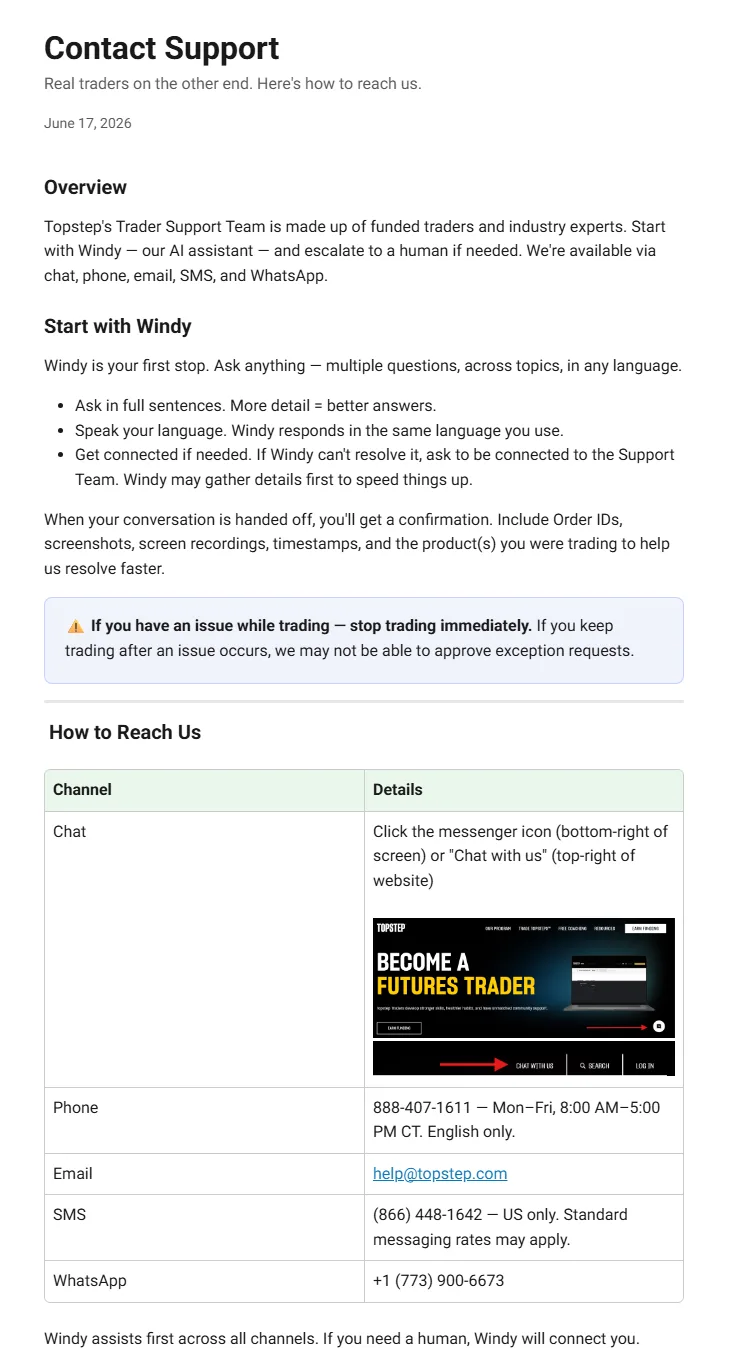
Topstep support starts with the AI assistant Windy, which hands off to a human agent when needed. Windy is said to reply in the language you type in. A dedicated support desk for languages other than English is not stated officially and is Under review.
| Channel | Contact and hours | Notes |
|---|---|---|
| Chat | AI assistant Windy, handing off to a human agent | Replies in the language you type in (extent of non-English support Under review) |
| help@topstep.com | Available | |
| Phone | 888-407-1611, Monday to Friday 8:00 AM to 5:00 PM CT, English only | English only |
| +1 (773) 900-6673 | Available | |
| SMS | (866) 448-1642 | US only |
The help center says Spanish text conversations are handled with automatic translation. For detailed questions about terms or pricing, sending them in English by email or chat lets you review the answers later.
Source: Official help: Support
Common pitfalls when starting with Topstep
The confusing parts of starting with Topstep are the choices you cannot change after purchase and how the subscription works. Checking the following before you apply helps avoid unnecessary costs.
- The path (Standard or No Activation Fee) cannot be changed after purchase
- A DLL added at purchase cannot be changed and carries over to the XFA
- The subscription cannot be paused, and cancellation cannot be undone or restarted
- 1 profile per person. Creating a second one violates the terms
- Connecting through a VPN, proxy or TOR is prohibited
- TopstepX allows only 1 logged-in session across all devices
- An XFA with no trading for more than 30 days may be closed
Know the refund exceptions
Topstep generally does not give refunds. One exception is the 14-day satisfaction guarantee: within 14 calendar days of your first Combine purchase, if you have not passed yet, up to 1 monthly fee is refunded. It applies only once. A forgotten-cancellation renewal or buying the wrong size can also be reviewed, on conditions such as not having traded. Resets, activation fees, Back2Funded and Level 2 data are not refundable.
See the Topstep refund and cancellation conditions
Once you have checked the conditions, choose your first Combine and apply.
Sources for this section (9)
Source: Official help: Pricing / Official help: XFA / Official help: Subscriptions / Official help: Combine rules / Official help: Prohibited conduct / Official help: TopstepX / Official help: XFA 2 / Official help: Refunds / Official terms of use
Topstep FAQ
Which countries can trade with Topstep?
As of 2026-11-04, Topstep publishes a list of countries where trading is not allowed and a list of countries that cannot move to Live. Eligibility is judged on both citizenship and permanent residency, and you must be 18 or older. The lists change at any time, so check the official lists before you apply.
When is Topstep identity verification required?
Before your second purchase. It uses a photo of an original, valid government-issued ID (passport, driver's license, national ID card) and a selfie; copies and IDs shown on a screen are not accepted.
Can I pay Topstep with PayPal?
Does Topstep offer support in languages other than English?
A dedicated desk for other languages is not stated officially and is Under review. The AI assistant Windy is said to reply in the language you type in. Phone support is English only.
Where do I find the Topstep login and dashboard?
Can I practice trading at Topstep?
While you hold an active Trading Combine, you can use a free 150K practice account (up to 15 lots). Practice account resets are also free.
Which Topstep account should I choose first?
There are 3 account sizes, 50K, 100K and 150K, with monthly prices from $49 for 50K Standard. Standard charges a $149 activation fee when you pass, while No Activation Fee costs more per month but has no activation fee. The path cannot be changed after purchase, so choose based on how many months you expect to need to pass.