

What Is TopstepX? The Topstep Trading Platform and Supported Tools
- As of 2026-11-04, Topstep trading runs mainly on its own TopstepX (browser-based, with TradingView charts), and Quantower can be used only in the evaluation and the simulated funded account (XFA).
- NinjaTrader, Tradovate and Rithmic support is not listed in the official help center as of 2026-11-04, so it is Under review.
- Automated trading is allowed with conditions. The TopstepX API costs $29 per month and is for the Sim environment only; it cannot be used in Live, and orders through a VPS or VPN are prohibited.
Which platforms can you use with Topstep?
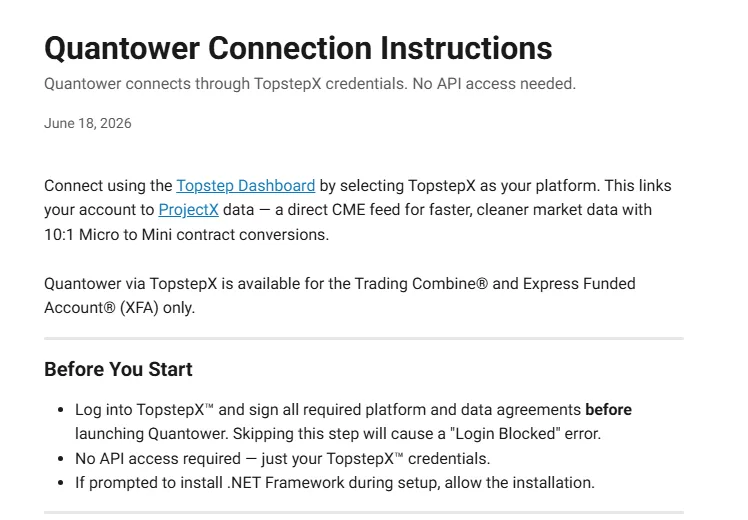
The platform you trade on at Topstep is TopstepX, developed by group company ProjectX Trading LLC. The other tool with connection instructions in the official help center is Quantower, which connects through TopstepX and can be used only in the evaluation (Trading Combine) and the simulated funded account (XFA).
NinjaTrader and Tradovate, often mentioned with futures prop firms, are not listed as supported in the Topstep help center as of 2026-11-04. Whether they can be used is Under review, and this article does not assume they can.
| Tool | Type | Stages | Official listing |
|---|---|---|---|
| TopstepX | Browser (built in-house) | Combine, XFA. Live Under review | Yes (TopstepX help article) |
| Quantower | Connects through TopstepX | Combine and XFA only | Yes (connection instructions article) |
| NinjaTrader | Under review | Under review | Not listed in the help center |
| Tradovate | Under review | Under review | Not listed in the help center |
| Rithmic | Under review | Under review | Not listed in the help center |
For the platform used in Live (real-capital account), the help center only says platform licenses are at your own cost; we could not confirm a tool name. We treat the Live platform as Under review.
Below, we cover what TopstepX is, the times and settings to know before you start, the Quantower conditions, the automation and copy trading rules, and data and commission fees.
Sources for this section (4)
Source: Official help: TopstepX / Official help: Quantower / Official help: Live funded / Official site: About
What is TopstepX? Topstep's own browser-based trading platform
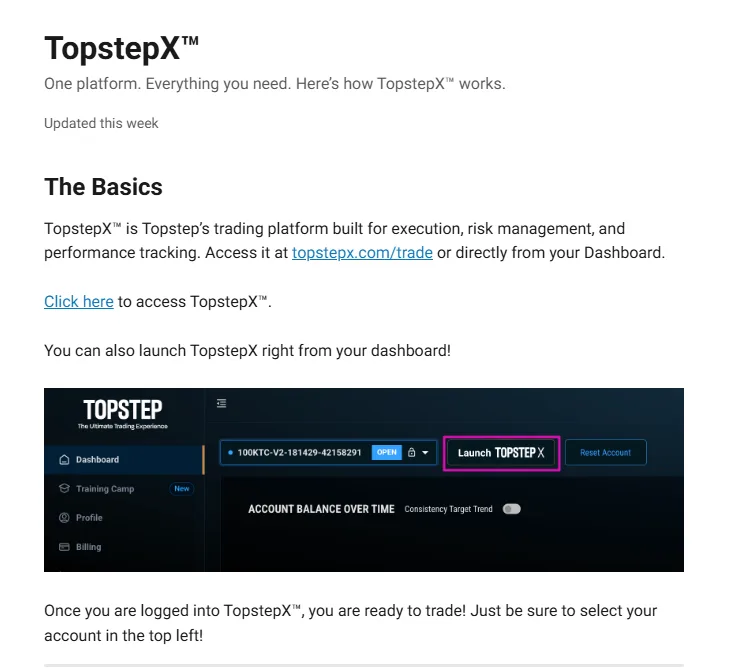
TopstepX is a trading platform developed by ProjectX Trading LLC, a Topstep group company. According to the official company history, it launched in 2024. The Topstep terms of use also name ProjectX Trading LLC as the developer of TopstepX.
You open and use it in a browser. Placing orders, checking positions and closing trades in the Topstep evaluation are basically all done on this screen.
 1
Can you use TradingView charts in TopstepX?
TopstepX has TradingView charts built in. The official help center says it includes TradingView charts, but does not say whether you can place orders on your Topstep account directly from the TradingView site or app. Whether a paid TradingView plan is needed is not stated either and is Under review.
Can you trade Topstep on your phone?
There is no TopstepX mobile app. Instead, the official help center says you can open TopstepX in a phone or tablet browser.
Only 1 login at a time
Under exchange rules, TopstepX allows only 1 session at a time across all devices. You cannot trade with it open on a computer and a phone simultaneously. When switching to your phone on the go, check your positions and orders before you switch.
With the basics of TopstepX covered, next are the times and settings to know before you start.
Sources for this section (3)
Source: Official help: TopstepX / Official site: About / Official terms of use
How to use TopstepX: times and settings to know before trading
Regardless of the TopstepX screen, Topstep accounts close for trading at fixed times. Learning these times in your own time zone before you start helps avoid confusion.
| Topstep time (US Central Time) | Applies to | Positions | What happens |
|---|---|---|---|
| Sunday 5:00 PM CT | Start of the week | New positions allowed | Trading week opens |
| Weekdays 3:08 PM CT | Every trading day | Closed by risk management | Risk management starts closing positions |
| Weekdays 3:10 PM CT | Every trading day | Must be flat | All positions must be closed by this time |
| Weekdays 4:00 PM CT | Every trading day | Flat | XFA winning day becomes final |
| Weekdays 5:00 PM CT | Every trading day | New positions allowed | Next trading day begins |
You cannot hold positions overnight; Topstep accounts are for day trading only. Positions remaining after 3:10 PM CT are not expected. CBOT grains and livestock (HE, LE) have separate trading hours, so check them individually if you trade them.
Complete the non-professional data declaration
To receive market data in a Topstep simulated account, the CME non-professional declaration is required. Complete it before you start trading on TopstepX.
Decide your own daily loss limit
In the Combine and XFA, the Daily Loss Limit (DLL) is optional. A DLL added at purchase cannot be changed later and carries over to the XFA. Hitting the DLL is not a rule violation: trading stops for the day, and you can resume at the next session (5:00 PM CT). Separately, you can also set a fixed or trailing Personal DLL manually.
Until your XFA is ready after passing
After passing the Combine, activate the XFA from the dashboard. Activation takes a few minutes, but if you pass on a Friday, you can trade from Sunday 5:00 PM CT.
See Topstep trading hours and prohibited activities in detail
Once the platform and times are set, here are the Quantower conditions for anyone who wants a tool other than TopstepX.
Sources for this section (5)
Source: Official help: Hours and products / Official help: Market data / Official help: XFA / Official help: XFA activation / Official help: Payouts
Can you use Quantower with Topstep?
The official Topstep help center has a Quantower connection instructions article, and Quantower connects through TopstepX. Quantower can be used only in the Trading Combine evaluation and the simulated XFA.
- Connects through TopstepX
- Available only in the Combine and XFA
- Quantower cannot be used in Live (real-capital account)
- Check the screen-by-screen steps in the official connection instructions article
Quantower stops being available when you move to Live, so traders who got used to Quantower during the evaluation will have a different setup after promotion. Live costs include platform licenses at your own cost, but the name of the Live platform could not be confirmed in the help center and is Under review.
Live is by invitation from the Topstep risk team, and not everyone moves there. During the Combine and XFA, you can trade on either TopstepX or Quantower.
If you want to use other external tools, especially NinjaTrader or Tradovate, see what is currently known in the next section.
Sources for this section (3)
Source: Official help: Quantower / Official help: Live funded / Official help: Live funded 2
Can you use NinjaTrader or Tradovate with Topstep? (Under review)
Whether NinjaTrader, Tradovate and Rithmic can be used with Topstep is Under review as of 2026-11-04. In the official Topstep help center, TopstepX and Quantower have articles, but we found no article saying these 3 are supported.
No listing is not the same as an official statement that they cannot be used. But since nothing says they can, this article does not present them as supported.
How to treat information found in search results
If you come across guides combining NinjaTrader or Tradovate with Topstep, their assumptions may depend on when they were written. Check the article date and compare it with the official TopstepX help center article before deciding.
- Check the publication and update dates
- Check whether the official Topstep help center says the same
- If unsure, contact Topstep support (chat, or email help@topstep.com) and name the tool you want to use
Topstep lists trading with external or delayed data feeds as prohibited conduct. Connecting to your account by a route not described officially could breach this rule.
If you were planning automated trading with NinjaTrader, check the Topstep automation and API conditions in the next section first.
Sources for this section (4)
Source: Official help: TopstepX / Official help: Quantower / Official help: Prohibited conduct / Official help: Support
Is automated trading allowed at Topstep? TopstepX API conditions
Topstep allows automated trading with conditions. However, there is no setup help, and there is no relief if a program malfunctions and causes losses. The TopstepX API, provided by ProjectX, is the connection point for automated trading.
| Item | TopstepX API |
|---|---|
| Provider | ProjectX (developer of TopstepX) |
| Monthly | $29 |
| Environment | Sim environment (Combine, XFA) |
| Live (real-capital account) | Not available (the API is Sim only) |
| Orders through a VPS, VPN or remote server | Prohibited |
| Setup help, relief for malfunctions | None |
Automated setups likely to count as prohibited strategies
Topstep's prohibited strategies include unfair techniques using software, AI, ultra-fast systems or large data inputs. Hundreds of rapid trades, orders targeting abnormal fills on gaps and extremely tight bracket orders are also named as exploiting simulated fills.
- Logic that sends hundreds of orders in a short time may be treated as exploiting simulated fills
- A design that enters major economic releases at maximum position size is a prohibited strategy
- Running it on a server outside your home (VPS) alone breaches the order-routing prohibition
- Connecting through a VPN or proxy is also listed as prohibited conduct
If a violation is found, actions include a warning, removal of trading days, a reset, permanent account closure, or a delayed or denied payout. The more you rely on automation, the more important it is to check your logic's order frequency and where it runs.
See the full list of Topstep prohibited activities
If you want to send the same trades to several accounts, look at the copy trading feature in TopstepX before automation.
Sources for this section (5)
Source: Official help: Combine rules / Official help: TopstepX / Official help: Prohibited conduct / Official help: Prohibited conduct 2 / Official help: Live funded
What are the TopstepX copy trading (Trade Copier) rules?
TopstepX includes a Trade Copier feature that copies the same trades across your own accounts. Topstep allows copying only between your own accounts; copying other people's trades is not included.
- Only between your own accounts
- Across multiple XFAs, up to $750K in combined buying power
- You can hold up to 5 XFAs at once (5 accounts of 150K = $750K)
- While a payout is processing, the copy connection for that account is disconnected automatically
- Disconnected links do not come back automatically, so reconnect them manually
Until you reconnect, trades are not copied to that account. Setting a routine to check the Trade Copier connection after each payout keeps you safe. Payouts from multiple XFAs are handled separately for each account.
Copying is not the same as hedging
Topstep prohibits hedging between your own accounts (buying in one and selling in another in the same or highly correlated products). MES and ES, and MNQ and NQ, are given as examples. Copying trades in the same direction and holding opposite positions are treated completely differently, so set it up carefully. Trading on behalf of others or coordinated trading with others is also prohibited conduct.
See the Topstep payout rules and methods
Once your tools are decided, the last thing to check is the monthly data fees and per-trade commissions on TopstepX.
Sources for this section (5)
Source: Official help: TopstepX / Official help: XFA / Official help: Payouts / Official help: Prohibited conduct / Official help: Hedging
How much are TopstepX data fees and commissions?
In Topstep simulated accounts, Level 1 market data (4 exchanges) is free. If you want market depth (DOM), Level 2 costs $38 per month, billed on the 28th of each month, with no proration or refunds.
TopstepX round-turn fees are the commission (mini $1.00 / micro $0.50) plus the NFA fee of $0.02 and exchange fees. Round-turn examples for major products are below.
| Product | TopstepX round-turn fees (Sim) | Live round-turn fee examples |
|---|---|---|
| ES | $3.78 | $3.80 |
| MES | $1.22 | Not in the official examples |
| NQ | $3.78 | $3.80 |
| CL | $4.02 | $1.54 |
| GC | $4.32 | $4.24 |
| NKD | $5.32 | Not in the official examples |
From 2026-10-01, exchange fees for MCL and MNG rose by $0.10 per side. If you trade a lot of Micro Crude Oil, calculate with the revised amount.
Costs that rise in Live
In Live, CME professional data costs $133 per exchange per month. Topstep covers 1 exchange, so if you use all 4 exchanges, you pay $399 per month yourself. Platform licenses are also at your own cost.
See Topstep monthly fees, activation fee and reset costs
With costs covered, finally check the items Under review and recent changes to make sure you are not relying on outdated information.
Sources for this section (4)
Source: Official help: Market data / Official help: Commissions / Official help: Live funded / Official help: Pricing
TopstepX items Under review and recent changes
These are the items about Topstep trading tools that we could not confirm in the official help center as of 2026-11-04. We will update this article once they are confirmed.
- Support for NinjaTrader, Tradovate and Rithmic (not listed in the help center)
- The name of the trading platform used in Live (real-capital account)
- Whether the TopstepX interface is available in languages other than English
- Whether a TradingView account or paid plan is needed
- TopstepX outage history and compensation for outages (no official primary information)
For TopstepX connection outages, we found no official outage history or compensation criteria, and Prop Up has no verified records, so this article does not rate them.
Recent changes related to trading tools
- 2024: TopstepX launched (official company history)
- 2026-07-01: The monthly Live competition Topstep Octagon began, replacing the former Live Performance Bonus
- 2026-10-01: Exchange fees for MCL and MNG revised (up $0.10 per side)
The steps to start a Topstep evaluation, from sign-up to identity verification, are covered in a separate article.
See how to start with Topstep and the identity verification steps
Sources for this section (5)
Source: Official help: TopstepX / Official site: About / Official help: Commissions / Official help: Article / Official help: TopstepX 2
Topstep FAQ
What is TopstepX?
Can I use NinjaTrader or Tradovate with Topstep?
Can I trade Topstep on my phone?
There is no TopstepX mobile app, but you can open TopstepX in your phone's browser. Only 1 session can be active across all devices.
Is automated trading allowed at Topstep?
Is copy trading allowed at Topstep?
Can I use Quantower in Topstep Live?
No. Quantower connects through TopstepX and can be used only in the Trading Combine and XFA.
How much are TopstepX data fees?
In simulated accounts, Level 1 (4 exchanges) is free, and Level 2 (DOM) costs $38 per month. It is billed on the 28th of each month, with no proration or refunds. A CME non-professional declaration is required.