

Tradeify Rules (Drawdown, Consistency Rule, 10-Second Rule and Hedging Ban)
- Touching the max drawdown is the only numeric rule that fails a Tradeify account on the spot (checked 2026-11-04), and it is checked in real time including open losses. The DLL, consistency rule and 10-second rule only pause trading or payouts; prohibited conduct such as hedging is handled separately.
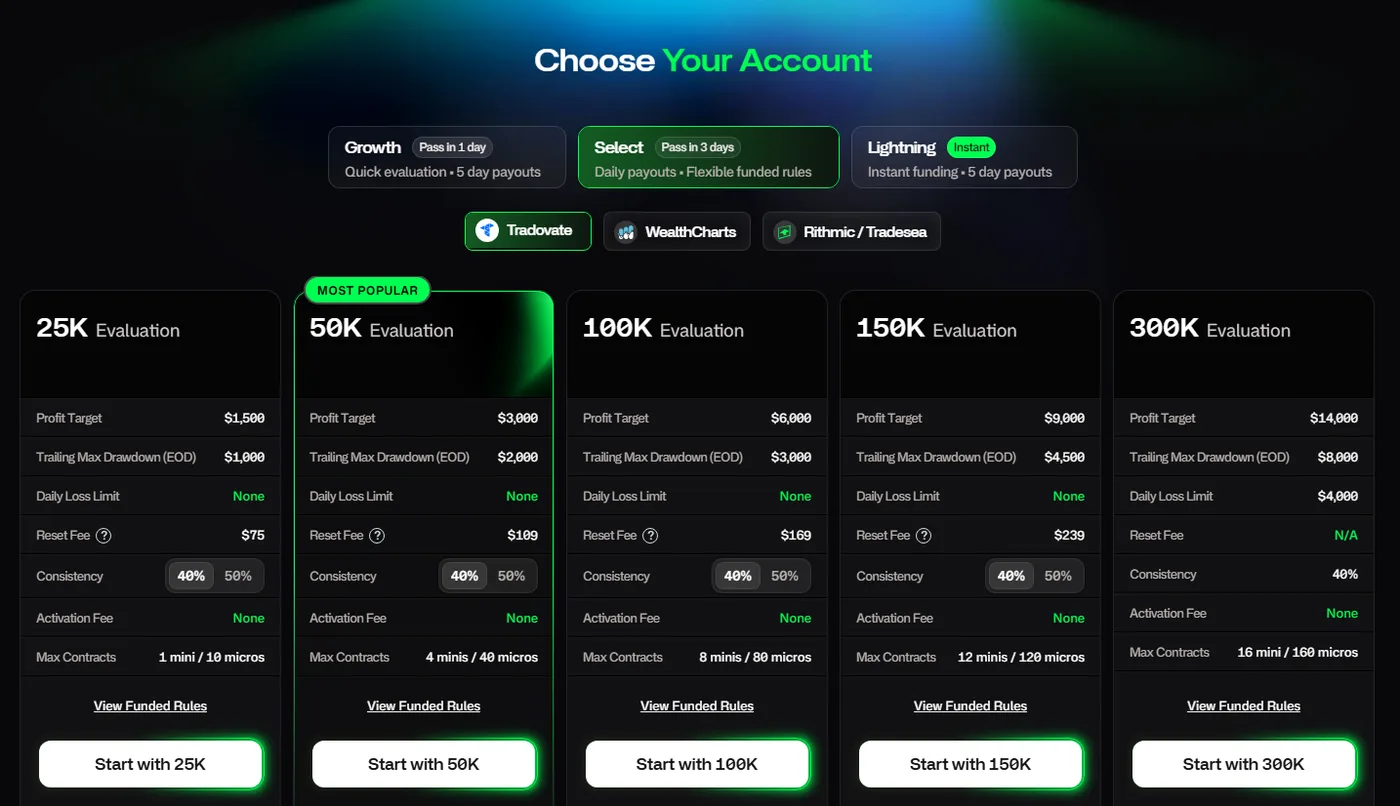
- The consistency rule applies at opposite stages depending on the plan: Growth applies 35% on Sim Funded, Select applies 40% in the evaluation, and Lightning applies 20%, 25% and 30% on Sim Funded.
- All positions must be closed by 4:45 PM ET every day. Hedging is banned not only in the same product but also across correlated products, such as long ES and short NQ, and between your own accounts.
Which Tradeify rules fail your account, and which do not?
Tradeify has many rules, but sorting them by how serious a breach is makes them easier to follow. The only numeric rule that fails an account on the spot is reaching the max drawdown (prohibited conduct such as hedging is separate). Most others only stop trading for the day or block payout requests.
| Rule | Applies to | If breached |
|---|---|---|
| Max drawdown (EOD Trailing) | All accounts | Immediate failure (hard breach) |
| Daily loss limit (DLL) | Growth (evaluation and Sim Funded), Lightning, Select Daily Sim Funded | Trading stops for the day only (soft breach) |
| Consistency rule | Growth Sim Funded, Select evaluation, Lightning | Cannot pass or request a payout yet; more trading days can fix it |
| 10-second rule | Sim Funded only | Cannot request a payout yet |
| Flat by 4:45 PM ET | All accounts | Positions are closed automatically; no failure |
| Hedging ban | All accounts | Automatic breach, profit forfeited, permanent ban for serious cases |
| 1 trade per week | Evaluation and Sim Funded | The account may be closed (you are contacted first) |
The general mechanics of drawdowns and consistency rules are common to futures prop firms. This article focuses on Tradeify numbers and rules.
Sources for this section (7)
Source: Official help: Article / Official help: Article 2 / Official help: Daily loss limit / Official help: Consistency / Official help: Article 3 / Official help: Article 4 / Official help: Hedging
How does the Tradeify max drawdown work? (EOD Trailing and lock)
The Tradeify max drawdown is EOD Trailing on every plan and account. It follows the highest end-of-day balance (high-water mark) upward and never moves down. It updates once a day, at the close.
Updated at the close, checked in real time
It only moves up at the close, but whether you have reached it is checked in real time. If your account value, including open profit and loss, touches that level even briefly, the account fails on the spot. A price recovery later in the day does not undo it.
| Size | Growth (evaluation) | Select (evaluation, Flex) | Select Daily | Lightning |
|---|---|---|---|---|
| 25K | $1,000 | $1,000 | $1,000 | $1,000 |
| 50K | $2,000 | $2,000 | $2,000 | $2,000 |
| 100K | $3,500 | $3,000 | $2,500 | $4,000 |
| 150K | $5,000 | $4,500 | $3,500 | $5,250 |
 1
Drawdown lock (Sim Funded only)
On Sim Funded accounts, the max drawdown stops at a certain point and locks at the starting balance plus $100 ($50,100 on 50K). It locks when the end-of-day balance exceeds the drawdown amount plus $100, or when you request a payout, whichever comes first. After that, it does not move.
| Size | Growth | Lightning | Select Flex | Select Daily |
|---|---|---|---|---|
| 25K | $26,100 | $26,100 | $26,100 | $26,100 |
| 50K | $52,100 | $52,100 | $52,100 | $52,100 |
| 100K | $103,600 | $104,100 | $103,100 | $102,600 |
| 150K | $155,100 | $155,350 | $154,600 | $153,600 |
For 100K and 150K, the balance that triggers the lock differs by plan. For example, a 100K Lightning account must grow to $104,100, while Select Daily locks at $102,600.
No lock during the evaluation
On evaluation accounts (Growth and Select), the drawdown does not lock. It keeps trailing the highest balance until the end of the evaluation.
Requesting a payout also triggers the lock. Requesting while your balance is still small narrows your room for losses.
See how Tradeify payouts and the drawdown lock interact
Sources for this section (5)
Source: Official help: Article / Official help: Article 2 / Official help: Article 3 / Official help: Payouts / Official help: Article 4
What is the Tradeify daily loss limit (DLL)?
The Tradeify daily loss limit (DLL) stops trading for the day when you reach it. It is called a soft breach: the account is not failed, and you can resume trading from the next session.
Which accounts have a DLL, and the starting amounts
A DLL applies to Growth (evaluation and Sim Funded), Lightning and Select Daily Sim Funded accounts. The Select evaluation and Select Flex have no DLL (only Select 300K is described as having a $4,000 DLL in the evaluation). Lightning 25K also has no DLL.
| Size | Growth (start) | Growth (after 6%) | Lightning (start) | Lightning (after 6%) | Select Daily |
|---|---|---|---|---|---|
| 25K | $600 | $1,000 | None | None | $500 |
| 50K | $1,250 | $2,000 | $1,250 | $2,000 | $1,000 |
| 100K | $2,500 | $3,500 | $2,500 | $4,000 | $1,250 |
| 150K | $3,750 | $5,000 | $3,000 | $5,250 | $1,750 |
At 6% profit, the DLL widens to the drawdown amount
On Growth and Lightning, once the account reaches 6% profit, the DLL widens to the same amount as the max drawdown from the next session. The balances are $26,500 for 25K, $53,000 for 50K, $106,000 for 100K and $159,000 for 150K. For accounts bought before 2025-09-12, the DLL is removed entirely at 6%.
Reset time, and why not to use it as a stop
The DLL resets at 6:00 PM ET, the start of each session. Tradeify warns against using the DLL as a substitute for a stop loss, because fast markets can push losses beyond the DLL.
Sources for this section (4)
Source: Official help: Daily loss limit / Official help: Article / Official help: Article 2 / Official help: Article 3
How does the Tradeify consistency rule work? (evaluation or payout stage, by plan)
The Tradeify consistency rule checks what percentage of total profit for the period came from your best day. The point to watch at Tradeify is that the stage where it applies is reversed between plans.
| Plan | Evaluation | Sim Funded (each payout) |
|---|---|---|
| Growth | None | 35% |
| Select | 40% (50% add-on available) | None |
| Lightning | No evaluation | 20% for the 1st, 25% for the 2nd, 30% from the 3rd |
How it is calculated
The formula is best-day profit divided by total profit. Exactly at the limit (for example 20.00%) passes; only above it fails. Commissions are not included in the profit calculation. The calculation resets once a payout is approved.
Say you win $1,500 in one day on a Select 50K evaluation. To stay at 40% or less, total profit must be $3,750 or more, so even after reaching the $3,000 profit target you do not pass until you add another $750. On the 1st Lightning 50K payout with $3,000 of profit, your best day must be $600 or less.
Going over does not fail the account
Exceeding the consistency rule does not fail the account. Trade more days to raise total profit and lower the ratio, and you can pass or request a payout. Lightning accounts bought before 2025-09-12 use 20% for every payout.
Sources for this section (5)
Source: Official help: Consistency / Official help: Article / Official help: Article 2 / Official help: Payouts / Official help: Payouts 2
What is the Tradeify 10-second rule, and can you trade the news?
The Tradeify 10-second rule is a condition for requesting payouts from Sim Funded accounts. Evaluation accounts are exempt. Not meeting it does not fail the account, but you cannot take a payout.
- More than 50% of trades must be held longer than 10 seconds
- More than 50% of profit must come from trades held longer than 10 seconds
Both are required. Even if most of your trades by count are held over 10 seconds, you cannot request if most of your profit comes from trades of 10 seconds or less. In the official text checked on 2026-11-04, the rule applies only to Sim Funded accounts.
Trading around news releases
Tradeify places no restriction on trading around economic news releases. You can trade on every account, at your own risk. On Sim Funded accounts, though, more short trades right after a release can lower your 10-second ratio.
See Tradeify payout rules by plan
Sources for this section (3)
Source: Official help: Article / Official help: Article 2 / Official help: News events
What are the Tradeify contract limits and trading hours? (no overnight holds)
Tradeify max contracts are set in mini and micro. 10 micro equal 1 mini, and full-size and E-mini contracts count as 1 mini. You can hold mini and micro at the same time as long as the total stays within the limit. The mini-to-micro conversion is standard in futures, so only Tradeify limits are listed here.
| Size | Growth, Lightning and Select evaluation | Select Sim Funded at start |
|---|---|---|
| 25K | 1 mini / 10 micro | 1 / 10 |
| 50K | 4 mini / 40 micro | 2 / 20 |
| 100K | 8 mini / 80 micro | 3 / 30 |
| 150K | 12 mini / 120 micro | 3 / 30 |
Growth and Lightning can use the full contract limit from day 1, even on Sim Funded. Select Sim Funded accounts start smaller and scale with profit (on 50K, 3 / 30 at +$1,500 and 4 / 40 at +$2,000). Purchases before 2025-09-12 have 5 / 50 for 50K, 10 / 100 for 100K and 15 / 150 for 150K.
Trading hours and close-out deadline (ET)
Tradeify gives trading hours in US Eastern Time (ET). ET is UTC-5 in winter and UTC-4 during US daylight saving time.
| Item | Official time (ET) |
|---|---|
| Trading opens | Sunday to Thursday 6:00 PM |
| Close all positions by | Daily 4:45 PM |
| Close-out on shortened holiday sessions | 12:59 PM |
| Trading closes | Monday to Friday 5:00 PM |
| Maintenance | 5:00 to 6:00 PM |
Overnight and weekend holds are not allowed, including on Live accounts. Within 1 session (6:00 PM ET to 4:45 PM ET the next day), you can keep a position open. Positions still open at 4:45 PM ET are closed automatically, and the account is not failed.
A trading day runs from 6:00 PM ET to 5:00 PM ET the next day. On Rithmic, trades on shortened holiday sessions are recorded on the next regular close.
Sources for this section (7)
Source: Official help: Article / Official help: Article 2 / Official help: Hedging / Official help: Payouts / Official help: Article 3 / Official help: Article 4 / Official help: Article 5
Does Tradeify allow hedging?
Tradeify bans hedging. The ban is broad and goes beyond holding long and short in the same product at the same time.
- Long and short in the same product
- Correlated products in the same product group (long ES and short NQ, long MES and short NQ, and so on)
- Opposite positions across your own accounts
- Long a stock index and long volatility (FVS), treated as offsetting
3 conditions that trigger automatic detection
If an opposite position exists, lasts longer than 10 seconds, and the hedge produces more than $150 of profit, all at once, it is an automatic breach. Hedges across accounts or correlated products are reviewed separately by the risk team.
Penalties
A breach puts every related account in violation, and profit from the violation period is forfeited. Serious or repeated cases lead to a permanent ban. Setting copy trading to send opposite orders to different accounts is also a hedging violation.
Sources for this section (3)
Source: Official help: Hedging / Official help: Copy trading / Official help: Article
Can you use bots and copy trading at Tradeify? Other prohibited conduct
Tradeify allows automated trading (bots) under conditions: you must be the sole owner, not share it with other people or firms, not use high-frequency trading (HFT), and be able to prove ownership.
Tradeify may ask for a live video of you starting the code on your own computer. You cannot use the same bot at another firm. HFT is banned whether or not it is a bot.
Copy trading
Copy trading is allowed only between accounts you own and control, using tools such as Tradovate Group Trade or the WealthCharts Trade Copier. Copying to or from other people's accounts is banned, and every account must trade in the same direction. Setup is covered in the platforms article.
See Tradeify platforms and copy trading tools
Other prohibited conduct
- Team trading, trading on someone else's instructions, third-party account management or trading in sync with others
- Exploiting platform errors (price display errors, latency and so on)
- Using unnatural prices in illiquid contract months
- Sharing an account, letting someone else trade, or paying in another person's name (not allowed even with family consent)
- Multiple profiles or getting around restrictions
There is no specific rule on averaging down (DCA), reversing or adding to positions. DCA can be part of a strategy, but unlimited averaging into a losing position is discouraged.
1 trade per week (inactivity rule)
Evaluation and Sim Funded accounts each need at least 1 trade per week (Monday to Friday). Inactive accounts may be closed, and you are contacted first.
Sources for this section (8)
Source: Official help: Article / Official help: Article 2 / Official help: Copy trading / Official help: Article 3 / Official help: Hedging / Official help: Article 4 / Official site / Official help: Article 5
What can you trade at Tradeify? Rule change history
Tradeify supports futures on CME, COMEX, NYMEX and CBOT. EUREX is available only on accounts that chose Tradovate, with an extra subscription.
- Equity indexes: ES, NQ, YM, RTY, EMD, NKD and micros MES, MNQ, MYM, M2K
- Energy: CL, NG, QM, QG, MCL
- Metals: GC, SI, HG, PL, PA, QO, MGC (MGC is the only micro metal)
- Currencies: 6E, 6B, 6J, 6A, 6C, 6S, M6E, M6A
- Agriculture and livestock: ZC, ZW, ZS, ZL, ZM, HE, LE, GF
- EUREX (Tradovate only): FDAX, FDXM, FDXS, FESX, FSXE, FXXP, FVS, FGBL, FGBM, FGBS, FGBX
Crypto futures (including Bitcoin futures) and Micro Silver (SIL) cannot be traded. For Nikkei futures, NKD is on the supported list.
Rule change history
| Date | Change |
|---|---|
| 2025-09-12 8:00 AM ET | Lower max contracts (50K from 5 to 4 and so on), Lightning consistency from a fixed 20% to steps, DLL widened at 6% instead of removed |
| 2026-03-31 | Lightning 150K DLL from $3,750 to $3,000 (purchases before 3/31 keep the old value) |
| 2026-09-15 | Risk & Compliance Guidelines updated |
| Date not stated | Holding mini and micro at the same time allowed (if the total is within the limit) |
The rules in this article were checked in the Tradeify official help center on 2026-11-04. Some conditions change with purchase date, so before trading, check the official rules that match your account purchase date.
See Tradeify plan differences and prices
Sources for this section (7)
Source: Official help: Article / Official help: Article 2 / Official help: Daily loss limit / Official help: Article 3 / Official help: Consistency / Official help: Article 4 / Official help: Hedging
Tradeify FAQ
Is the Tradeify max drawdown trailing?
Yes. It is EOD Trailing on every account and rises with the highest end-of-day balance. It is checked in real time, and touching it even briefly, including open losses, fails the account. On Sim Funded accounts it stops at the starting balance plus $100.
Does hitting the Tradeify DLL fail the account?
No. The DLL is a soft breach that only stops trading for the day. You can resume from the next session at 6:00 PM ET.
Does the Tradeify 10-second rule apply to evaluations?
Can I hold positions overnight at Tradeify?
No. Every account, including Live, must be flat by 4:45 PM ET daily. Remaining positions are closed automatically, but the account is not failed.
Can I trade during news releases at Tradeify?
Is holding ES and NQ in opposite directions hedging at Tradeify?
Yes. Tradeify also bans opposite positions in correlated products in the same product group (such as long ES and short NQ) as hedging. It is a violation across your own accounts too.