

How to Start with My Funded Futures
- My Funded Futures publishes a restricted countries list of 90 countries and territories, and eligibility is judged by citizenship or residence (checked 2026-11-04). Check that the country you live in, and any country you hold citizenship of, is not on the official list before you apply. Not appearing on the list does not guarantee that you can use the service.
- The steps are: create an account and buy a plan, pass the evaluation, upgrade to Sim Funded, complete identity verification (KYC), and prepare for your first payout. KYC is required before you start trading in Sim Funded, and you need a photo of a physical photo ID, a live selfie, and proof of address dated within 3 months.
- Purchases from 2026-08-25 are one-time payments, and the activation fee is $0 on every plan. An account may be closed after 7 calendar days in a row with no trades. Refunds require a request within 14 days with no trading, but the refund amount differs between the terms and the help center and is under review.
How do you start with My Funded Futures? The 5 steps
Starting with My Funded Futures breaks down into 5 broad steps. You create an account and buy a plan, pass the evaluation, upgrade to Sim Funded from the dashboard, complete identity verification (KYC), and then trade in Sim Funded. Payouts are requested from this Sim Funded account.
How the whole program works (the 3 stages of evaluation, Sim Funded and Live) and company information are on the main My Funded Futures review page. This article focuses on what you need to do from sign-up to preparing for your first payout.
| Step | What to do | Official condition |
|---|---|---|
| 1. Sign up and buy | Create an account, choose a plan and pay | One-time payment (from 2026-08-25). Activation fee is $0 |
| 2. Evaluation | Reach the plan profit target | Minimum 1 to 4 days depending on the plan |
| 3. Sim Funded | Upgrade from the dashboard | Instant, trading allowed the same day. A review of up to 24 hours may apply |
| 4. Identity verification (KYC) | Submit documents and a selfie through Sumsub | Required before trading in Sim Funded |
| 5. Prepare for first payout | Create a Riseworks account and sign the agreement | Required before the first payout |
There are 3 things to know before you start. One-time accounts may be closed after 7 calendar days in a row with no trades. Trading even once removes your eligibility for a refund. KYC decisions cannot be changed.
The sections below cover what to check before you start, the sign-up steps, identity verification, preparing for your first payout, and refunds and cancellation, in that order.
Sources for this section (7)
Source: My Funded Futures official site / Official help: Article / Official help: Article 2 / Official help: Article 3 / Official help: Article 4 / Official help: Article 5 / Official help: Payouts
Can you sign up for MFFU from your country? What to check first
At My Funded Futures, there are 4 conditions to check before you sign up: your country, your age, the number of profiles, and that no one else is involved. Breaking any of them can lead to account suspension or forfeiture of profit.
How country eligibility is judged
The My Funded Futures restricted countries article (updated 2026-10-14) lists 90 countries and territories (official information checked 2026-11-04). Before you apply, check on the official site that the country you live in is not on it. Not appearing on the list does not guarantee that you can use the service. The list can change, so check the official restricted countries page right before you sign up.
Eligibility is judged by citizenship or residence. The list covers citizens and residents of countries under OFAC sanctions, countries restricted because of partner requirements, and countries with a high risk of card fraud and similar issues. Even if the country you live in is not on the list, you may be covered if you hold citizenship of a restricted country.
When you travel to a restricted country
The official help center says you can still trade while traveling in a restricted country, and it recommends contacting support in advance. However, you cannot make new purchases or resets during the stay.
Age, number of profiles, and other people
Only individuals of legal age may use My Funded Futures, and each person gets 1 profile and 1 identity verification. You cannot let anyone trade your account or pay with a card in someone else's name, even a family member or friend. The official help center says copy trading with others or sharing devices can lead to a permanent ban. If family members in the same household each use the firm, keep separate devices.
| What to check | Official condition |
|---|---|
| Eligible countries | Not on the restricted list of 90 countries and territories |
| Basis of eligibility | Citizenship or residence |
| While in a restricted country | Trading allowed. New purchases and resets not allowed. Contacting support in advance is recommended |
| Age | Legal age or older |
| Profiles | 1 per person |
| Who trades | Only you (not family or friends). No device sharing |
| Payment card | In your own name only (not a family member's or friend's card) |
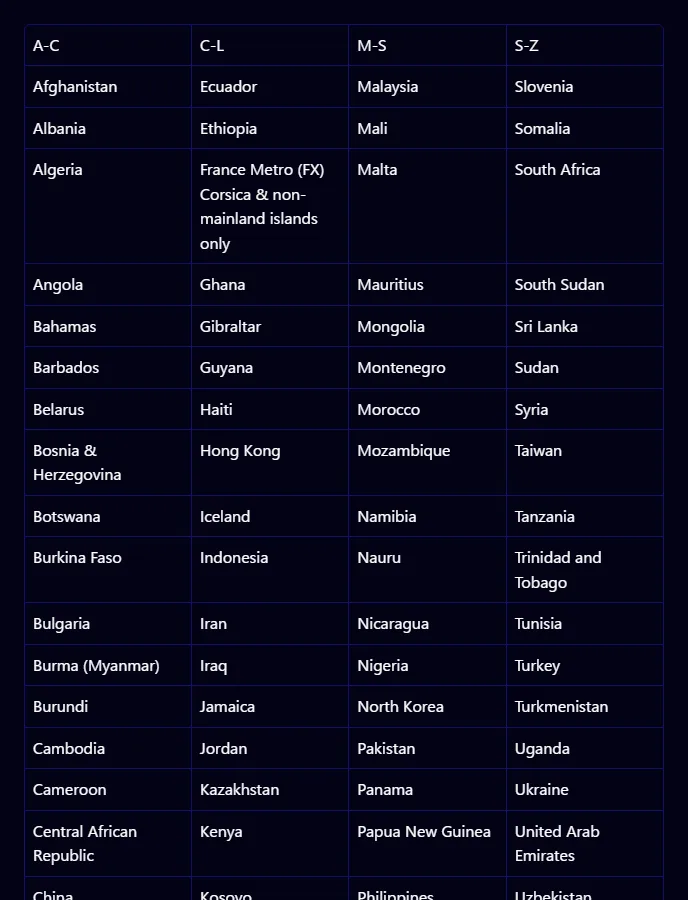
Source update dates: restricted countries article 2026-10-14, KYC/AML article 2026-10-13, articles on others trading and cards 2026-08-24.
Sources for this section (5)
Source: Official help: Article / Official help: Article 2 / Official help: Article 3 / Official help: Article 4 / Official help: Prohibited conduct
My Funded Futures steps from sign-up to Sim Funded
Getting from sign-up at My Funded Futures to trading in Sim Funded takes the following 5 steps. Screen details can change, so this section focuses on conditions confirmed in the official help center.
- Create an account and choose a plan and size
- Pay with a card in your own name or with crypto
- Log in to the trading platform and sign the market data agreement
- Reach the plan profit target in the evaluation
- Upgrade to Sim Funded from the dashboard and complete KYC
Step 1: Create an account and buy a plan
My Funded Futures has 5 current plans: Builder, Rapid, Rapid EOD, Pro and Studio. The evaluation consistency rule, the Sim Funded drawdown type and payout frequency differ a lot by plan, so we suggest comparing them in the plans article before you buy.
Compare the 5 My Funded Futures plans and their prices
New purchases from 2026-08-25 are one-time payments with no renewal charges. The activation fee is $0 on every plan and size. Resets are available on one-time accounts too, but we could not find the reset fee on official pages, so it is under review.
The fields on the sign-up screen and how long account creation takes are under review in this article's primary sources.
Step 2: Payment methods
The payment methods accepted at My Funded Futures are below. Cards must be in your own name, and the billing address must match your registered address.
| Payment method | Official condition |
|---|---|
| Visa, Mastercard | Card in your own name. Billing address must match registered address |
| Google Pay, Apple Pay | Stated as available in some states only |
| Crypto | ETH, LTC, USDT, USDC, SOL, POL, TRON. Not available in some countries |
| Not accepted | Prepaid cards, Forex cards, cards in someone else's name |
Crypto payments are not eligible for refunds (according to the help article). Check before you buy how your payment method affects refunds, and check the amount on screen right before you pay.
Step 3: Connect a platform and sign for market data
My Funded Futures supports 8 platforms, including NinjaTrader, Tradovate and TradingView, and Studio uses Hyperprop only. On Tradovate, you sign the market data agreement at your first login to activate data.
See My Funded Futures supported platforms and connection notes
Step 4: Pass the evaluation and upgrade to Sim Funded
Once you pass the evaluation, you can upgrade to Sim Funded instantly from the dashboard and trade the same day. The help center says a review of up to 24 hours may sometimes apply.
The Sim Funded maximum drawdown locks at the starting balance + $100 once your profit from the starting balance reaches "drawdown amount + $100". The drawdown type differs by plan and is covered in detail in the rules article.
See My Funded Futures drawdown and consistency rules
Watch the 7-calendar-day inactivity rule on one-time accounts
One-time accounts bought from 2026-08-25 may be closed after 7 calendar days in a row with no trades. This applies to Sim Funded as well as evaluations. The official help center asks you to contact support in advance if you will not trade for several days, for example during a vacation.
Source update dates: payment methods article 2026-10-05, moving to Sim Funded article 2026-09-04, inactivity rule article 2026-09-03.
Sources for this section (10)
Source: My Funded Futures official site / Official help: Article / Official help: Article 2 / Official help: Article 3 / Official help: Article 4 / Official help: Article 5 / Official help: Article 6 / Official help: Article 7 / Official help: Article 8 / Official help: Refunds
How does My Funded Futures identity verification (KYC) work, and what documents do you need?
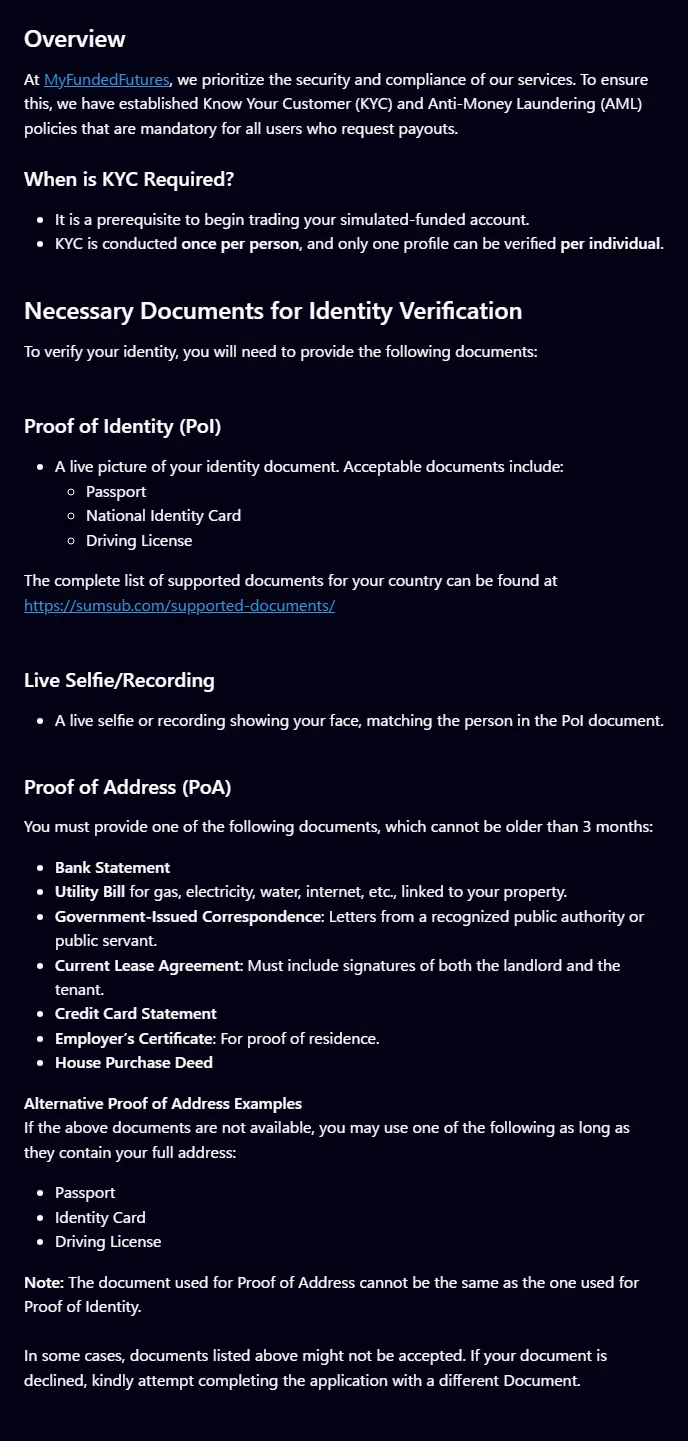
My Funded Futures identity verification (KYC) is required before you start trading in a Sim Funded account. Everyone who requests a payout must complete it, once per person. Reviews are done by an outside provider called Sumsub.
| What to submit | Official condition |
|---|---|
| ID document | Passport, national ID card or driver's license. Photograph the physical document |
| Live selfie | A selfie photo or video taken on the spot |
| Proof of address | Bank statement, utility bill, government document, lease, credit card statement or similar, dated within 3 months |
| Proof of address note | The same document as your ID cannot be used |
The official help center does not publish a country-by-country list, so whether a specific national ID card or a proof of address in a language other than English is accepted is under review. Passports and driver's licenses are named explicitly as accepted ID types.
Prepare a proof of address separate from your ID document. For example, if you verify your identity with a driver's license, you cannot use the same driver's license as proof of address. There is also a limit of 3 months from issue, so check the dates on your documents before signing up.
What the review checks, and how decisions are handled
My Funded Futures says it automatically screens against sanctions lists such as OFAC, the UN, HM Treasury (HMT), the EU and the Australian Department of Foreign Affairs and Trade (DFAT), as well as politically exposed persons (PEP) and adverse media.
KYC decisions are stated to be final. To avoid a rejection for reasons such as a blurry document or an address that does not match your registration, compare your documents with your registered details before you submit.
Submitted documents are checked for expiry on an ongoing basis
The official help center says the expiry dates of submitted documents are checked daily. If your passport or driver's license is close to expiring, you may need to resubmit the renewed document.
Source update dates: KYC/AML article 2026-10-13, ongoing document monitoring article 2026-08-24.
Sources for this section (3)
Source: Official help: Article / Official help: Article 2 / Official help: Article 3
How do you prepare for your first My Funded Futures payout? (Riseworks)
Before your first payout at My Funded Futures, you need to finish KYC and create a Riseworks (Rise) account. At your first payout, you sign the agreement in Riseworks.
You withdraw the money you receive from Rise by bank transfer or crypto. Plaid and ACH are for US residents only. Payout fees (on the My Funded Futures side and the Rise side) could not be found in official sources and are under review.
| Item | Official condition |
|---|---|
| Needed before the first payout | KYC completed and a Riseworks account created |
| At the first payout | Sign the agreement in Riseworks |
| How you receive funds | Withdraw from Rise by bank transfer or crypto |
| Plaid, ACH | US residents only |
| Processing time | Most are approved instantly. Manual reviews take 6 to 12 business hours on weekdays |
| Payout fees | Under review |
When you can first request a payout differs by plan. Builder allows it 48 hours after your first trade, Rapid 24 hours after your first trade, and Pro every 14 calendar days from your first trade. In every case, you also need to meet conditions such as the buffer and the minimum payout.
See My Funded Futures payout conditions by plan and how to receive payouts
Tax documents
For payouts through Rise, the 1099 is mailed by Rise; for payouts through Plaid or ACH, the 1099 is mailed by My Funded Futures. The 1099 is a US tax form. Whether people living outside the US need to submit a tax form (such as the W-8BEN) is not stated officially and is under review.
Source update dates: first payout guide 2026-08-26, payout policy overview 2026-08-25, 1099 article 2026-03-04.
Sources for this section (6)
Source: Official help: Payouts / Official help: Payouts 2 / Official help: Article / Official help: Article 2 / Official help: API / Official help: Article 3
What are the My Funded Futures refund and cancellation conditions?
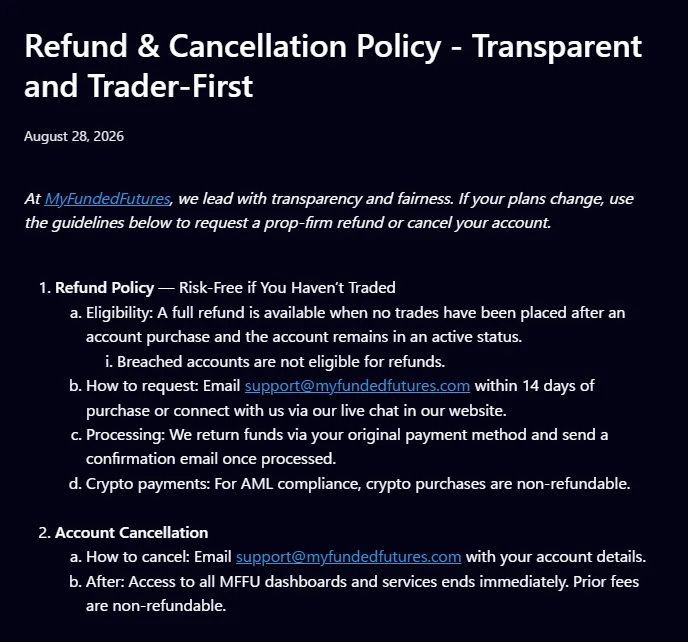
A My Funded Futures refund requires a request within 14 days of purchase and no trading at all. In the official information checked on 2026-11-04, the terms page and the help article differ on the refund amount. We show both without choosing one.
| Item | Terms page (cancellation policy) | Help article |
|---|---|---|
| Deadline | Within 14 days of purchase | Within 14 days |
| Trading condition | No trading (including positions and access to market data) | Active with no trades |
| Refund amount | Amount paid minus a non-refundable $75 | Full amount |
| Where to apply | Email support@myfundedfutures.com | Not stated (under review) |
| Refunded to | Original payment method | Not stated |
| Not eligible | Requests that miss the deadline or trading condition | Breached accounts, crypto payments |
The refund amount does not match between the terms ($75 deducted) and the help center (full amount), so it is under review. Confirm the amount with support before you apply. The terms page counts access to market data as trading, so you may lose eligibility as soon as you log in to a platform and activate market data.
Cancelling stops access immediately
You cancel by email. Cancelling ends access to all dashboards immediately, and amounts already paid are not refunded. If you want a refund, first check whether you meet the refund conditions rather than cancelling.
One-time payment vs the old subscription
Accounts bought on a monthly subscription continue on the old conditions. The official sources differ on the cutoff date: the help center uses 2026-08-25 (the move to one-time payment), while the terms define purchases before 2026-08-20 as Legacy Subscription. If you bought between those dates, ask support which applies to your account.
Source update dates: refund and cancellation article 2026-08-27, resets and renewals article 2026-09-24.
Sources for this section (5)
Source: Official site / Official help: Refunds / Official help: Article / Official help: Article 2 / Official terms of use
Why you should not file a chargeback with My Funded Futures
A chargeback, where you ask your card issuer to reverse a payment, is treated seriously at My Funded Futures. A chargeback freezes all related accounts without notice. Chargebacks for services already provided are treated as fraud and lead to a permanent ban. The firm also says it may take legal action when needed.
The refund and cancellation article says unresolved disputes go to binding arbitration under the rules of the American Arbitration Association (AAA), and that by signing up you waive chargebacks and lawsuits. The terms are governed by the law of the State of Texas.
If you have a question about a charge, the official guidance is to contact support@myfundedfutures.com before contacting your card issuer. If you meet the refund conditions, use that process first.
Source update dates: chargeback article 2026-09-02 (body last updated 2026-07-14).
Sources for this section (4)
Source: Official help: Article / Official help: Refunds / Official site / Official terms of use
How do you contact My Funded Futures support?
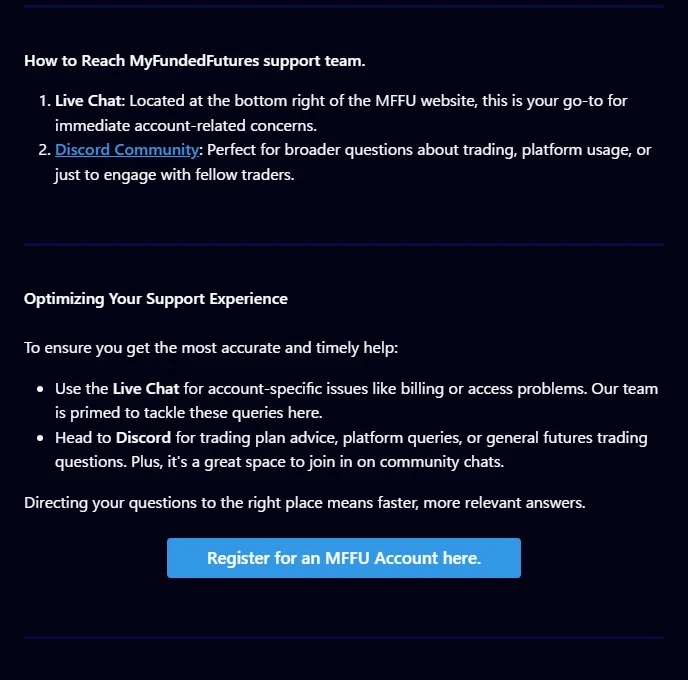
My Funded Futures support uses different channels depending on the request. Use the live chat at the bottom right of the site for account matters, Discord for general questions, and email for refunds, cancellations and contact before a chargeback.
| Channel | Best for |
|---|---|
| Live chat (bottom right of the site) | Account matters |
| Discord | General questions |
| Email (support@myfundedfutures.com) | Refunds, cancellations, contact before a chargeback |
| Help center | Looking up articles on rules and procedures yourself |
Support hours are not stated officially and are under review.
Source update date: support article 2026-08-24.
Sources for this section (2)
Source: Official help: Article / Official site
My Funded Futures change history and items under review for getting started
My Funded Futures updated its pricing model and many procedure articles in the second half of 2026. The main dates of changes related to getting started are below.
| Date | Change |
|---|---|
| 2026-07-14 | Chargeback policy updated |
| 2026-08-20 | The terms define purchases before this date as Legacy Subscription (the help article uses 2026-08-25, so official sources differ) |
| 2026-08-25 | New purchases moved to one-time payment. 7-calendar-day inactivity rule introduced |
| 2026-10-05 | Payment methods article updated |
| 2026-10-13 | KYC/AML article updated |
| 2026-10-14 | Restricted countries article updated (90 countries and territories) |
Items under review
- Refund amount (the terms deduct $75, the help center says full amount)
- Reset fee
- Sign-up screen fields and how long the KYC review takes
- Whether specific national ID cards and proof of address in languages other than English are accepted
- Which states and countries can use Google Pay, Apple Pay and crypto
- Payout fees (on the My Funded Futures side and the Rise side)
- Whether people living outside the US need tax forms
- Support hours
The content of this article was checked on the official My Funded Futures site and help center on 2026-11-04. Before signing up or buying, check the latest official information.
Sources for this section (8)
Source: Official help: Article / Official terms of use / Official help: Article 2 / Official help: Article 3 / Official help: Article 4 / Official help: Article 5 / Official help: Article 6 / Official site
My Funded Futures FAQ
Can you sign up for My Funded Futures from your country?
My Funded Futures publishes a restricted countries list of 90 countries and territories (checked 2026-11-04), and eligibility is judged by citizenship or residence. Check on the official site that the country you live in is not on the list before you apply. Not appearing on the list does not guarantee that you can use the service.
What do you need for My Funded Futures identity verification (KYC)?
A photo of a physical passport, national ID card or driver's license, a live selfie, and proof of address dated within 3 months (such as a bank statement or utility bill). Proof of address must be a different document from your ID. Reviews are done by Sumsub, and decisions are final.
When do you need KYC at My Funded Futures?
Before you start trading in a Sim Funded account. It is not required during the evaluation, and everyone who requests a payout must complete it. Verification is once per person, and each person may have only 1 profile.
What payment methods does My Funded Futures accept?
Can you get a refund from My Funded Futures?
Is My Funded Futures monthly or a one-time payment?
New purchases from 2026-08-25 are one-time payments with no renewal charges. The activation fee is $0 on every plan. Older monthly subscriptions continue on the old conditions. The official cutoff date differs, though: the terms define purchases before 2026-08-20 as Legacy Subscription. One-time accounts may be closed after 7 calendar days in a row with no trades.
What do you prepare before your first My Funded Futures payout?
Complete KYC and create a Riseworks account. At your first payout you sign the agreement in Riseworks, then withdraw from Rise by bank transfer or crypto. Plaid and ACH are for US residents only. Payout fees are under review.