

My Funded Futures (MFFU) Payout Rules
- At My Funded Futures, you request payouts from the Sim Funded account (a simulated funded account) after you pass the evaluation. Rapid and Rapid EOD allow daily requests, Pro every 14 calendar days, and Builder works in cycles with up to 5 payouts (checked 2026-11-04).
- The profit split is 80/20 on Builder and Pro, 90/10 on Rapid and Rapid EOD, and 80/20 in Sim and 90/10 in Live on Studio. The Builder 150K per-cycle cap differs between the official help center ($4,500) and the plan page ($3,500) and is under review.
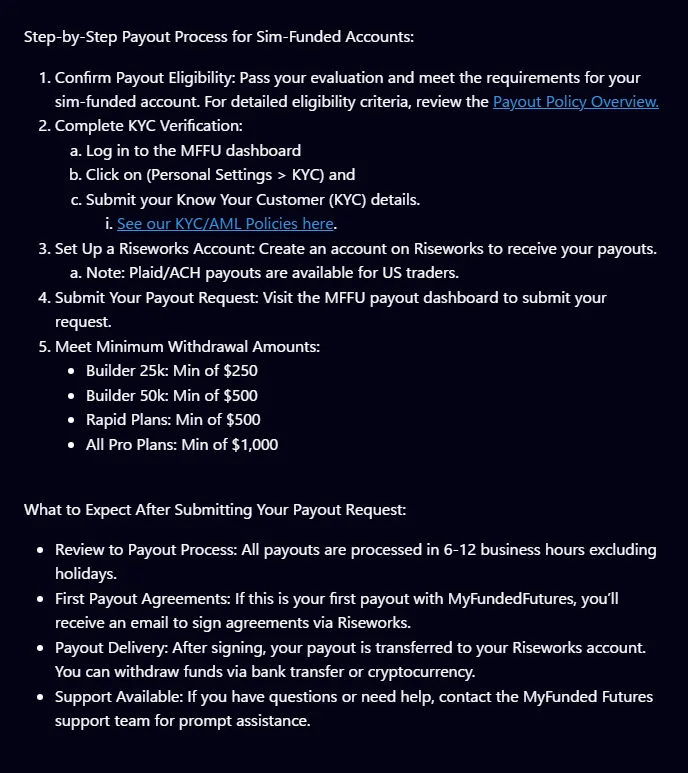
- Before your first payout, you complete identity verification (KYC) and create a Riseworks account, then withdraw from Rise by bank transfer or crypto. Payout fees could not be found for either MFFU or Rise and are under review.
How often can you request a payout at MFFU?
My Funded Futures payouts start once you pass the evaluation and move up to Sim Funded. You cannot withdraw from an evaluation account. Sim Funded is a simulated account, and you request a payout from the dashboard once you meet the conditions.
Even within My Funded Futures, payout frequency, minimum, cap and profit split differ completely by plan. Start with the 3 biggest differences.
- Frequency: daily on Rapid and Rapid EOD, every 14 calendar days on Pro, per cycle on Builder (minimum 2 qualifying days), and any time on Studio
- Split: 80/20 on Builder and Pro, 90/10 on Rapid and Rapid EOD, and 80/20 in Sim and 90/10 in Live on Studio
- Move to Live: Builder after the 5th approved Sim payout, the Rapid plans with conditions such as $10,000 net profit in 1 trading day, and Pro by review after events such as 3 consecutive payouts
Sources for this section (8)
Source: Official help: Payouts / Official help: Payouts 2 / Official site / Official site: API / Official site: API 2 / Official help: Article / Official help: Article 2 / Official help: API
My Funded Futures payout conditions and per-payout cap by plan (50K)
This table lines up My Funded Futures payout conditions at 50K (Studio in its 3 sizes). The buffer is the level of profit you need to build before a payout, and on every plan it equals the Maximum Loss Limit (MLL) plus $100.
| Item (50K) | Builder | Rapid | Rapid EOD | Pro |
|---|---|---|---|---|
| Buffer | $2,100 ($1,600 with add-on) | $2,100 (realized profit) | $2,100 (first payout) | $2,100 |
| Profit needed for first payout | $500 above buffer | Above buffer | Above buffer | Above buffer |
| Minimum payout | $500 | $500 | $500 | $1,000 |
| Frequency | Per cycle (minimum 2 qualifying days) | Daily | Daily | Every 14 calendar days |
| First request | 48 hours after first trade | 24 hours after first trade | Under review | 14 calendar days after first trade |
| Per-payout cap | $2,000 per cycle | Not stated (under review) | No cap | $100,000 total in the Sim stage |
| Consistency at payout | 50% | None | Under review | None |
| Profit split | 80/20 | 90/10 | 90/10 | 80/20 |
Studio works differently: there is no buffer or waiting period, and you can withdraw all or part of your Sim Funded net profit at any time. The minimum payout is $100 on #003 ($5,000) and $250 on #001 ($10,000) and #002 ($20,000).
How the buffer works (50K example)
The buffer is "MLL + $100". The 50K MLL is $2,000, so the buffer is $2,100. Profit up to this level protects the account, and the basic idea is that you withdraw from profit above it.
As an example, say your realized profit on Rapid 50K reaches $2,700. The amount above the $2,100 buffer is $600, which exceeds the $500 minimum, so you can request a payout. If realized profit is $2,500, the amount above the buffer is $400, which does not reach the minimum. This example only shows the idea. The official conditions are in the Rapid 50K article in the official help center. Check the request screen on your dashboard for the amount you can actually request.
For Pro, the official payout overview article says you can withdraw up to 60% of your profit even before reaching the buffer. This statement comes from the overview article, so confirm with support before relying on it.
How much can you withdraw per payout? (payout cap)
| Plan | 25K | 50K | 100K | 150K |
|---|---|---|---|---|
| Builder (per cycle) | $1,000 | $2,000 | $3,000 | $4,500 (help center) / $3,500 (plan page) |
| Rapid | Not stated (under review) | Not stated (under review) | Not stated (under review) | Not stated (under review) |
| Rapid EOD | No cap | No cap | - | - |
| Pro | - | $100,000 total per user in the Sim stage | Same | Same |
For the Builder 150K per-cycle cap, the official information checked on 2026-11-04 shows $4,500 in the 150K help article and $3,500 on the Builder plan page. Since we cannot settle on one, confirm it on screen or with support before you request.
Sources for this section (16)
Source: Official help: Article / Official help: Article 2 / Official help: Article 3 / Official help: Article 4 / Official site / Official help: API / Official help: API 2 / Official help: API 3 / Official help: API 4 / Official site: API / Official help: API 5 / Official help: API 6 / Official help: Article 5 / Official help: Payouts / Official help: Article 6 / Official help: Consistency
My Funded Futures Builder plan payout rules: cycles, up to 5 payouts
The My Funded Futures Builder plan counts payouts by cycle. In each cycle you need at least 2 qualifying days and must stay within the 50% consistency rule before requesting. You can request from 48 hours after your first trade, and you can take up to 5 payouts in Sim.
| Item | 25K | 50K | 100K | 150K |
|---|---|---|---|---|
| Buffer (MLL + $100) | $1,100 | $2,100 ($1,600 with add-on) | $3,100 | $4,600 |
| Net profit needed for first payout | $250 above buffer | $500 above buffer | $1,000 above buffer | $1,500 above buffer |
| Minimum payout | $250 | $500 | $1,000 | $1,500 |
| Cap per cycle | $1,000 | $2,000 | $3,000 | $4,500 / $3,500 (under review) |
| Number of Sim payouts | 5 | 5 | 5 | 5 |
The 50% consistency at payout is set in the official consistency rule article, which also explains how it is calculated. The evaluation has no consistency rule, so on Builder the first time it can stop you is at the payout stage. The rules article shows an example.
The Builder Sim Funded account shows a starting balance of $0, and the balance can go negative until the MLL rises to 0. It helps to read the buffer as the level of profit you build up from that starting point.
See a My Funded Futures consistency rule calculation example
Sources for this section (6)
Source: Official help: Article / Official help: Article 2 / Official help: Article 3 / Official help: Article 4 / Official site / Official help: Consistency
My Funded Futures Rapid and Rapid EOD payouts: daily, 90/10
My Funded Futures Rapid and Rapid EOD let you request payouts daily from the Sim Funded account. The profit split is 90/10, and Rapid moved to 90% on 2026-01-12. The minimum payout is $500 on both.
Rapid (intraday trailing)
On Rapid, you can make your first payout request 24 hours after your first trade. The buffer is counted on realized profit: 25K $1,100, 50K $2,100, 100K $3,100 and 150K $4,600. The Sim Funded account has no consistency rule. We could not find an official per-payout cap, so it is under review.
The Rapid Sim Funded account uses an intraday trailing drawdown, so the MLL follows the peak including open profit. Once you pass the buffer, trailing stops and the MLL locks at +$100. Note that if you give back a lot of open profit before a payout, your room to the MLL shrinks before your withdrawable amount does.
Rapid EOD (net profit condition from the 2nd payout)
On Rapid EOD, you make the first request after passing the buffer (25K $1,100, 50K $2,100). From the 2nd payout on, you can request once you build net profit since the previous payout of $250 at 25K or $500 at 50K. Payouts are daily with no cap.
Once you move to Live on Rapid EOD, you cannot trade Sim and Live at the same time. You can hold up to 3 Sim Funded accounts per size.
Sources for this section (9)
Source: Official site: API / Official help: API / Official help: API 2 / Official help: API 3 / Official help: API 4 / Official site: API 2 / Official help: API 5 / Official help: API 6 / Official help: Payouts
My Funded Futures Pro and Studio payouts
Pro: every 14 calendar days, $1,000 minimum
My Funded Futures Pro (after the October 2026 redesign) lets you request a payout every 14 calendar days from your first trade. The plan page calls it Bi-Weekly. The buffer is 50K $2,100, 100K $3,100 and 150K $4,600, the minimum payout is $1,000, and the profit split is 80/20. The Sim Funded account has no DLL and no consistency rule.
On Pro, after the first payout the MLL locks at the starting balance + $100 ($50,100 at 50K). Total Sim-stage payouts are capped at $100,000 per user, and reaching the cap moves you to the Live review (any excess is forfeited). Old Pro accounts bought before the redesign keep the old rules.
Studio: withdraw any time, but watch the daily profit cap
The Studio Sim Funded account lets you withdraw net profit at any time, with no buffer or waiting period. In exchange, daily profit is capped (#003 $2,500, #001 $5,000, #002 $10,000), and any excess is forfeited. The Sim profit split is 80/20.
Sources for this section (4)
Source: Official site / Official help: Article / Official help: Payouts / Official help: Article 2
How do you receive My Funded Futures payouts, and how long does it take?
My Funded Futures payouts are received through a payment service called Riseworks (Rise). US residents can also use Plaid and ACH. Riseworks is the route described in this section.
| Stage | What happens |
|---|---|
| Before the first payout | Complete identity verification (KYC) and create a Riseworks account |
| At the first payout | Sign the agreement in Riseworks |
| Approval | Most are instant. Manual reviews take 6 to 12 business hours on weekdays |
| Withdrawal | Withdraw from Rise by bank transfer or crypto |
| Fees | Under review (not stated by either MFFU or Rise) |
KYC and Riseworks before the first payout
Identity verification is required before you start trading in Sim Funded. It is handled by Sumsub, and you submit a photo ID, a live selfie and proof of address dated within 3 months. The steps are in the how-to-start article.
See the My Funded Futures identity verification (KYC) and sign-up steps
Withdraw from Rise by bank transfer or crypto
Once a payout is approved, the funds go to Rise. From there you withdraw by bank transfer or crypto. Rise's country-specific details, such as whether you can receive funds in your local currency at your bank and which cryptocurrencies are supported, are under review in this article's primary sources.
Payout fees are under review
We could not find payout fees for either My Funded Futures or Rise in the official help center as of 2026-11-04. What you take home is the requested amount times your profit split, minus Rise and bank fees and any currency conversion difference.
Tax documents
The official help center says a 1099 (a US tax form) is mailed by Rise for payouts through Rise, and by MFFU for payouts through Plaid or ACH. Whether residents outside the US need forms such as the W-8BEN is under review.
Sources for this section (4)
Source: Official help: Payouts / Official help: Payouts 2 / Official help: Article / Official help: Article 2
Why would a My Funded Futures payout be denied or reversed?
A My Funded Futures payout does not go through for 2 kinds of reasons: you have not met the conditions yet, or the firm judges that you broke the rules.
Conditions not met
- Profit above the buffer has not reached the minimum payout
- On Builder, you exceed the 50% consistency at payout, or have not reached 2 qualifying days in the cycle
- On Pro, 14 calendar days have not passed since the previous payout
- KYC or Riseworks setup is not finished
When it is judged a rule violation
- Hedging on the same underlying (for example NQ and MNQ), HFT, or trading in coordination with others
- Someone else trading your account, sharing devices, or copy trading with others
- Automated strategies or orders that aim to exploit favorable simulated fills
- No trades for 7 calendar days in a row on a one-time account (it may be closed)
The official help center says that if trading is judged prohibited, the result can be immediate termination, forfeiture of profit, and a review of evaluations you already passed. The rules article explains each condition in detail.
See My Funded Futures prohibited practices and the inactivity rule
Sources for this section (7)
Source: Official help: Consistency / Official help: Article / Official help: Article 2 / Official help: Payouts / Official help: Prohibited conduct / Official help: Article 3 / Official help: Article 4
How does the My Funded Futures transition to Live work? By plan, plus the Reserve Program
My Funded Futures Live is the stage where you trade the real market in an actual brokerage account. The conditions for moving there differ by plan. The official help center says you cannot decline the move to Live.
| Plan | Condition to move to Live | Main Live conditions |
|---|---|---|
| Builder | After the 5th approved Sim payout (the overview article also mentions reaching the $100k Sim cap and risk team discretion) | 80/20, daily payouts, $250 minimum, no consistency rule, 1 Live account |
| Rapid and Rapid EOD | Automatic once you reach $10,000 net profit in 1 trading day (excess that day is forfeited), or risk team review | Starts at $0, MLL 50K $2,000 (EOD), 90/10, daily payouts, no buffer requirement |
| Pro | 3 consecutive payouts on the same account, reaching the $100,000 cap, a risk team invitation, or review at $20,000 profit | Starts at $0, MLL 50K $2,000, no DLL, max contracts 50K 2, $250 minimum payout, 80/20 |
| Studio | 5 approved payouts, or $5,000 in total requests | Starting balance is 40% of total requests (up to $2,000), 90/10, 1 request per day, $250 minimum |
For the Builder Live DLL, the official information checked on 2026-11-04 differs by article. For 25K, 100K and 150K, the help articles say "none" while the plan page says $600, $1,750 and $2,500. At 50K, both say $1,000. Treat this as under review.
Reserve Program (Rapid and Pro)
When you move from Rapid to Live, up to $5,000 of your Sim profit is held as a Reserve. It is paid as a performance bonus once you reach 20 profitable days in Live and $10,000 in total Live payouts. For Pro, the Reserve bonus requires 20 profitable days and total Live payouts of $10,000 at 50K, $20,000 at 100K or $30,000 at 150K. If you lose the Live account, the Reserve covers the negative balance, and the rest goes back to a payout-only Sim account.
After losing Live, and Live costs
If you lose a Live account, there is a 21-day cooldown during which you cannot trade Sim, buy a new evaluation or reset. On Rapid, if you withdraw the Sim account buffer after losing Live, you get 50% if you had fewer than 30 trading days, or 80% (after the split) otherwise.
In a Live account, CME professional data fees, round-turn commissions and platform license fees are paid by the trader and deducted from the Live account balance. The amounts are under review in this article's primary sources.
Change history
| Date | Change |
|---|---|
| 2026-01-12 | Rapid Sim Funded profit split raised to 90% |
| 2026-08-25 | New purchases moved to one-time payment, 7-calendar-day inactivity rule introduced |
| 2026-08-26 | First payout guide (Riseworks steps) updated |
| 2026-10-14 update | Pro redesigned (Reserve introduced, old Pro keeps old rules) |
| 2026-10-21 update | Rapid Reserve Program article updated |
The numbers in this article were checked in the official My Funded Futures help center and plan pages on 2026-11-04. Before requesting a payout, check your dashboard and the latest wording in the official help center.
Sources for this section (14)
Source: Official help: Live funded / Official help: Article / Official help: Article 2 / Official help: Article 3 / Official help: Article 4 / Official help: Article 5 / Official site / Official help: Payouts / Official help: API / Official help: API 2 / Official help: Article 6 / Official help: Article 7 / Official help: Payouts 2 / Official help: Article 8
My Funded Futures FAQ
When can you first request a payout at My Funded Futures?
How do you receive My Funded Futures payouts?
Complete KYC and create a Riseworks account before your first payout, then sign the agreement at the first payout. After approval, withdraw from Rise by bank transfer or crypto. Plaid and ACH are for US residents only.
What is the My Funded Futures profit split?
What is the per-cycle cap on My Funded Futures Builder 150K?
How long do My Funded Futures payouts take?
Are there payout fees at My Funded Futures?
Under review. We could not find fees for either My Funded Futures or Rise in the official help center as of 2026-11-04.