

Take Profit Trader Payout Rules (Buffer Zone, Fees, Timing)
- The buffer zone decides what you can withdraw: on a Take Profit Trader PRO account you can request profit above the buffer balance (starting balance plus the max drawdown amount) from day one, at an 80% split (checked 2026-11-04). PRO+ has no buffer.
- Payouts take 2 steps: from the account to your wallet, then from the wallet to an outside account. Wallet withdrawals over $250 are free; $250 or less costs $50. The minimum payout is not stated officially and is under review.
- The official help articles describe payout methods outside the US differently. The article on withdrawing from the wallet lists Wise and PayPal, while the payout system article lists Routable, PayPal and Wise (checked 2026-11-04).
How does the Take Profit Trader buffer zone affect payouts?
There are 3 things to know about Take Profit Trader payouts. All are conditions stated in the official help center, checked on 2026-11-04.
- From your first day on PRO, you can request 80% of the profit above the buffer (there is no fixed payout day and no maximum payout cap)
- Account profit first moves to your Take Profit Trader wallet, and you send it to your own account from there
- Wallet withdrawals over $250 are free; $250 or less costs $50
| Item | PRO (sim funded account) | PRO+ (live account, invitation only) |
|---|---|---|
| Payouts start | From day one | From day one |
| Profit split | 80% | 90% |
| Buffer | Yes (withdraw only what is above it) | None |
| Maximum payout | No cap | No cap |
| Account to wallet | Automatic on Tradovate, manual on Rithmic | Manual processing |
This article covers the PRO buffer numbers with worked examples, the 2-step payout flow, payout methods outside the US, fees, tax forms, and the main reasons a payout is held or denied. The full path from Test to PRO and PRO+ is covered on the firm page.
Sources for this section (5)
Source: Take Profit Trader official site / Official site / Official site 2 / Official site 3 / Official site: Payouts
At which stage can you withdraw from Take Profit Trader?
Take Profit Trader has 3 stages: the Test (evaluation), PRO (sim funded account) and PRO+ (live account). You can withdraw from PRO and PRO+, but not during the Test.
The PRO profit split is 80/20, with 80% to the trader. PRO+ is 90/10, with 90% to the trader. The comparison table on the official homepage says payouts start "from day one" and the maximum payout has "no cap" on both PRO and PRO+.
PRO is a sim account where orders are not sent to an exchange, but the payouts you receive are real money. PRO+ is invitation only, and when you move up, $5,000 of your PRO profit is frozen for a period. The upgrade process and how the freeze works are covered in the article on PRO vs. PRO+.
See Take Profit Trader PRO vs. PRO+ (upgrade and the $5,000 freeze)
Sources for this section (3)
Source: Take Profit Trader official site / Official site / Official site 2
What is the Take Profit Trader PRO buffer zone? (Balances by size and worked examples)
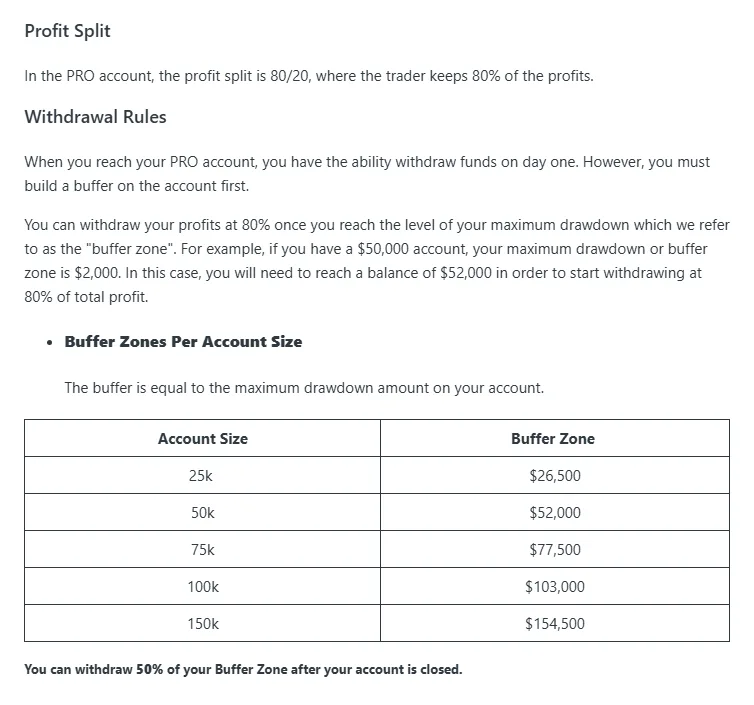
A Take Profit Trader PRO account has a buffer, a floor for payouts. The official help center says the buffer equals the max drawdown amount, and you can withdraw 80% of whatever your account balance is above the buffer balance.
Buffer balance by account size
| Size | Starting balance | Max drawdown | Buffer balance (payout floor) |
|---|---|---|---|
| 25K | $25,000 | $1,500 | $26,500 |
| 50K | $50,000 | $2,000 | $52,000 |
| 75K | $75,000 | $2,500 | $77,500 |
| 100K | $100,000 | $3,000 | $103,000 |
| 150K | $150,000 | $4,500 | $154,500 |
The PRO drawdown is an intraday trailing drawdown: it follows the peak balance including open profit and stops once it reaches the starting balance. In numbers, when your balance reaches the buffer balance, the drawdown sits exactly at the starting balance. Limiting payouts to profit above the buffer keeps a cushion above the starting balance even after you withdraw.
Example: a 50K account with a $53,000 balance
On a 50K PRO account with a $53,000 balance, the $1,000 above the $52,000 buffer balance is eligible for payout. At the 80% split, you receive $800. Sending it from the wallet is over $250, so there is no withdrawal fee.
On the same 50K account with a $52,300 balance, $300 is eligible and you receive $240. Withdrawing that amount from the wallet as is falls at $250 or less, so a $50 withdrawal fee applies. The fee math is summarized in a later section.
When you close the account you can withdraw 50% of the buffer
The official help center says that after you close a PRO account, you can withdraw 50% of the buffer. This lets you receive part of the profit sitting inside the buffer, but only when the account ends. The base for the calculation (whether it means the profit from the starting balance up to the buffer balance) and how it interacts with the 80% split are under review in the sources for this article. Before closing, confirm the amount on your dashboard and with support.
PRO+ has no buffer
PRO+ has no buffer, and its drawdown is calculated on an EOD (end-of-day balance) basis. PRO+ starts from a $0 balance and works differently, so the PRO examples do not apply.
The general idea of a payout buffer is shared across the 6 futures prop firms and is covered in a separate shared article. This article shows only the Take Profit Trader numbers.
Sources for this section (5)
Source: Official site / Official site 2 / Official site 3 / Take Profit Trader official site / Official site 4
How do you withdraw from Take Profit Trader? (2 steps: account to wallet, wallet to outside account)
A Take Profit Trader payout has 2 steps: moving funds from your PRO or PRO+ account to your Take Profit Trader wallet, then sending them from the wallet to your bank account or another destination. Each step has its own timing.
- Close all positions so you are flat (you must be flat when you request)
- From the dashboard, request a transfer of the withdrawable amount to your wallet
- Check your wallet balance, choose a payout method and request an outside withdrawal
- Wait for admin approval (up to 12 business hours)
- Funds arrive at the destination (timing depends on the method)
| Step | Official timing |
|---|---|
| Account to wallet (PRO on Tradovate) | Automatic, 5 to 10 seconds |
| Account to wallet (PRO on Rithmic, PRO+, some archived accounts) | Manual processing |
| Wallet to outside (admin approval) | Up to 12 business hours |
| US bank (Plaid) | Usually real time, sometimes 1 to 2 business days |
| Outside the US (Wise or PayPal) | Within 12 business hours |
Account to wallet
For PRO accounts connected through Tradovate, an official help article updated 2026-08-20 says transfers from the account to the wallet are automated and finish in 5 to 10 seconds. PRO accounts on Rithmic, PRO+, and some archived accounts are processed manually. The timing of manual processing is under review in the sources for this article.
Wallet balances update daily at 8 to 9 PM EST. The official site writes EST, and how this shifts during US daylight saving time is under review.
Wallet to outside account
Withdrawals from the wallet to an outside account take up to 12 business hours for admin approval. Because this counts business hours, weekends and US holidays stretch it on the calendar. The official how-to article says transfers outside the US are processed within 12 business hours. How long it takes to reach your bank also depends on the payout method, so this is under review.
 1
Sources for this section (4)
Source: Official site / Official site: Payouts / Official site 2 / Official site 3
How do you receive Take Profit Trader payouts outside the US? (Wise, PayPal, Routable)
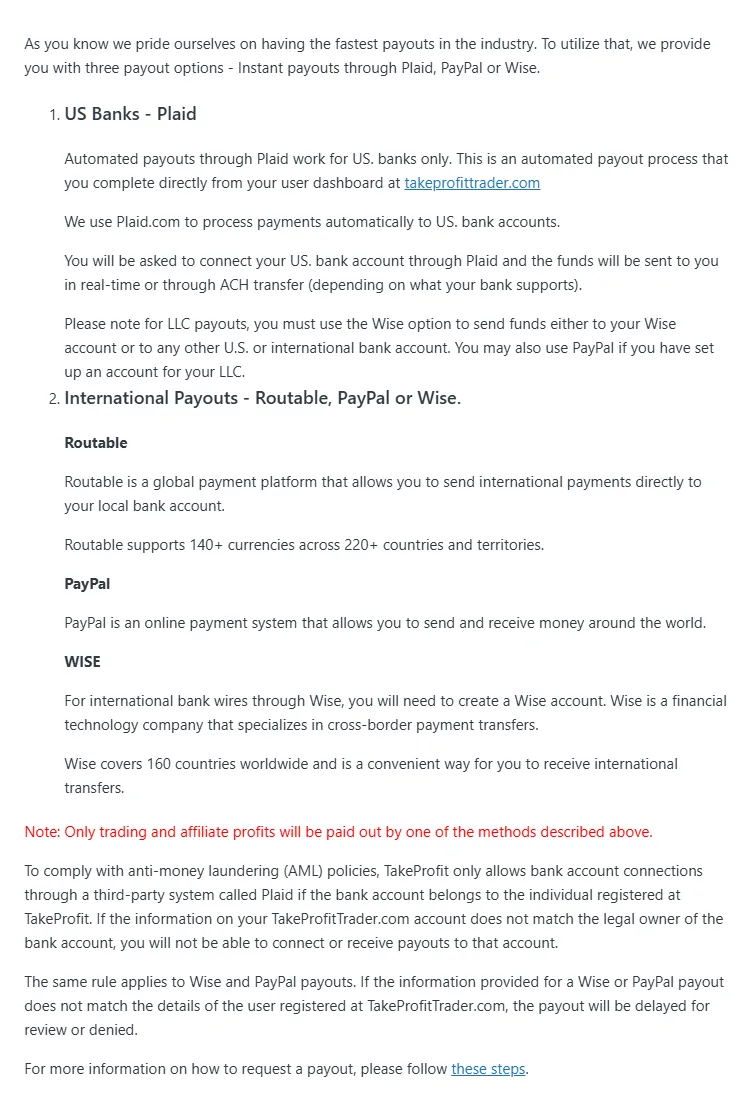
Two official help articles list the wallet payout methods differently. Per the official information checked 2026-11-04, the article on withdrawing from the wallet gives Wise or PayPal for users outside the US, while the Payout System article lists Routable, PayPal and Wise for international transfers. This article shows both instead of picking one.
| Method | How-to article (How to Withdraw from the Wallet) | Payout System article |
|---|---|---|
| Plaid | For US bank accounts. Usually real time, sometimes 1 to 2 business days | Not listed as an international method |
| Wise | Method outside the US. Within 12 business hours | International method. Wise for payouts to an LLC |
| PayPal | Method outside the US. Within 12 business hours. PayPal may charge its own fees | International method. A PayPal account in the LLC name is also allowed for an LLC |
| Routable | Not listed | International method. 140+ currencies, 220+ countries and regions |
Plaid connects to US bank accounts, so it is not an option if you receive into a bank account outside the US. If you live outside the US, the methods to look at are Wise, PayPal and Routable.
Whether Routable is available in your country, and its steps and fees if it is, are under review in the sources for this article. Whether Wise and PayPal can pay out to your bank in your local currency, and their conversion fees, depend on each service, so these are also under review. Before you request, check the payout methods shown on your wallet screen.
Payouts go only to accounts in your own name
As an anti-money-laundering (AML) measure, Take Profit Trader requires the payout account name to match the registered user. Payouts with a mismatched name are held or denied. You cannot use a family member's account or someone else's PayPal. For payouts to an LLC, the firm points to Wise or a PayPal account in the LLC name.
Take Profit Trader publishes a restricted countries list (updated 2026-08-25). Whether the check is based on citizenship or residence is under review. Before you sign up, confirm on the official site that the country you live in is not on the list. Not appearing on the list does not guarantee that you can use the service, so treat use from your country as under review.
Sources for this section (3)
Source: Official site / Official site: Payouts / Official site 2
What are the Take Profit Trader withdrawal fees, minimum and daily limit?
The Take Profit Trader withdrawal fee depends on the amount you send from the wallet to an outside account. The conditions in the official fees article are below.
| Amount withdrawn from wallet | Take Profit Trader fee | Note |
|---|---|---|
| Over $250 | Free | PayPal may charge its own fees |
| $250 or less | $50 | The fee weighs more if you withdraw small amounts often |
Net payout example
If you withdraw every time a 50K PRO account is $300 above the buffer, you receive $240 each time. Each $240 wallet withdrawal costs $50, so assuming the fee is deducted, you keep $190. If you let 2 of those build up in the wallet and withdraw $480 at once, it is over $250 and no fee applies.
Whether the fee is deducted from the payout or billed separately is under review in the sources for this article. Treat the numbers above as an estimate that assumes deduction. Receiving fees at your bank and currency conversion costs are not included.
The minimum payout is under review
The Take Profit Trader minimum payout is not stated in the official help center and is under review. The only confirmed condition is "$250 or less costs a $50 fee." Check the request screen to see whether small requests are accepted or whether there is a floor.
Daily limit and payout frequency
The comparison table on the official homepage says the maximum payout has no cap on PRO and PRO+, and payouts start from day one. As of 2026-11-04, no separate daily payout limit was found in the official information.
Sources for this section (3)
Source: Official site / Take Profit Trader official site / Official site 2
Which tax forms does Take Profit Trader require before a payout?
Take Profit Trader is a US company and follows US tax law. The official help center says PRO users must sign a tax form before withdrawing. You cannot request a payout until it is signed, so complete it early once you reach PRO.
At year end, the firm issues a tax document summarizing what you received that year. Which form residents outside the US sign (W-8BEN or another) is under review in the sources for this article. Check the form name and instructions shown on the signing screen.
How payouts are classified and reported in your country depends on local rules, not on the firm. For your own situation, check with your tax authority or a tax professional.
Source: Official site
Why are Take Profit Trader payouts held or denied?
Take Profit Trader payouts stop for 2 kinds of reasons: problems with the request, and review of your trading. Both are described in the official help center and terms.
Problems with the request
- The payout account name does not match the registered user (held or denied)
- Positions are still open when you request the transfer to the wallet
- The tax form has not been signed
Review of your trading
- Patterns flagged under the Sustainable Trading Policy (trading most of the time at max size, relying on sim fill inefficiencies, taking large positions at the open or at the exact moment of a news release, and similar)
- Universal Trading Policies (UTP) violations: automated trading or bots, exceeding max size, breaking CME rules, and more
- Holding opposite positions in the same or related instruments across accounts with the same beneficial owner (counter positions)
- Coordinating trades with others or trading an account in someone else's name
The Sustainable Trading Policy says matching patterns are subject to review and the agreement may be ended without notice. UTP and counter-position violations can lead to forfeited profit, a reset, account liquidation or closure, and a permanent ban.
Access from restricted countries
Access from a restricted country is prohibited, including trading and viewing market data, and a single detection can lead to account restriction or a block. This includes access through a VPN or remote connection. Before you log in while traveling, check that the country is not on the list.
See all Take Profit Trader rules and prohibited practices
Sources for this section (9)
Source: Official site: Payouts / Official site / Official site 2 / Official site 3 / Official site 4 / Official site 5 / Official site 6 / Official site 7 / Official terms of use
How have the Take Profit Trader payout rules changed?
Take Profit Trader kept updating its payout-related help articles through 2026. The main changes and article update dates are below.
| Date | Change |
|---|---|
| 2026-08-20 (article updated) | Automated account-to-wallet transfers for PRO on Tradovate (5 to 10 seconds) |
| 2026-08-25 (article updated) | Restricted countries list updated |
| 2026-09-28 (article updated) | PRO+ Development accounts and a 30-day cooldown announced |
| 2026-10-09 to 10-22 (articles updated) | Universal Trading Policies (UTP), Independent Trade Execution Policy and the trade copier approval list updated |
The numbers in this article were checked on 2026-11-04 on the Take Profit Trader official homepage and help center. Before you request, check the latest terms on your dashboard and wallet screen.
See Take Profit Trader pricing and the $130 activation fee
Sources for this section (5)
Source: Official site: Payouts / Official site / Official site 2 / Official site 3 / Official site 4
Take Profit Trader FAQ
When can you withdraw from Take Profit Trader?
What is the Take Profit Trader 50K buffer?
The 50K buffer balance is $52,000 (the starting balance plus an amount equal to the $2,000 max drawdown). With a $53,000 balance, you receive $800: 80% of the $1,000 above the buffer.
How do you receive Take Profit Trader payouts outside the US?
The official help articles differ. The article on withdrawing from the wallet gives Wise or PayPal outside the US, while the payout system article lists Routable, PayPal and Wise (checked 2026-11-04). Whether Routable is available in your country and the fees for each method are under review. Payouts go only to accounts in your own name.
How much are Take Profit Trader withdrawal fees?
Free if your wallet withdrawal is over $250, and $50 if it is $250 or less. PayPal may charge its own fees.
How long do Take Profit Trader payouts take?
Account to wallet takes 5 to 10 seconds for PRO on Tradovate; PRO on Rithmic and PRO+ are manual. Wallet to outside takes up to 12 business hours for admin approval, and transfers outside the US (Wise or PayPal) are processed within 12 business hours. The time until funds reach your bank is under review.
What is the Take Profit Trader minimum payout?
What happens to profit inside the buffer when you close a Take Profit Trader PRO account?
The official help center says you can withdraw 50% of the buffer after closing the account. The base for the calculation and how it relates to the 80% split are under review, so confirm the amount with support before closing.