

Take Profit Trader Supported Platforms (Tradovate, NinjaTrader, Rithmic, TradingView)
- Take Profit Trader does not recommend either CQG (via Tradovate) or Rithmic. The confirmed difference is PRO payout speed: on Tradovate, PRO transfers from account to wallet are automatic and take 5 to 10 seconds, while Rithmic PRO transfers are processed manually (checked 2026-11-04).
- 5 platforms are free during the Test: TradingView (Basic plan), NinjaTrader, Tradovate, R|Trader and Quantower. Bookmap, ATAS and others need a paid license.
- Automated trading (bots and algos) is banned on all Take Profit Trader accounts. Trade copying is allowed only between accounts you own and control, using approved tools.
Should you choose CQG or Rithmic at Take Profit Trader?
Take Profit Trader (TPT) has no trading screen of its own and uses outside data connections and trading platforms. There are 2 data connections: CQG (via Tradovate) or Rithmic. The official homepage says it supports "15+ trading platforms."
The data connection is the route that carries price data and orders. The orders themselves are placed from platforms such as NinjaTrader or Tradovate that connect to that route. A general explanation of this relationship is planned for an article shared across the 6 firms.
| Category | Platforms |
|---|---|
| Free during the Test | TradingView (Basic plan), NinjaTrader, Tradovate, R|Trader, Quantower |
| Paid license required | Bookmap, MultiCharts, MotiveWave, Trade Navigator, VolFix, ATAS, Investor R/T, Finamark, Jigsaw Trader |
| Data connection | CQG (via Tradovate) or Rithmic |
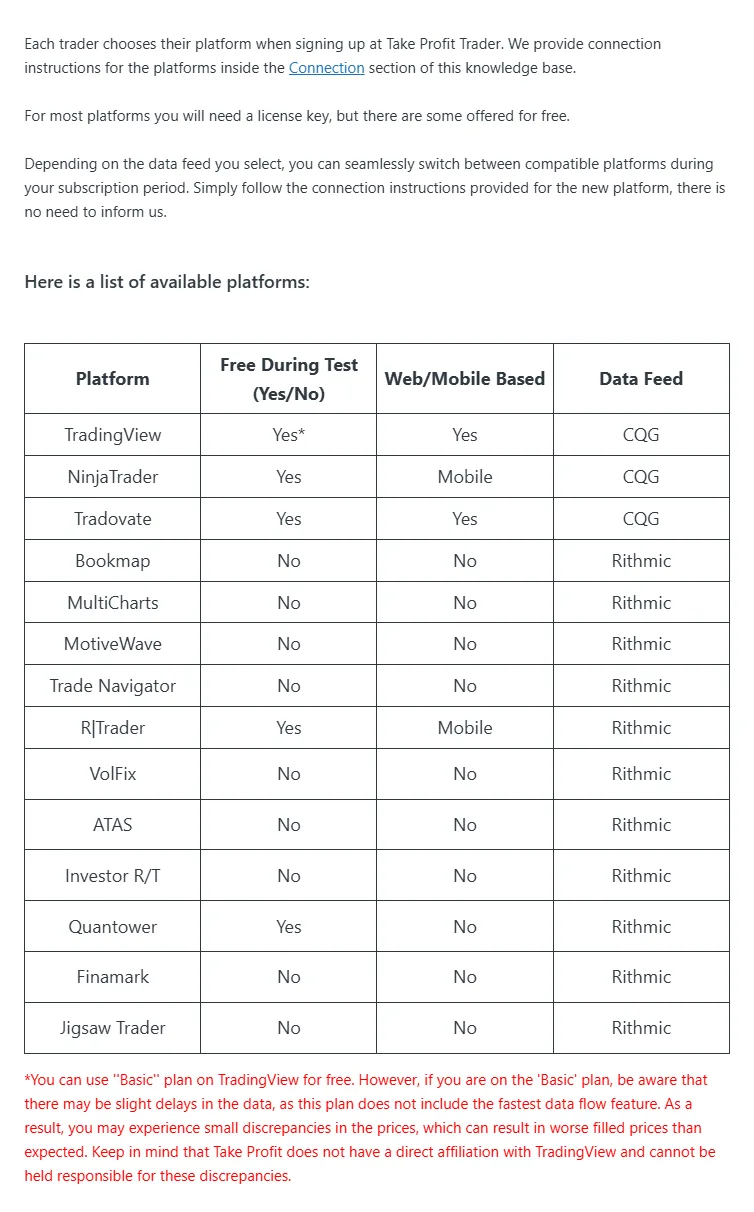
Choose a platform based on both the screen you are used to and the payout flow once you reach PRO. The next section starts with the difference between the 2 data connections.
Sources for this section (2)
How do CQG (Tradovate) and Rithmic differ at Take Profit Trader?
The official help center does not recommend CQG or Rithmic over the other at Take Profit Trader. Below are only the differences that can be confirmed in official articles.
| Item | CQG (via Tradovate) | Rithmic |
|---|---|---|
| Data agreement | Signed as Non-Professional | Signed as Non-Professional |
| PRO account-to-wallet transfer | Automatic. 5 to 10 seconds | Processed manually |
| How PRO orders are processed | Inside the Tradovate simulation | Inside the Rithmic simulation |
Payout speed differs
A Take Profit Trader payout has 2 steps: moving funds from the PRO account to your TPT wallet, then sending them from the wallet to an outside account. The first step finishes automatically in 5 to 10 seconds for PRO on Tradovate (official article updated 2026-08-20). PRO on Rithmic and PRO+ are processed manually. You must close all positions before you request.
Wallet balances update daily at 8 to 9 PM EST (written officially in EST; how this shifts during US daylight saving time is under review). The second step, from the wallet to an outside account, takes up to 12 business hours for admin approval on either connection.
See Take Profit Trader payout rules and payout methods
PRO is a sim account, but payouts are real money
PRO is a sim account: orders are not sent to an exchange and are processed inside the data provider's (Rithmic or Tradovate) simulation. Payouts are real money. On PRO+, orders go directly to the exchange through Tradovate.
Check the official article for which connection each platform uses
The list of supported platforms is in the official help article "Choosing Your Platform." Which platforms work with CQG and which with Rithmic is under review in the sources for this article, as is whether you can change your connection later. If you already know which platform you want, check the connection in the official article before buying a Test.
Sources for this section (8)
Source: Official site / Official site 2 / Official site 3 / Official site: Payouts / Official site 4 / Official site 5 / Official site 6 / Take Profit Trader official site
Which platforms does Take Profit Trader support? (Free vs. paid license)
The official Take Profit Trader help center splits supported platforms into those free during the Test and those that need a paid license.
| Platform | Cost during the Test | Note |
|---|---|---|
| TradingView | Free (Basic plan) | Data may be delayed |
| NinjaTrader | Free | - |
| Tradovate | Free | CQG-side connection |
| R|Trader | Free | - |
| Quantower | Free | - |
| Bookmap | Paid license required | - |
| MultiCharts | Paid license required | - |
| MotiveWave | Paid license required | - |
| Trade Navigator | Paid license required | - |
| VolFix | Paid license required | - |
| ATAS | Paid license required | - |
| Investor R/T | Paid license required | - |
| Finamark | Paid license required | - |
| Jigsaw Trader | Paid license required | - |
For paid-license platforms, you pay the license fee to each platform provider. The fees are not listed in the Take Profit Trader help center, so check each platform's official site.
The 5 free platforms are described as free during the Test. Whether they stay free after you move to PRO or PRO+ is not stated separately and is under review.
See Take Profit Trader pricing and the total cost to pass
Sources for this section (2)
Can you use TradingView at Take Profit Trader?
At Take Profit Trader, you can use TradingView for free during the Test. The official help center covers the TradingView Basic plan and says data may be delayed.
Data delay matters more the shorter your holding times and the more often you trade, because the price shown on the chart can differ from the price you actually get filled at. If you trade only from the TradingView screen, keep this in mind.
How many seconds the delay is, and whether a paid TradingView plan removes it, cannot be confirmed in the Take Profit Trader help center and are under review. Which data connection (CQG or Rithmic) TradingView uses is also under review.
Rules to watch on TradingView
The Take Profit Trader ban on automated trading applies the same way when you place orders from TradingView. Trading by bots or algos is banned on all accounts, and the PRO rules require all trades to be placed manually.
Sources for this section (3)
Source: Official site / Official site 2 / Official site 3
How do you use NinjaTrader and Tradovate at Take Profit Trader?
At Take Profit Trader, NinjaTrader and Tradovate are also free during the Test. Tradovate is the CQG-side connection, and on PRO it is the route where account-to-wallet transfers are automatic.
Connection steps
The official help center has one article for activating CQG data and one for activating Rithmic data. In both, you sign the data agreement as Non-Professional while on the Test and PRO.
- When you buy the Test, confirm which data connection (CQG or Rithmic) you will use
- Activate the data connection by following the official help center steps
- Sign the data agreement as Non-Professional
- Log in to the platform you use, such as NinjaTrader or Tradovate, and trade
Detailed screen-by-screen steps and how NinjaTrader license keys are handled are under review in the sources for this article. If you get stuck in setup, check the official help center how-to articles or ask through live chat. Live chat is available in 8 languages, including English.
Commissions
The comparison table on the official homepage lists round-trip commissions for the Test and PRO as "$4.50 / $1.50." PRO+ uses broker rates, and the official help center points to the NinjaTrader commission schedule.
Sources for this section (6)
Source: Official site / Official site 2 / Official site 3 / Official site: Payouts / Take Profit Trader official site / Official site: Commissions
Does Take Profit Trader charge data fees?
On the Take Profit Trader Test and PRO, you use CME market data under the Non-Professional classification. When you activate the data connection, you sign the data agreement as Non-Professional.
As of the official information checked 2026-11-04, there is no mention of charging users separately for data. The refund clause in the terms says Take Profit Trader pays technology and market data costs to third parties on the user's behalf. The $75 deducted from refunds within 72 hours is explained as covering these costs, which cannot be recovered.
PRO+ switches you to professional data
When you move up to PRO+, you are classified as a professional trader and switched to professional market data. During the switch, you cannot trade for up to 12 hours. Who pays for professional data is not stated officially and is under review.
| Stage | Data classification | Cost |
|---|---|---|
| Test | Non-Professional | No mention of separate charges |
| PRO | Non-Professional | No mention of separate charges |
| PRO+ | Switched to professional (no trading for up to 12 hours) | Who pays is under review |
See Take Profit Trader PRO vs. PRO+
Sources for this section (5)
Source: Official site / Official site 2 / Official terms of use / Official site 3 / Official site 4
Does Take Profit Trader allow automated trading or copy trading?
At Take Profit Trader, automated trading by bots or algos is banned on all accounts: Test, PRO and PRO+. It is the first item in the Universal Trading Policies (UTP) that apply to all accounts, and the PRO rules also require all trades to be placed manually.
Having your own strategy in NinjaTrader or another platform place orders also counts as algorithmic trading. Violations can lead to forfeited profit, a reset, account closure and other measures.
Copy trading only between your own accounts
Trade copying (placing one account's orders on other accounts too) is allowed only between accounts you own and control. Only officially approved tools can be used.
| Category | Details |
|---|---|
| Approved outside tools | Tradesyncer, TradeCopia, Affordable Indicators, Replikanto Flowbot (Compliance Edition only) |
| Built-in platform copy features | Tradovate, NinjaTrader, MotiveWave, Quantower and others |
| Prohibited | Syncing with other users' accounts, taking part in passing or payout services run by others |
Violations to watch when copying
Holding opposite positions in the same or related instruments (ES and MES, NQ and MNQ, YM and MYM, and so on) across accounts owned by the same person is banned. It is a violation even if a copier setting caused the opposite positions, and it can lead to account liquidation and forfeited profit.
Coordinating identical trades with other users and trading an account in someone else's name are also banned under the Independent Trade Execution Policy. The Sustainable Trading Policy says patterns such as trading most of the time at max size or relying on lenient simulated fills are subject to review.
See all Take Profit Trader rules and prohibited practices
Sources for this section (6)
Source: Official site / Official site 2 / Official site 3 / Official site 4 / Official site 5 / Official site 6
Can you add Market Depth at Take Profit Trader? (And items under review)
The official Take Profit Trader help center has an article for adding Market Depth. The body of that article was not checked in the sources for this article, so the steps and fees for adding it are under review. If you want to trade while watching the order book, read the official article first.
Items under review
- Which platforms work with CQG and which with Rithmic
- Whether you can change your data connection later
- How many seconds the TradingView Basic plan is delayed, and how paid plans are handled
- Whether the 5 free platforms stay free on PRO and PRO+
- How NinjaTrader license keys are handled, and the screen-by-screen connection steps
- Who pays for professional data on PRO+
- Steps and fees for adding Market Depth
This article reflects what was checked on 2026-11-04 on the Take Profit Trader official site, terms and help center. Before choosing a platform, check the latest support in the official "Choosing Your Platform" article.
Sources for this section (3)
Source: Official site / Official site 2 / Official site 3
Take Profit Trader FAQ
Which trading platforms can you use at Take Profit Trader?
TradingView (Basic plan), NinjaTrader, Tradovate, R|Trader and Quantower are free during the Test. Bookmap, MultiCharts, MotiveWave, ATAS and others need a paid license. The data connection is CQG (via Tradovate) or Rithmic.
Is CQG or Rithmic better at Take Profit Trader?
Can you use TradingView at Take Profit Trader?
Yes, free on the Basic plan during the Test. The official help center says data may be delayed. The length of the delay and how paid plans are handled are under review.