

How to Start with Lucid Trading: Countries, Sign-Up Steps and KYC
- Lucid Trading publishes a restricted list of 82 countries and regions, but its terms of use are written for US persons, and use from outside the US is under review (checked 2026-11-04). Check the eligible regions in the terms and the restricted list on the official site before you sign up.
- The steps are: create a profile, choose a plan and size, pay by card, and connect a platform. The evaluation is a one-time payment, and when you pass you move to a funded account. LucidDirect has no evaluation and trades as a funded account from purchase.
- The documents and timing for individual identity verification (KYC) have no dedicated help article and are under review. What is known: the documents for business registration, the check at WorkMarket, and the check at the broker when moving to LucidLive.
Can you sign up for Lucid Trading from your country? The steps at a glance
Lucid Trading's terms of use are written for US persons, and use from outside the US is under review. Check the eligible regions in the terms on the official site before you sign up.
Starting with Lucid Trading has 4 stages. You register a profile, choose a plan and account size and pay, connect a platform and take the evaluation, and after you pass you trade in a funded (sim) account. LucidDirect has no evaluation, so it starts in a funded account right after the 2nd stage.
Every plan is a one-time payment with no monthly billing or auto-renewal, and there is no funded activation fee after you pass. In exchange, Lucid Trading asks you to decide a lot before you buy. On LucidPro, the daily loss limit (DLL) ON or OFF choice made at purchase cannot be changed later, and each person gets 1 profile that cannot be recreated.
| Stage | What you do | Timing and notes |
|---|---|---|
| 1. Check and register | Check the eligible regions in the terms and the restricted countries, then create a profile (individual or business) | 1 profile per person. You cannot switch between individual and business or recreate it |
| 2. Buy | Choose the plan, account size and DLL ON or OFF, and pay by card | One-time payment. On LucidPro the DLL choice cannot be changed after purchase |
| 3. Evaluation | Connect a platform and reach the profit target without breaking the maximum drawdown | LucidPro takes as little as 1 trading day. Direct has no evaluation |
| 4. Funded | Move to a funded account after you pass, meet the conditions and request payouts | No activation fee |
The sections below cover what to check before you start, the steps from registration to your first trade, identity verification, business registration, things to watch after you buy, and support.
Sources for this section (5)
Source: Official terms of use / Official help: Article / Official help: Article 2 / Official help: Article 3 / Official help: Article 4
Which countries are allowed at Lucid Trading? What to check first
At Lucid Trading there are 4 things to check before registering: eligibility, eligible regions, restricted countries, and how many profiles and accounts you can hold. Eligibility and eligible regions are under review; restricted countries and the profile and account limits are stated in the help center.
Eligibility
Lucid Trading eligibility (age and other conditions) is under review. Check the latest conditions in the terms of use before you sign up.
Use from outside the US is under review
Lucid Trading's terms of use are written for US persons, and use from outside the US is under review. Check the eligible regions in the terms on the official site before you sign up.
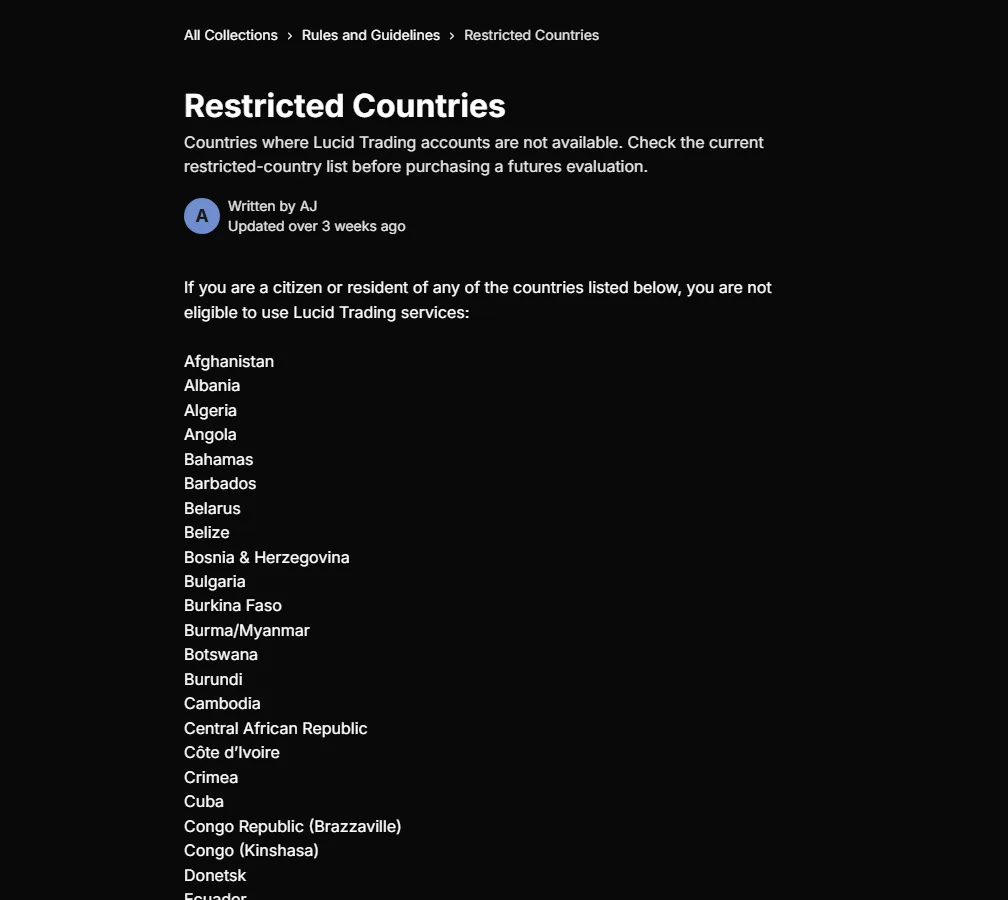
Separately, the help center has a restricted countries list and says citizens or residents of those countries cannot use the service. Check that your country of residence is not on it before you apply (official information checked on 2026-11-04).
Prop Up treats use from outside the US as under review. Not appearing on the list does not guarantee that you can use the service. Before you buy, ask Lucid Trading support whether you can use it from your country, and keep the reply.
The full restricted list (82 items)
The help center restricted countries article lists these 82 items (checked 2026-11-04, including regions): Afghanistan, Albania, Algeria, Angola, Bahamas, Barbados, Belarus, Belize, Bosnia and Herzegovina, Bulgaria, Burkina Faso, Myanmar (Burma), Botswana, Burundi, Cambodia, Central African Republic, Cote d'Ivoire, Crimea, Cuba, Congo (Brazzaville), Congo (Kinshasa), Donetsk, Ecuador, Ethiopia, Ghana, Guinea, Haiti, Iceland, Indonesia, Iran, Iraq, Jamaica, Kazakhstan, Kenya, Kherson, Kosovo, Kyrgyzstan, Laos, Lebanon, Liberia, Libya, Lithuania, Luhansk, Mali, Mauritius, Mongolia, Montenegro, Morocco, Mozambique, Namibia, Nicaragua, Nigeria, North Korea, North Macedonia, Pakistan, Panama, Papua New Guinea, Philippines, Russia, Senegal, Serbia, Sevastopol, Seychelles, Slovenia, Somalia, South Africa, South Sudan, Sri Lanka, Sudan, Syria, Tajikistan, Tanzania, Turkey, Trinidad and Tobago, Tunisia, Uganda, Ukraine, Uzbekistan, Vietnam, Venezuela, Yemen, Zimbabwe.
The list can change. If you live abroad or plan to trade while traveling, check the latest version in the official restricted countries article.
1 profile per person, and account limits apply
Each person gets 1 Lucid Trading profile, registered as either an individual or a business. After registering you cannot change the type or recreate it. Accounts are counted per household: up to 10 evaluations, up to 5 funded accounts across all types, and up to 5 LucidLive. Evaluations and funded accounts combined are also capped at 10, so with 5 evaluations you can hold up to 5 funded.
| What to check | Official condition |
|---|---|
| Age and background | Under review (check the official site) |
| Eligible regions in the terms | Under review (check the official site) |
| Restricted countries | Citizens or residents of the 82 listed items cannot use the service |
| Use from your country | Under review. Ask Lucid Trading before you buy |
| Profile | 1 per person, individual or business; cannot be changed or recreated |
| Accounts (per household) | 10 evaluations, 5 funded, 5 LucidLive. Evaluations and funded combined up to 10 |
Sources for this section (4)
Source: Official terms of use / Official help: Article / Official help: Article 2 / Official help: Article 3
How do you sign up for Lucid Trading? Steps to your first trade
From registration to your first trade at Lucid Trading takes the 4 steps below. The fields on the registration screen could not be confirmed from primary sources, so this section focuses on the conditions confirmed on the official site and help center.
- Create a profile as an individual or a business
- Choose the plan, account size and DLL ON or OFF
- Pay by credit or debit card
- Connect a platform and start trading
Step 1: Create a profile
At Lucid Trading, whether you are an individual or a business is set when you create the profile. If you register under a business name, payouts are also received as a business. This cannot be changed later, so decide first how you want to receive payouts. The business process is covered in a later section.
The login and dashboard entry points are at the top of the official site. The fields on the registration screen and how long registration takes are under review.
Step 2: Choose a plan and account size
The 4 plans Lucid Trading sells publicly are LucidPro, LucidFlex, LucidDaily and LucidDirect. All come in 25K, 50K, 100K and 150K. LucidMaxx is invitation-only and cannot be bought publicly.
LucidPro and LucidFlex ask you to choose DLL ON or OFF at purchase. LucidPro cannot be changed after purchase. Besides the DLL, LucidDaily also lets you choose the evaluation drawdown (EOD or intraday) and the consistency rule (40% or 50%). Each choice changes the rules and payout conditions, so compare before you buy.
| Plan | 25K | 50K | 100K | 150K |
|---|---|---|---|---|
| LucidPro (one-time) | Under review | Under review | Under review | Under review |
| LucidDirect (one-time, no evaluation) | Under review | Under review | Under review | Under review |
| LucidFlex | Under review | Under review | Under review | Under review |
| LucidDaily | Under review | Under review | Under review | Under review |
LucidPro and LucidDirect prices are under review on the official site. LucidFlex and LucidDaily prices are also under review. The LucidPro DLL OFF price is also under review. Prices can change, so check the final price on the checkout page right before you pay.
Compare the 4 Lucid Trading plans and their prices
Step 3: Payment
Lucid Trading accepts Visa, Mastercard, American Express, Discover, Diners Club and Maestro. PayPal and crypto payments are not mentioned in the help center.
The official site states that fraudulent chargebacks (disputing a payment with your card issuer) lead to a permanent ban from all services, and that legal action to recover funds is possible.
Step 4: Connect a platform
Lucid Trading supports CQG-based software (NinjaTrader, Tradovate, TradingView) and Rithmic-based software (Quantower, Sierra Chart, ATAS and others) on all account types. The specific connection steps could not be confirmed from primary sources and are under review.
See the platforms and fees at Lucid Trading
Time from passing to funded
When you pass the Lucid Trading evaluation, you move to a funded account with no activation fee. The help center evaluation article says the switch to funded takes about 5 to 30 minutes after you reach the profit target. LucidDirect has no evaluation and trades as a funded account from purchase.
Sources for this section (12)
Source: Official help: Article / Official help: Article 2 / Official help: Article 3 / Official help: Article 4 / Official help: Article 5 / Official help: Article 6 / Official help: Article 7 / Official help: Article 8 / Official help: Article 9 / Official site: Refunds / Official help: Article 10 / Official help: Article 11
What is known about Lucid Trading KYC?
For Lucid Trading identity verification (KYC), the documents required of individuals and when they are requested are under review. As of 2026-11-04, no dedicated help article on individual identity verification has been found.
What the help center does confirm is 3 situations where identity verification is involved.
| Situation | What the help center says |
|---|---|
| Registering as a business | Email proof of incorporation, proof of ownership, and government-issued photo ID for everyone who owns 25% or more |
| Receiving payouts through WorkMarket | WorkMarket runs identity verification on its side (stated for businesses) |
| Moving from LucidDaily to LucidLive | Sim profit above the buffer is paid after KYC is completed with the broker partner and the sub-account is approved |
| Registering and getting paid as an individual | Under review (documents and timing not stated) |
Payout methods and identity verification
Lucid Trading has 3 payout methods: Plaid, WorkMarket by ADP and crypto. Plaid is an instant bank transfer for US residents, WorkMarket is for the US and international with bank transfer or PayPal, and crypto is for international traders with BTC, ETH, LTC, USDT and USDC. Having international methods is a separate question from whether you can use them where you live, and the latter is under review.
See the Lucid Trading payout conditions and payout methods
Individual documents and timing are under review
Primary sources do not say which documents are accepted, such as a driver license or passport, or whether they are requested at registration or at the first payout. This article does not guess and treats it as under review. When you ask support whether you can use the service from your country, ask about KYC documents and timing in the same message to avoid back-and-forth.
Sources for this section (3)
Source: Official help: Article / Official help: Payouts / Official help: Article 2
Registering with Lucid Trading as a business
At Lucid Trading you can register a profile under a business name. If you register as a business, payouts are received as a business. Each person gets 1 profile, so you cannot hold both an individual and a business profile, and you cannot switch after registering.
To register as a business, email the following documents.
- A document proving the business was incorporated
- A document proving the ownership of the business
- Government-issued photo ID for everyone who owns 25% or more
If you receive payouts through WorkMarket, WorkMarket also verifies the business on its side. Because use from outside the US is under review, also confirm with Lucid Trading whether a business registered in your country can sign up.
Sources for this section (2)
Source: Official help: Article / Official help: Payouts
What to watch after you start trading at Lucid Trading
After you start trading at Lucid Trading, 3 rules can easily cost you an account or money if you miss them: trading hours, deletion of inactive accounts, and refund conditions.
Trading hours
On LucidPro, LucidFlex and LucidDirect, all positions are closed automatically by 4:45 PM EST Monday to Friday. Holding over does not fail you, but you cannot hold overnight or over the weekend. Trading resumes at 6:00 PM EST Sunday to Thursday.
| Time (stated officially in EST) | What happens | Days |
|---|---|---|
| 4:45 PM EST | Automatic close | Monday to Friday |
| 6:00 PM EST | Trading resumes | Sunday to Thursday |
The official site writes EST, but it does not state whether the same Eastern clock time (ET) applies during US daylight saving time, and this is under review. Convert these times to your local time and keep a note. On shortened days such as holidays, close before the market closes.
See the Lucid Trading rules (drawdown, consistency rule, prohibited activities)
Accounts with no trades for 30 calendar days are deleted
At Lucid Trading, an account with no trade of at least $1 net P&L within 30 calendar days is treated as abandoned and permanently deleted. An account that breaks its drawdown is also deleted automatically if not reset within 30 days. Resets are paid and bought from the dashboard; there are no automatic or free resets.
Refunds are considered only for accounts not yet traded
An account that has been traded even once is not refunded, regardless of number of trades, results or technical problems. Accounts not yet traded are considered at the company's discretion. Termination for breaking the terms or disqualification is not eligible. If you buy before confirming that you can use the service from your country, you may not get your money back if it turns out you cannot.
Sources for this section (4)
Source: Official help: Article / Official help: Article 2 / Official help: Article 3 / Official site: Refunds
How to contact Lucid Trading support
You contact Lucid Trading support by live chat and email. Live chat is staffed by people, open 24 hours Monday to Friday, and usually replies in 2 to 4 hours. The email address and communities such as Discord are under review.
| Channel | Details |
|---|---|
| Live chat | Staffed by people. 24 hours Monday to Friday, usually replies in 2 to 4 hours |
| Under review | |
| Discord | Under review |
Support languages other than English are not stated officially, so plan to contact support in English. It is efficient to ask in one message whether you can use the service from your country, which documents and timing apply to individual KYC, and whether a business from your country can register.
Source: Official site
Lucid Trading changes that affect getting started, and items under review
At Lucid Trading, some conditions depend on the date you buy or reset. The main dates that affect getting started are below.
| Date | Change |
|---|---|
| 2025-11-28 3:00 PM EST | LucidPro accounts bought or reset from then on have a 40% funded consistency rule (35% before) |
| 2026-02-27 | Purchases and resets after this date use the new LucidLive structure |
| 2026-10-04 | LucidMaxx tiered pricing moved to Legacy |
Items under review
- Whether people outside the US can use the service (how the eligible regions in the terms relate to the restricted list)
- The documents required for individual identity verification and when they are requested
- The fields on the registration screen and how long registration takes
- LucidPro and LucidDirect prices, LucidFlex and LucidDaily prices, and the LucidPro DLL OFF price
- Eligibility (age and other conditions) and the email contact
- Which support languages are available besides English
- Whether the EST trading hours refer to the same clock time (ET) during US daylight saving time
This article was checked on the Lucid Trading official site, help center and terms of use on 2026-11-04. Before registering or buying, check the latest official information, and ask Lucid Trading directly whether you can use the service from your country.
Sources for this section (5)
Source: Official help: Consistency / Official help: Article / Official help: Article 2 / Official help: Article 3 / Official help: Article 4
Lucid Trading FAQ
Can you use Lucid Trading from outside the US?
Under review. Lucid Trading's terms of use are written for US persons, and use from outside the US is under review. A restricted list of 82 items is published, but not appearing on it does not guarantee eligibility. Check the eligible regions in the terms on the official site before you sign up.
What do you need for Lucid Trading identity verification?
The documents and timing for individuals have no dedicated help article and are under review. To register as a business, you email proof of incorporation, proof of ownership, and government-issued photo ID for everyone who owns 25% or more. If you receive payouts through WorkMarket, WorkMarket also runs a check.
Which cards can you use to pay Lucid Trading?
Visa, Mastercard, American Express, Discover, Diners Club and Maestro. PayPal and crypto payments are not mentioned in the help center.
After you pass the Lucid Trading evaluation, can you trade funded right away?
Can you create both an individual and a business account at Lucid Trading?
Can you get a refund on a Lucid Trading account?
An account that has been traded even once is not refunded, regardless of results or technical problems. Accounts not yet traded are considered at the company's discretion. Termination for breaking the terms or disqualification is not eligible.
How can you contact Lucid Trading support?
By live chat (24 hours Monday to Friday, usually replies in 2 to 4 hours); the email address is under review. Other support languages besides English are not stated officially, so plan to contact support in English.