


Topstep vs Tradeify: 50K Account Costs, Rules and Payouts Compared
On a 50K account, Tradeify Growth is a one-time $145 with no activation fee, while Topstep Standard costs $49 a month plus a $149 activation fee, or $198 if you pass in the first month (official prices checked on 2026-11-04). Topstep is cheaper to start, but the Tradeify price stays the same however long you take to pass. This page compares the Topstep Trading Combine Standard and the Tradeify Growth evaluation on that same account size.
- Billing is fundamentally different. Topstep 50K Standard costs $49 a month until you pass, plus a $149 activation fee after passing. Tradeify Growth 50K is a one-time $145 with no activation fee.
- The $3,000 profit target and the $2,000 maximum drawdown (trailing on an end-of-day basis) are the same. What differs is the daily loss limit (optional at Topstep, $1,250 on Tradeify Growth), consistency in the evaluation (55% at Topstep, none on Tradeify Growth) and the maximum size (5 mini vs 4 mini).
- Both firms publish lists of countries where trading is not allowed (checked 2026-11-04). Not being listed does not guarantee access, and payout options for your country and support languages are not fully stated, so check the official sites before you sign up.
Quick answer: which firm fits which trader
You want a small first payment and a monthly plan
The first payment for Topstep 50K Standard is $49 a month, smaller than the one-time $145 for Tradeify Growth 50K. The evaluation renews automatically every 30 days until you pass or cancel. Neither firm has a deadline to pass, but at Topstep the total grows the longer you take, and a $149 activation fee applies after passing, so check the cost table.
You want a one-time payment and no activation fee after passing
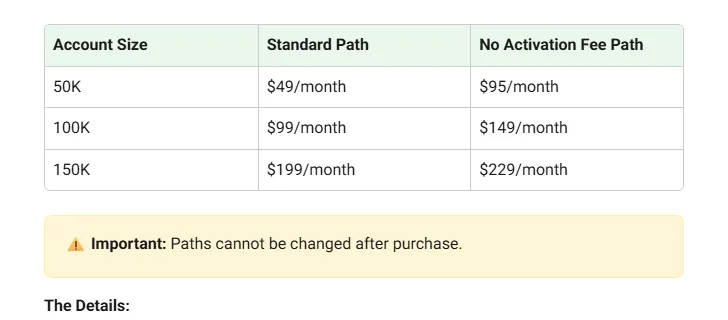
All current Tradeify plans are one-time payments with no activation fee. Growth 50K is $145. Topstep also has a $0 activation fee option, No Activation Fee ($95 a month), but it is a monthly plan.
You want to skip the evaluation and start in a simulated funded account
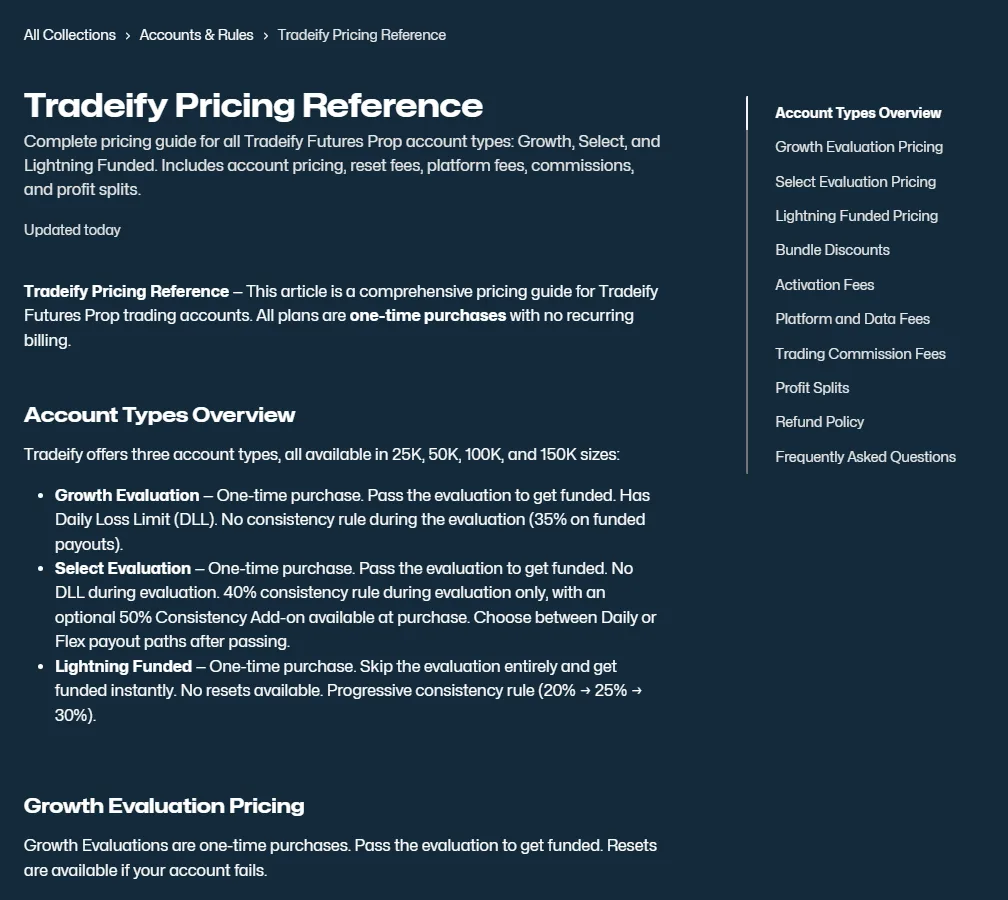
The official help center describes Tradeify Lightning as a plan that becomes a Funded account (simulated) right away with no evaluation. 50K is $492; there are no resets, and if you fail you buy again. Your first payout requires a $3,000 profit target and 20% consistency. Topstep 50K requires passing the Trading Combine evaluation before moving to the XFA.
You trade during the day and want to hold until near the US close
Neither firm allows holding positions overnight. The deadline to close all positions is 3:10 PM CT at Topstep and 4:45 PM ET at Tradeify, so Tradeify lets you hold 35 minutes longer. If you want to hold overnight, neither firm fits.
You want a payout as soon as possible after moving to the funded account
Depends on the plan you choose
At Topstep, XFA Consistency lets you request a payout after 3 trading days with consistency of 40% or less, and approval takes 1 to 3 business days. At Tradeify, Select Daily lets you request daily, and payment goes to Rise within 24 hours of approval. Topstep XFA Standard (winning days of $150 or more) and Tradeify Growth (days with more than $150 profit) both require 5 such days.
You want to trade around economic news releases
Tradeify does not restrict news trading on any account. Topstep does not allow opening new equity index and metals mini positions for 5 minutes before and after CPI, FOMC, NFP and PPI, and micros are limited to 3 on 50K.
This is not a ranking. Choose based on your own conditions, such as billing, the hours you trade and how quickly you need a payout.
Topstep vs Tradeify 50K comparison table
First, here are the Topstep 50K Trading Combine (Standard) and Tradeify Growth 50K side by side. Both require passing an evaluation before moving to a simulated funded account, and the profit target and maximum drawdown amounts are the same. The big differences are billing, the daily loss limit, the stage where the consistency rule applies, and the payout requirements.
| Item (50K) | Topstep 50K Standard | Tradeify Growth 50K |
|---|---|---|
| Evaluation price and billing | $49 a month. Auto-renews every 30 days until you pass or cancel | One-time $145. No recurring charges |
| Activation fee (after passing) | $149 | None (all current plans) |
| Profit target | $3,000 | $3,000 |
| Maximum drawdown and type | $2,000. Rises with the end-of-day balance and never moves down. Enforced including intraday open profit and loss. Locks at the $50,000 starting balance in the evaluation | $2,000. Follows the highest end-of-day balance (EOD Trailing). Enforced in real time. Locks at $50,100 in the funded account |
| Daily loss limit | Optional. $1,000 if added at purchase, and cannot be changed later. Hitting it stops trading for the day and does not fail the account | $1,250 (soft). Hitting it stops trading for the day. Widens to $2,000 once profit reaches 6% |
| Consistency rule | 55% in the evaluation (exceeding it raises the profit target; not a failure). For payouts, none on XFA Standard and 40% or less on XFA Consistency | None in the evaluation. 35% for funded account payouts |
| Deadline and minimum days | No deadline. At least 2 days | No deadline. At least 1 day, but you must trade at least once a week |
| Maximum size | 5 mini / 50 micro | 4 mini / 40 micro |
| Profit split | 90% in the funded account (XFA) | 90% in the funded account. 80% in Elite Live |
| Payout requirements | XFA Standard: 5 winning days of $150 or more and positive net profit since the last payout (not needed for the first). Cap per payout is 50% of balance, up to $2,000 | 5 days with more than $150 profit per payout, 35% consistency, balance of $53,000 or more. Minimum $500, first payout cap $1,500 |
| Payouts outside the US | International wire (Wire/SWIFT), 5 to 10 business days, $30 fee. Wise only for China, Canada and the UK | Mainly Rise (bank transfer, crypto, local currency). Plane only if Rise is unavailable (up to 7 days). Fees under review |
| Countries where trading is not allowed | 34 countries and regions cannot trade, and 25 cannot move to a real-capital account (2026-11-04) | 65 countries and regions, based on residence (2026-11-04) |
For both firms, the maximum drawdown is a line based on the end-of-day balance that only moves up, never down. However, it is enforced in real time including intraday price moves, and touching the line even for a moment fails the account. End-of-day basis does not mean you are safe during the day. The drawdown types guide explains the mechanics in detail.
Other Tradeify 50K plans
Besides Growth, Tradeify offers Select, which has no daily loss limit during the evaluation, and Lightning, which has no evaluation. Here are the main 50K terms.
| Tradeify 50K | Evaluation price | Activation fee | Drawdown type |
|---|---|---|---|
| Select 50K | One-time $165. 40% consistency during the evaluation | None | $2,000, trailing on an end-of-day basis (EOD) |
| Lightning 50K | No evaluation. One-time $492 | None | $2,000, trailing on an end-of-day basis (EOD Trailing) |
Compare the 3 Tradeify plans (Growth, Select, Lightning)
Sources for this section (20)
Source: Official help: Pricing / Official help: Subscriptions / Official help: Consistency / Official help: Max drawdown / Official help: Combine rules / Official help: XFA / Official help: XFA 2 / Official help: Payouts / Official help: Eligible countries / Official help: Article / Official help: Article 2 / Official help: Article 3 / Official help: Article 4 / Official help: Article 5 / Official help: Daily loss limit / Official help: Consistency 2 / Official help: Payouts 2 / Official help: Payouts 3 / Official help: Payouts 4 / Official help: Article 6
Which is cheaper? Total cost to pass, monthly vs one-time
The Topstep evaluation is a monthly subscription. 50K Standard costs $49 a month, renews automatically every 30 days, and continues until you pass or cancel. When you pass, that evaluation subscription stops automatically, but the amount paid for that month is not refunded or prorated. Activating the simulated funded account (XFA) after passing costs $149 on Standard. To avoid the activation fee you can choose No Activation Fee, but the monthly price rises to $95, and you cannot switch to Standard after purchase.
All current Tradeify plans are one-time payments with no recurring charges and no activation fee. Growth 50K is $145, and the evaluation price does not grow no matter how many months you take to pass. However, you must trade at least once a week (Monday to Friday) even in the evaluation account. Activating the simulated funded account after passing is not automatic; you do it yourself from the dashboard.
Amounts in the table below are official list prices from both firms (as of 2026-11-04). Sales and discounts are not included. Taxes and payment fees are not included either (Topstep prices are shown before tax, and regional taxes may be added).
| Time to pass (no resets) | Topstep 50K Standard | Topstep 50K No Activation Fee | Tradeify Growth 50K | Tradeify Select 50K |
|---|---|---|---|---|
| Pass in 1 month | $198 = $49 monthly + $149 activation fee | $95 | $145 | $165 |
| Pass in 2 months | $247 = $49 × 2 + $149 | $190 | $145 | $165 |
| Pass in 3 months | $296 = $49 × 3 + $149 | $285 | $145 | $165 |
The table assumes you pass without ever hitting the drawdown. With monthly Topstep, the number of months to pass becomes your cost, while one-time Tradeify costs the same regardless of time. Restarting after a failed evaluation costs extra.
| Restart cost (50K) | Price | Notes |
|---|---|---|
| Topstep Standard reset | $49 | A reset moves your next billing date 30 days later. Up to 2 per account per calendar day |
| Topstep No Activation Fee reset | $95 | Same as above |
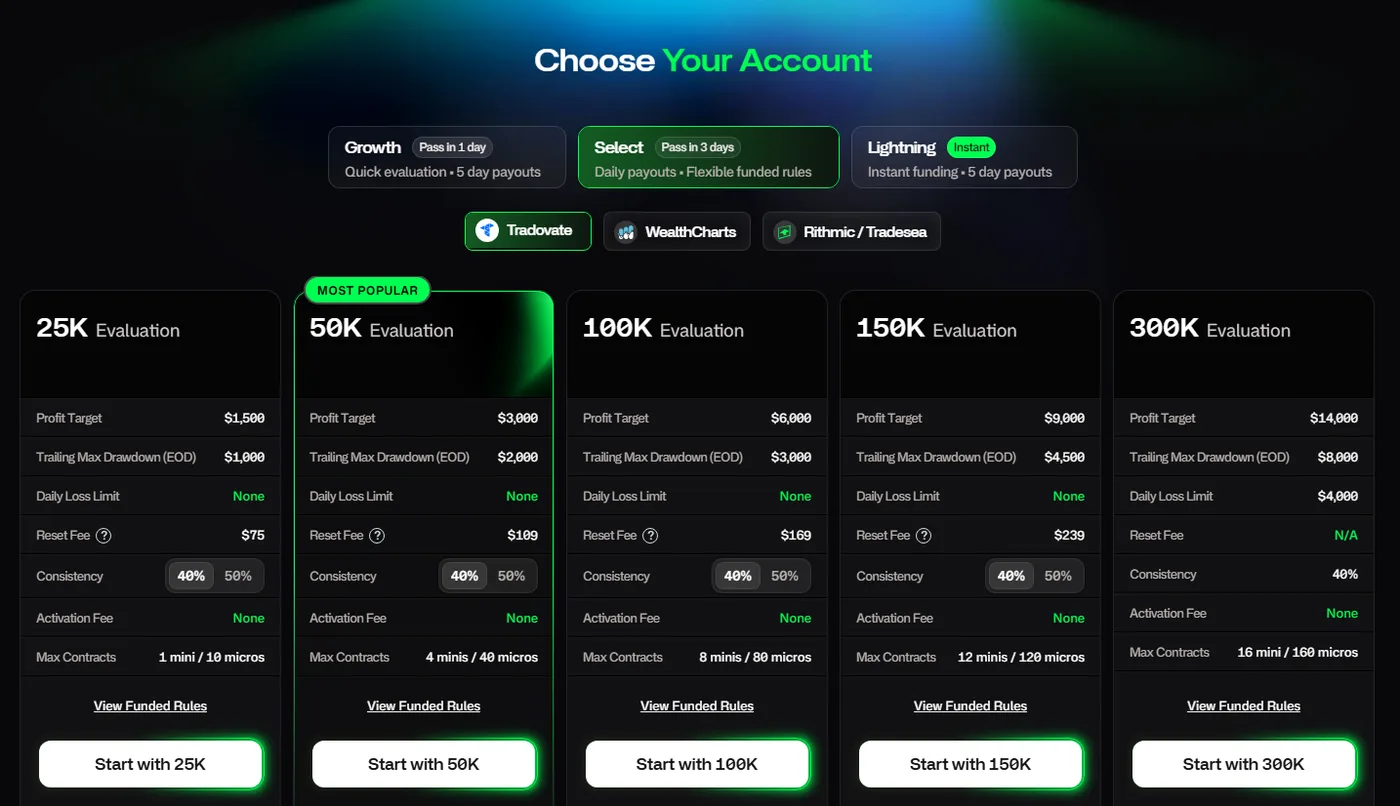
| Tradeify Growth reset | $95 | Funded accounts cannot be reset |
| Tradeify Select reset | $109 | Up to 10 per evaluation in 30 days |
| Tradeify Lightning | No resets | Buy again if you fail (50K $492) |
Refunds differ too. Topstep gives no refunds in principle, but as an exception refunds up to 1 monthly fee if you have not passed within 14 calendar days of your first evaluation purchase (first time only). Resets, activation fees and data fees are not refundable. At Tradeify all sales are final, with no refunds for account purchases, resets or other fees.
 1
See Topstep pricing and payment methods
Sources for this section (12)
Source: Official help: Pricing / Official help: Subscriptions / Official help: XFA activation / Official help: Resets / Official help: Refunds / Official help: Combine rules / Official help: Article / Official help: Article 2 / Official help: Article 3 / Official help: Article 4 / Official help: Article 5 / Official help: Article 6
How do the rules differ? Drawdown, daily loss limit, consistency and trading hours
Drawdown and lock
In the Topstep 50K evaluation, the maximum loss line starts at $48,000 against the $50,000 starting balance, and it rises as the end-of-day balance rises. For example, if the end-of-day balance grows by $500, the line moves to $48,500, and it stops once it reaches the $50,000 starting balance. The XFA after passing starts at a $0 balance, the line trails from -$2,000, and it is fixed at $0 after the first payout. Topstep says there are no adjustments or exceptions to the line.
Tradeify Growth also uses a line that follows the highest end-of-day balance, updated once a day. There is no lock during the evaluation. In the funded account, the line is fixed at $50,100 when the end-of-day balance exceeds $52,100 or when you request a payout, whichever comes first. It is enforced in real time: touching it even for a moment during the day fails the account immediately, and recovering afterward does not reverse it.
Daily loss limit
In the Topstep evaluation and XFA, the daily loss limit is optional. If you add it at purchase, it is $1,000 on 50K; you cannot remove or change it later, and it carries over to the XFA. Hitting it does not fail the account; trading stops for the day, and you can resume at the next session (5:00 PM CT).
Tradeify Growth has a $1,250 daily loss limit in both the evaluation and the funded account. Hitting it does not fail the account either; trading stops for the day. Once profit reaches 6% (a $53,000 balance), the limit widens to $2,000 from the next session.
 1
Consistency rule
In the Topstep evaluation, if your best day is more than 55% of total profit, the profit target rises to "best day ÷ 0.55". It is not a failure, but it can add days to pass and monthly costs. After passing, XFA Standard has no consistency requirement, and XFA Consistency requires 40% or less for payouts.
Tradeify Growth has no consistency requirement during the evaluation. Instead, each funded account payout requires 35% or less. Exceeding it does not fail the account; you can request once more trading days bring the ratio down. Exactly at the limit counts as meeting it. Select is the opposite: 40% during the evaluation and none in the funded account.
Trading hours and holding positions
| Event | Topstep | Tradeify |
|---|---|---|
| Start of the trading day | 5:00 PM CT | 6:00 PM ET |
| Deadline to close all positions | 3:10 PM CT. Closing starts at 3:08 PM CT | 4:45 PM ET. Remaining positions are closed automatically, and it is not a failure |
| Holding overnight or over the weekend | Not allowed | Not allowed (including real-capital accounts) |
| Around economic news | No new equity index and metals mini positions for 5 minutes before and after CPI, FOMC, NFP and PPI. Micros limited to 3 on 50K | No restriction (at your own risk) |
Both deadlines are set in US time, so convert them to your local time zone if you trade from outside the US. The Tradeify deadline comes 35 minutes later than the Topstep deadline.
Hedging, automated trading and short holds
Both firms prohibit holding opposite positions across your own accounts. Topstep prohibits cross-account hedging in the same or correlated products (such as MES and ES, or MNQ and NQ). Tradeify goes further: combinations within the same group, such as buying ES and selling NQ, are also violations, and conditions such as more than 10 seconds and more than $150 profit trigger automatic failure.
Both firms allow automated trading with conditions. Topstep prohibits orders sent through a VPS, VPN or remote server, and Tradeify allows only bots you alone own and prohibits high-frequency trading.
The Tradeify funded account has a payout requirement related to short holds. Unless more than 50% of your trades are held longer than 10 seconds and more than 50% of your profit comes from such trades, you cannot request a payout. The account does not fail, but if you open and close positions very quickly, check this rule.
See Topstep rules and failure conditions
See Tradeify rules and failure conditions
Sources for this section (16)
Source: Official help: Max drawdown / Official help: XFA / Official help: Consistency / Official help: Combine rules / Official help: Hours and products / Official help: Product limits / Official help: Hedging / Official help: Prohibited conduct / Official help: Article / Official help: Daily loss limit / Official help: Consistency 2 / Official help: Article 2 / Official help: Article 3 / Official help: News events / Official help: Hedging 2 / Official help: Article 4
How do payouts compare? Requirements, frequency and methods outside the US
At both firms, you request payouts from the simulated funded account after passing, and the trader keeps 90%. The differences are the days required, the cap per payout, the time to approval and how you receive money outside the US.
| Item (50K) | Topstep XFA | Tradeify Growth Funded |
|---|---|---|
| Requirements | Standard: 5 winning days of $150 or more and positive net profit (not needed for the first). Consistency: 3 trading days and consistency of 40% or less | 5 days with more than $150 profit per payout, consistency of 35% or less, balance of $53,000 or more |
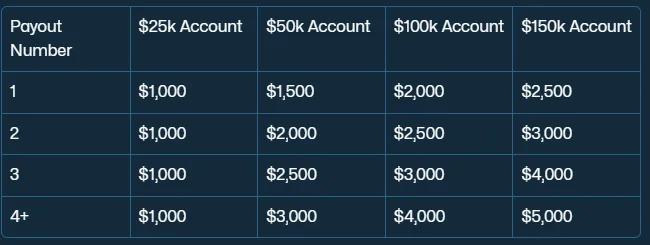
| Cap per payout | Up to 50% of balance, and Standard $2,000 / Consistency $3,000 | $1,500 for the 1st, $2,000 for the 2nd, $2,500 for the 3rd, $3,000 from the 4th |
| Minimum payout | $125 | $500 |
| Approval and payment | Internal approval in 1 to 3 business days | Paid to Rise within 24 hours of approval. Up to 72 hours outside weekdays 8:00 to 17:00 ET and on US holidays |
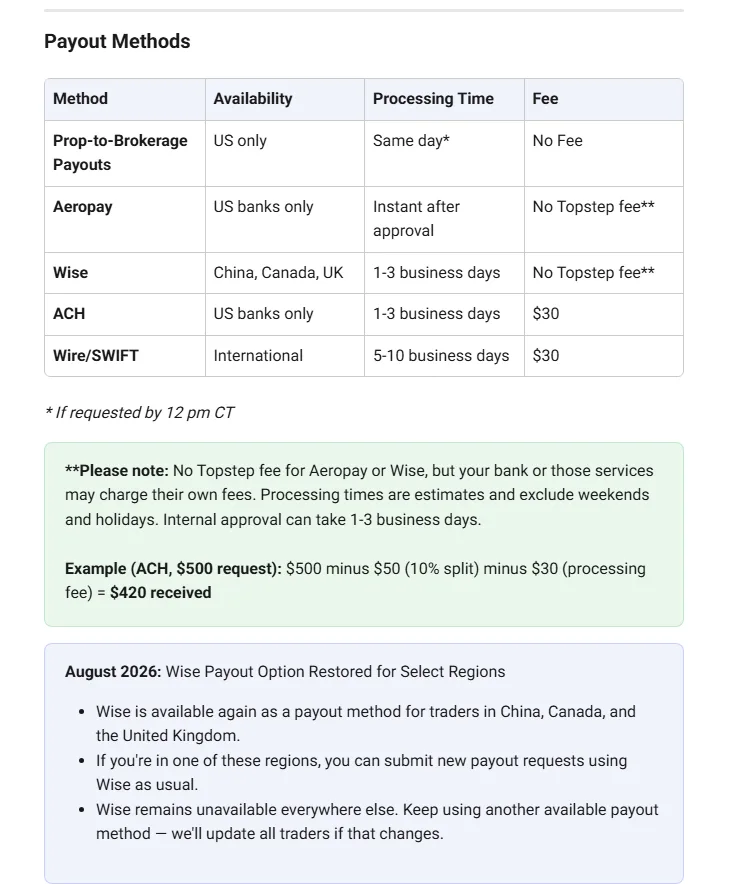
| Methods (outside the US) | Wire/SWIFT (5 to 10 business days, $30 fee). Wise only for China, Canada and the UK | Rise (bank transfer, crypto, local currency). Plane only if Rise is unavailable |
| Tax forms | W-8BEN for non-US traders | W-8BEN for non-US traders on Rise |
The Topstep XFA comes in Standard and Consistency, which have different payout requirements. Standard requires 5 winning days, while Consistency needs only 3 trading days but requires your best day to be 40% or less of total profit. The cap per payout is the lower of "50% of balance" and the amount in the table. Winning days are settled at 4:00 PM CT, and you request payouts from the dashboard during CME trading hours.
On Tradeify Growth, the count of profit days resets to zero after each payout, so you collect 5 days again every time. The cap per payout rises with the number of payouts, reaching $3,000 from the 4th. If you want to request sooner, Tradeify offers Select Daily (daily requests, $1,250 daily cap on 50K) and Lightning (no minimum days, $3,000 profit target for the first payout), while Select Flex works on every 5 winning days. The Tradeify payout article compares payouts by plan in detail.
 1
There are also differences after a payout. On the Topstep XFA, the maximum loss line is fixed at $0 after the first payout, so your balance becomes the loss floor. Topstep recommends building your balance until the line reaches $0 before you request. On the Tradeify funded account, the line is fixed at the starting balance + $100 when you request a payout. Only 1 request per account can be open at a time, and requests cannot be edited or canceled after submission.
How to move to a real-capital account
The Topstep real-capital account (Live Funded) is by invitation, based on the judgment of the risk team. When you move, all XFAs are closed, your starting balance is 20% of the transferred amount, and the remaining 80% is held as a reserve and released in stages. For Tradeify Elite Live, the minimum for consideration is 3 payouts on one account or 10 payouts across all plans, and reaching it does not move you automatically. When you move, unwithdrawn Sim profit does not carry over, you start from a $0 balance, and the profit split becomes 80%.
 1
See Topstep payout rules and methods
See Tradeify payout rules by plan
Sources for this section (12)
Source: Official help: Payouts / Official help: XFA / Official help: Consistency / Official help: Max drawdown / Official help: Live funded / Official help: Payouts 2 / Official help: Payouts 3 / Official help: Payouts 4 / Official help: Payouts 5 / Official help: Payouts 6 / Official help: Article / Official help: Article 2
Can you use them from your country? What the official pages say
This section lists only what the official terms and help centers of both firms say. Neither firm guarantees access from any particular country. For points that are not stated, check the official sites yourself before you sign up.
How eligible countries are decided
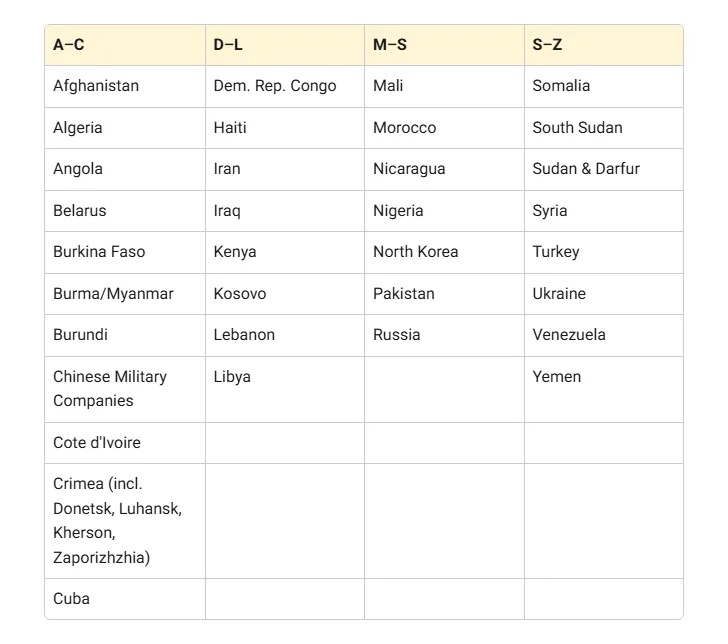
Topstep decides eligibility by both citizenship and permanent residency. There are 34 countries and regions that can neither trade nor receive payouts, and 25 that can use up to the simulated funded XFA but cannot move to a real-capital account (lists as of 2026-11-04). Even citizens of an eligible country cannot use Topstep if they live in an ineligible one. Topstep says the lists change from time to time.
Tradeify decides by the country where you permanently live (country of residence). There are 65 countries and regions where trading is not allowed (list as of 2026-11-04). Residents of eligible countries can trade while traveling in a restricted country, and residents of restricted countries cannot trade wherever they are.
Not being on a list does not guarantee access. The criteria differ ("citizenship and permanent residency" vs "country of residence"), so if your citizenship and residence are in different countries, check on the official sites how each firm treats you.
Identity verification
Topstep requires identity verification before your second purchase. You photograph an original, valid government-issued ID (passport, driver license or national ID card) and submit a selfie. Copies and IDs shown on a screen are not accepted.
Tradeify verifies a government-issued photo ID and a selfie through "Sumsub" (a third-party verification service). Residents of countries on a specific list must verify before receiving a funded account; for others, verification happens before the first payout. If you pay with crypto, it is required at purchase. "Rise", the payout provider, separately requires ID, proof of address and tax forms. You may be asked to complete an AI interview of under 10 minutes called "KYT (Know Your Trader)", which Tradeify says you can answer in any language.
Payouts and tax forms
Of the Topstep payout methods, the one available outside the US is "Wire/SWIFT" (international wire, 5 to 10 business days, $30 fee). "Wise" is available only for China, Canada and the UK. The receiving account must be in your own name, and non-US traders submit a "W-8BEN" (a tax form for non-US persons).
The main Tradeify payout provider is "Rise", which Tradeify says pays by bank transfer, crypto or local currency. Only if Rise is unavailable because of country restrictions, or if you do not pass the Rise review, can you use "Plane" (bank-to-bank transfer, up to 7 days).
| Points to check before signing up | Topstep | Tradeify |
|---|---|---|
| Restricted country list | Check for your country (2026-11-04) | Check for your country (2026-11-04) |
| Basis for eligibility | Citizenship and permanent residency | Permanent country of residence |
| When identity is verified | Before your second purchase | Before your first payout (at purchase if paying with crypto) |
| Receiving at your local bank | Not stated officially. Check the official site before you sign up. Outside the US: Wire/SWIFT | Not stated officially. Check the official site before you sign up. Rise states payouts in local currency |
| Payout fees | $30 for Wire/SWIFT | Not stated officially. Check the official site before you sign up |
| Support languages | Not stated officially. The AI assistant "Windy" replies in the language you write in; phone support is in English only | Not stated officially. Only the KYT interview can be answered in any language |
| Tax treatment in your country | Not stated officially. Check with a local tax professional | Not stated officially. Check with a local tax professional |
Neither firm's official information explains how to report this income for tax. Check with a tax professional in your country about how payouts are treated.
See how to start with Topstep (sign-up to identity verification)
See how to start with Tradeify (purchase to identity verification)
Sources for this section (9)
Source: Official help: Eligible countries / Official help: ID verification / Official help: Payouts / Official help: Support / Official help: Article / Official help: Article 2 / Official help: Article 3 / Official help: Payouts 2 / Official help: Payouts 3
Which platforms, data fees and commissions do they have?
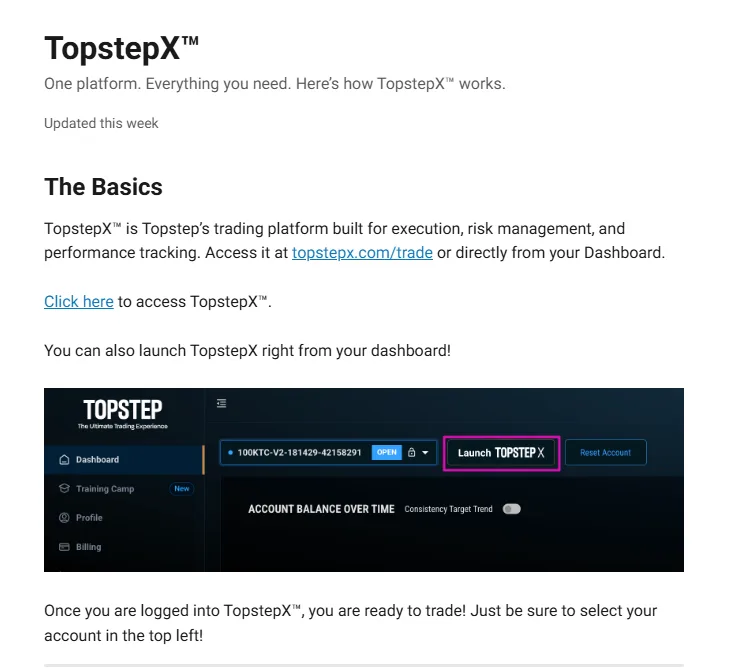
Topstep uses its own platform, TopstepX. It runs in the browser with TradingView charts built in. There is no mobile app, but it works in a smartphone browser. In the evaluation and the XFA, you can also connect Quantower through TopstepX. Support for NinjaTrader, Tradovate, Rithmic and others is not stated in the official help center and is under review. Under exchange rules, only 1 session can be logged in at a time across all devices.
 1
At Tradeify, you choose a broker at purchase and cannot change it later. The price is the same whichever you choose. Choosing Tradovate gives you Tradovate, NinjaTrader and TradingView; choosing Rithmic gives you Tradesea, Quantower, Sierra Chart (paid subscription required) and R|Trader. Choosing WealthCharts gives you WealthCharts only.
| Item | Topstep | Tradeify |
|---|---|---|
| Platforms | TopstepX (browser), Quantower (evaluation and XFA only) | Choose Tradovate-based, Rithmic-based or WealthCharts at purchase |
| Real-time data (Level 1) | Free (4 exchanges) | CME free. You must sign a non-professional agreement at first login (if unsigned, a $300/month professional fee may apply) |
| Market depth (Level 2) | $38/month. Not prorated, non-refundable | Paid add-on on Tradovate only. Not offered on Rithmic or WealthCharts |
| Round-turn commission (ES) | $3.78 | $5.76 |
| Round-turn commission (MES) | $1.22 | $1.82 |
Commissions and copy trading
Commissions are shown exactly as listed in each firm's official help center tables. The Topstep values are round-turn amounts including NFA and exchange fees, and the Tradeify values are round-turn amounts per contract.
Both firms allow copy trading between your own accounts. Tradeify requires all accounts to trade in the same direction, and an opposite-direction setup is a hedging violation. You can hold up to 5 funded accounts at once at Topstep, and up to 5 per person and per household at Tradeify.
See how TopstepX works and its fees
See Tradeify platforms and data fees
Sources for this section (10)
Source: Official help: TopstepX / Official help: Quantower / Official help: Market data / Official help: Commissions / Official help: XFA / Official help: Article / Official help: Article 2 / Official help: Article 3 / Official help: Article 4 / Official help: Hedging
FAQ
What is the biggest difference between Topstep and Tradeify?
Billing. Topstep 50K Standard costs $49 a month until you pass and requires a $149 activation fee after passing. Tradeify Growth 50K is a one-time $145 with no activation fee. The $3,000 profit target and $2,000 maximum drawdown are the same; the daily loss limit, the stage where the consistency rule applies and the time to close all positions differ.
Topstep pricingTradeify plan comparison
Sources for this section (7)
Source: Official help: Pricing / Official help: Subscriptions / Official help: Consistency / Official help: Max drawdown / Official help: Article / Official help: Article 2 / Official help: Article 3
On a 50K account, which costs less to pass?
It depends on how many months you take. At official list prices (as of 2026-11-04, excluding sales, discounts, taxes and payment fees), Topstep 50K Standard without resets costs $198 for 1 month, $247 for 2 months and $296 for 3 months. Tradeify Growth 50K costs $145 regardless of time. Reset fees after a failure are $49 for Topstep Standard and $95 for Tradeify Growth.
Topstep pricingTradeify plans and pricing
Sources for this section (3)
Source: Official help: Pricing / Official help: Resets / Official help: Article
Which firm lets you start without an activation fee?
Tradeify has no activation fee on any current plan. At Topstep, choosing No Activation Fee makes the activation fee $0, but the 50K monthly price rises to $95, and you cannot switch to Standard after purchase. The Standard activation fee is $149.
Topstep overviewTradeify overview
Sources for this section (4)
Source: Official help: Article / Official help: Article 2 / Official help: Pricing / Official help: XFA activation
Do they use the same drawdown?
Both use $2,000 on 50K, with a line based on the end-of-day balance that only moves up. Both enforce it in real time including intraday moves, and touching it even for a moment fails the account. The lock differs: the Topstep evaluation stops at the $50,000 starting balance, and the XFA is fixed at $0 after the first payout. Tradeify fixes the funded account line at $50,100 when the end-of-day balance exceeds $52,100 or when you request a payout.
Sources for this section (2)
Source: Official help: Max drawdown / Official help: Article
Which firm lets you get paid sooner?
It depends on the account type. Topstep XFA Consistency lets you request after 3 trading days with consistency of 40% or less, and approval takes 1 to 3 business days. Tradeify Select Daily lets you request daily, and Lightning has no minimum days, so you can request once you reach the profit target. Tradeify pays to Rise within 24 hours of approval. Topstep XFA Standard (winning days of $150 or more) and Tradeify Growth (days with more than $150 profit) both require 5 such days.
Topstep payoutsTradeify payouts
Sources for this section (4)
Source: Official help: Payouts / Official help: Payouts 2 / Official help: Payouts 3 / Official help: Payouts 4
Can I use Topstep and Tradeify from my country?
As of 2026-11-04, Topstep lists countries that cannot trade (34) and countries that cannot move to a real-capital account (25), and Tradeify lists countries where trading is not allowed (65). Not being listed does not guarantee access, and the criteria differ: citizenship and permanent residency at Topstep, country of residence at Tradeify. Local bank payouts, support languages and tax treatment are not stated officially, so check the official sites before you sign up.
How to start with TopstepHow to start with Tradeify
Sources for this section (4)
Source: Official help: Eligible countries / Official help: Article / Official help: Support / Official help: Payouts
Which firm should I choose if I want to use NinjaTrader?
The Tradeify help center says you can use NinjaTrader if you choose Tradovate at purchase. The broker cannot be changed after purchase. The Topstep help center does not mention NinjaTrader support, so it is under review. At Topstep you can use its own TopstepX, and Quantower in the evaluation and the XFA.
How to use TopstepXTradeify platforms
Sources for this section (3)
Source: Official help: Article / Official help: TopstepX / Official help: Quantower
Can I hold positions overnight?
No, at neither firm. Topstep requires all positions to be closed by 3:10 PM CT on weekdays, and Tradeify by 4:45 PM ET every day. Tradeify does not allow overnight holding even in real-capital accounts. At both firms, remaining positions are closed automatically.
Sources for this section (2)
Source: Official help: Hours and products / Official help: Article
More on each firm
Sources and check dates
Every figure was checked on 2026-11-04 against 47 official pages.